

Popis
Nejlepší plugin pro vkládání PDF do WordPressu, oblíbený u více než 20 000 uživatelů
PDF Poster | Dokumentace | Ceník | Podpora | Demo
PDF Poster je flexibilní plugin, který vám umožňuje vkládat PDF dokumenty přímo do WordPress příspěvků, stránek, widgetů nebo šablon. Ať už sdílíte brožury, e-knihy, firemní soubory nebo portfolia, plugin poskytuje responzivní a přístupné rozložení, které funguje na všech zařízeních.
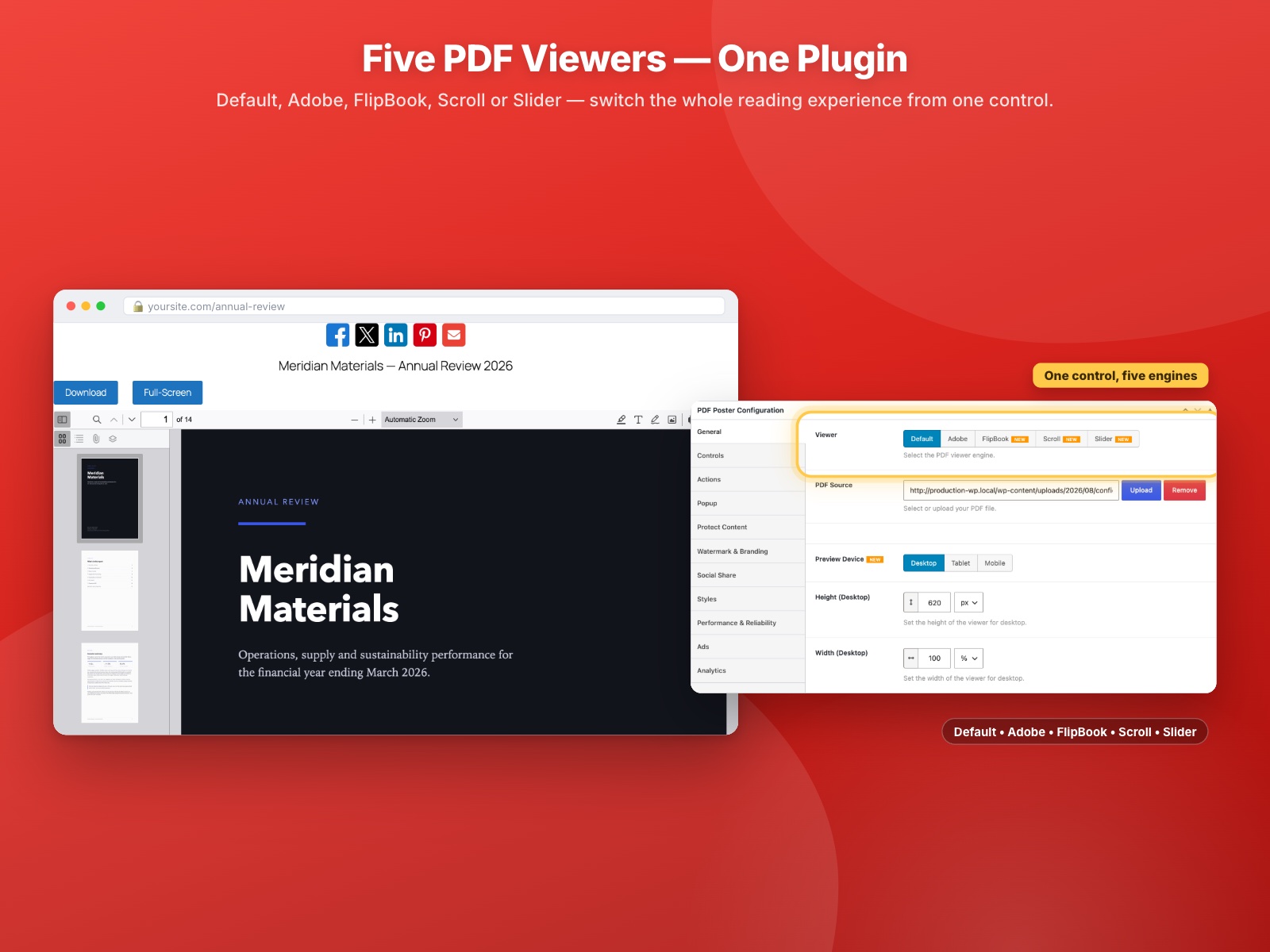
Embed with the Gutenberg block, the [pdf_embed] shortcode, or the classic editor — whichever fits how you already work. The free version ships three PDF viewers (the bundled PDF.js viewer, an interactive FlipBook and a Slider), independent height and width for desktop, tablet and mobile, print, download and full-screen buttons, social sharing, light/dark theming, RTL support, a popup (lightbox) viewer, text watermarking, custom CSS and progressive loading for large files. It also counts how many times each PDF is viewed and downloaded each day, in your own database, with no third-party service and no IP address stored. Analytics history and trends, content protection, logo watermarking, Reader Mode, the Adobe and Continuous Scroll viewers and cloud imports are Pro.
PDF Poster Free Features — Everything Below Is Included, Free
No trials, no locked toggles, no watermark on your pages. Everything in this section works in the plugin you install from WordPress.org.
Free PDF Viewers — Three Ways to Read a Document
- Default PDF viewer (PDF.js) — The bundled Mozilla PDF.js engine: page navigation, zoom, text search and text selection, on desktop and mobile.
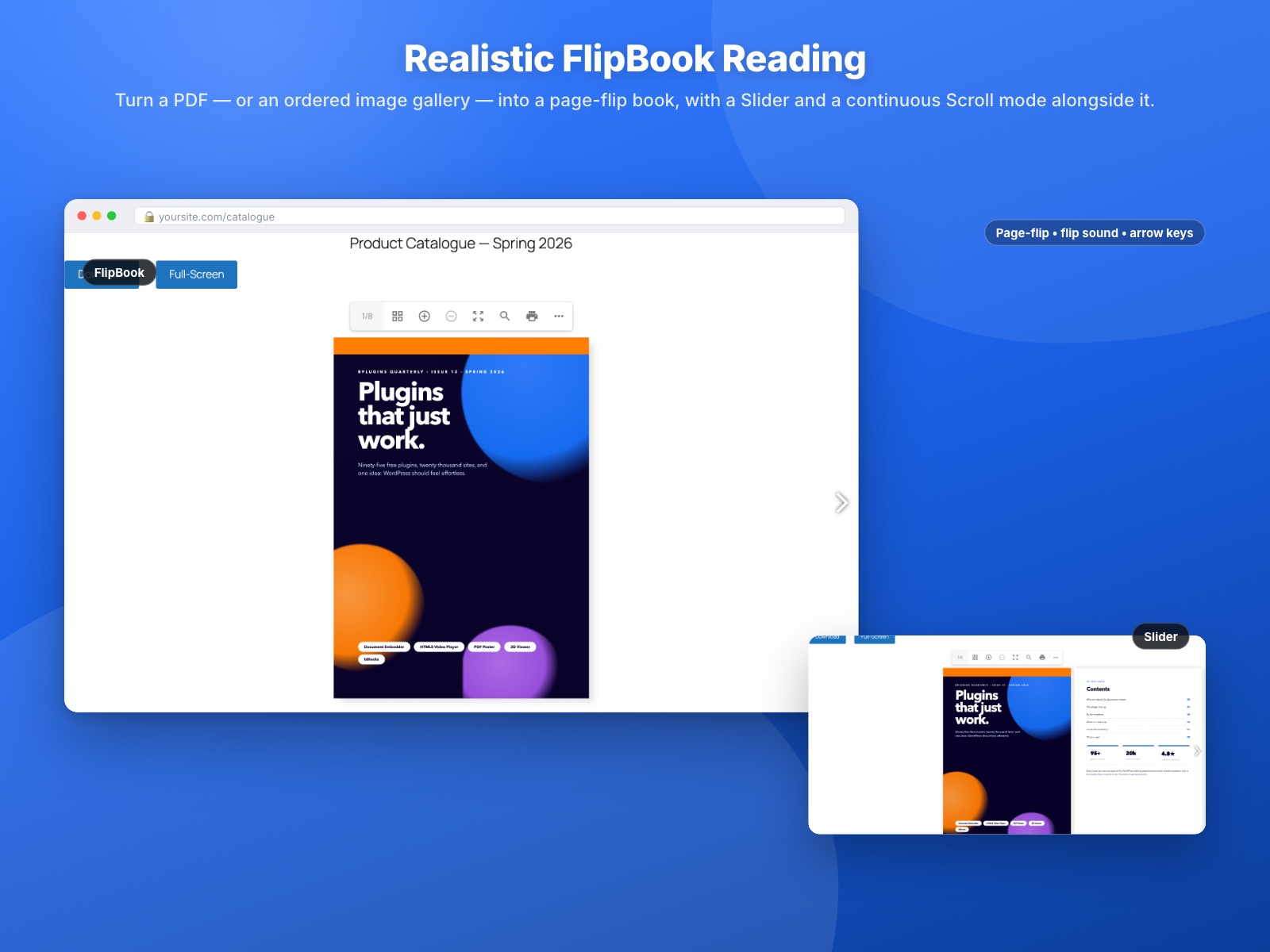
- FlipBook PDF viewer — A realistic page-turn book for brochures and magazines, with a page-flip sound you can switch off.
- Slider PDF viewer — One page at a time, swiped or clicked through. Made for menus, price lists and catalogues.
- FlipBook from images — Build the page-turn book from an ordered image gallery instead of a PDF, for scans and design-tool exports.
Embed PDF Files Anywhere in WordPress
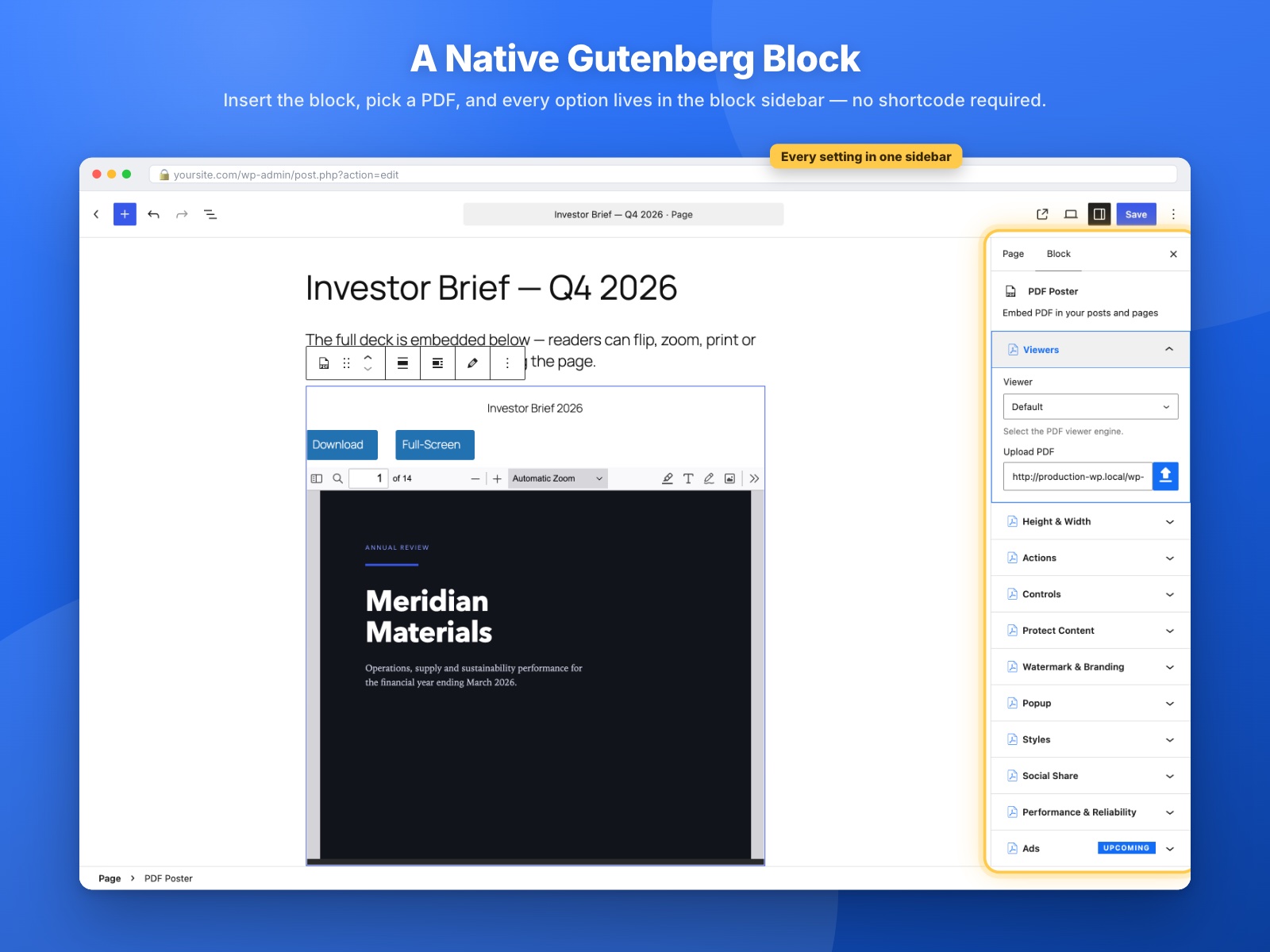
- Two Gutenberg PDF blocks — PDF Poster to embed a file directly, and PDF Poster Selector to drop in a document you already saved.
- PDF shortcode —
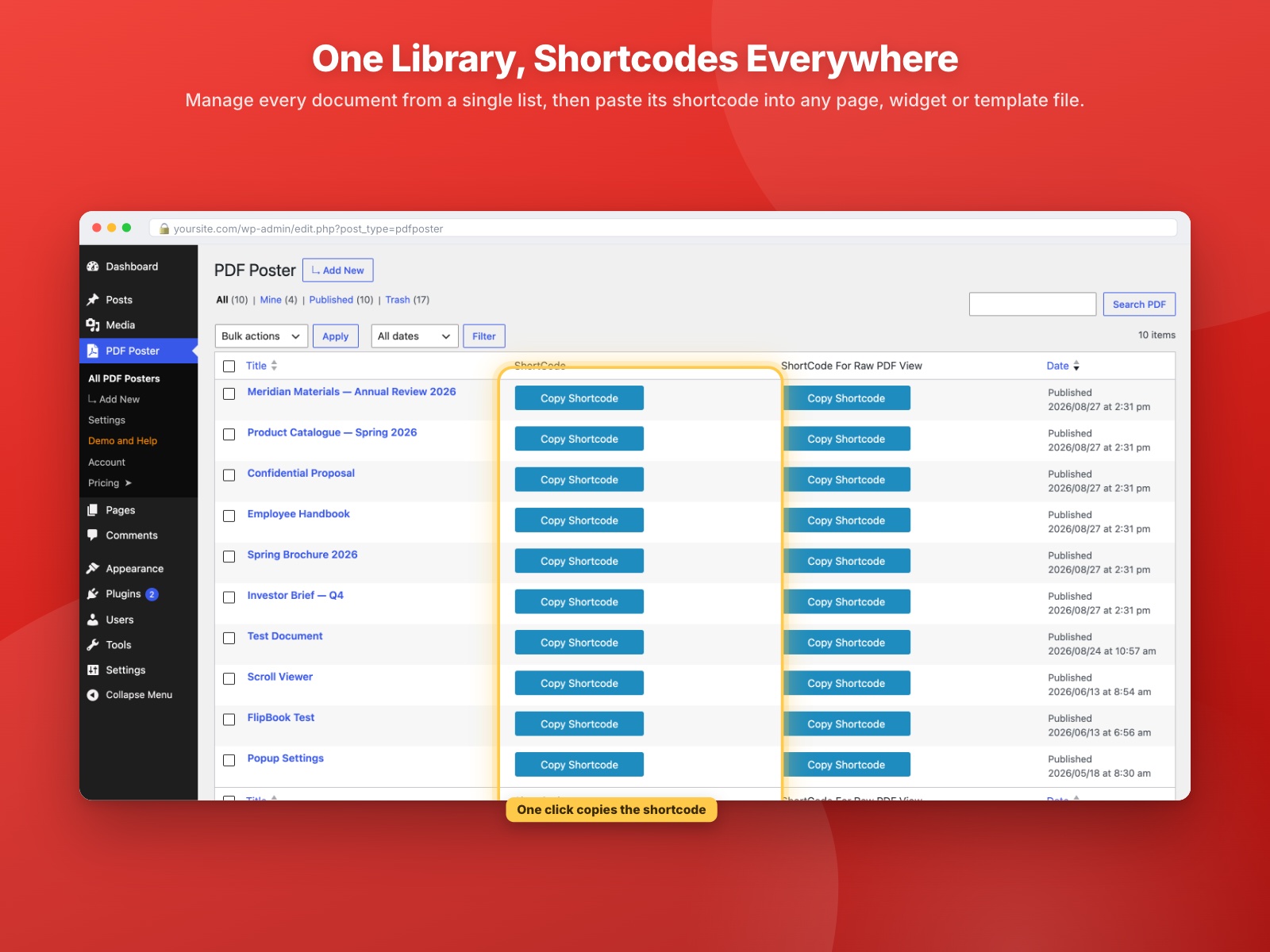
[pdf_embed url="…"]drops a PDF into any post, page, widget or template, with attributes for size, title, print, download and the full-screen label. For full control, save a PDF Poster document and paste its[pdf id="123"]shortcode — it carries every setting you configured. - Classic editor metabox — A full settings panel on every PDF Poster document, so you never have to open a block to configure a viewer.
- Unlimited PDF embeds — No cap on how many PDFs you embed, or how many pages they have.
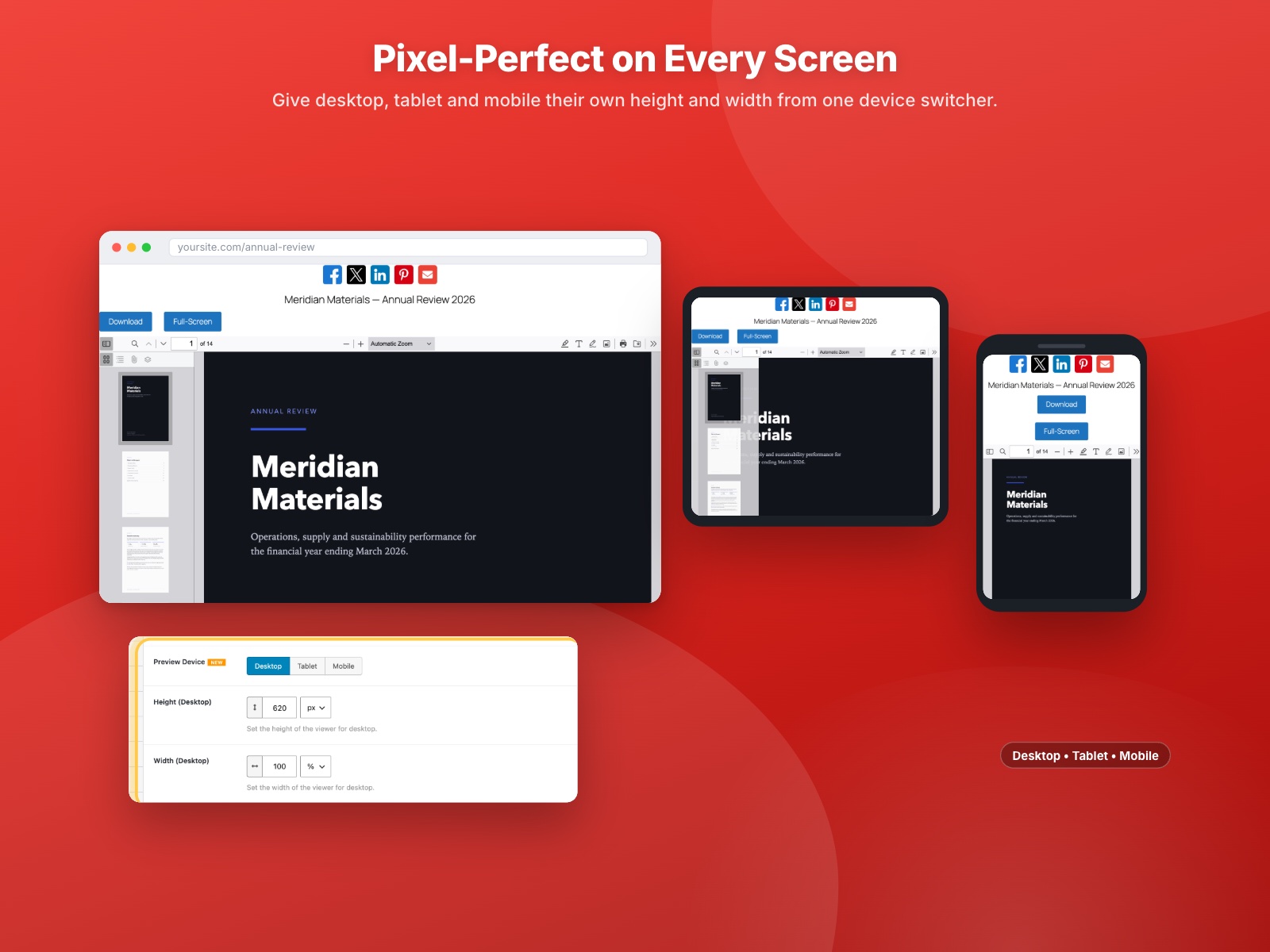
Responsive PDF Viewer on Every Screen
- Separate height and width for desktop, tablet and mobile — Set each breakpoint independently instead of forcing one size on every device.
- Device preview switcher — Flip between desktop, tablet and mobile while you configure, in both the block and the metabox.
Reading Experience and Navigation
- Viewer theme: light, dark or auto — Themes the viewer toolbar and background. The PDF page content itself is never altered.
- RTL layout: off, on or auto — Flips the viewer and toolbar for Arabic, Hebrew and other right-to-left languages, in every viewer.
- Keyboard navigation — Left and right arrow keys turn pages in all viewers.
- Annotation mode — Shows the notes, highlights, comments and clickable links already saved inside the PDF.
- Open PDF links in a new tab — Links clicked inside the document open in a new tab, so your page stays put.
- Filename display — Show the document name above the viewer.
Print, Download, Full Screen and Social Sharing
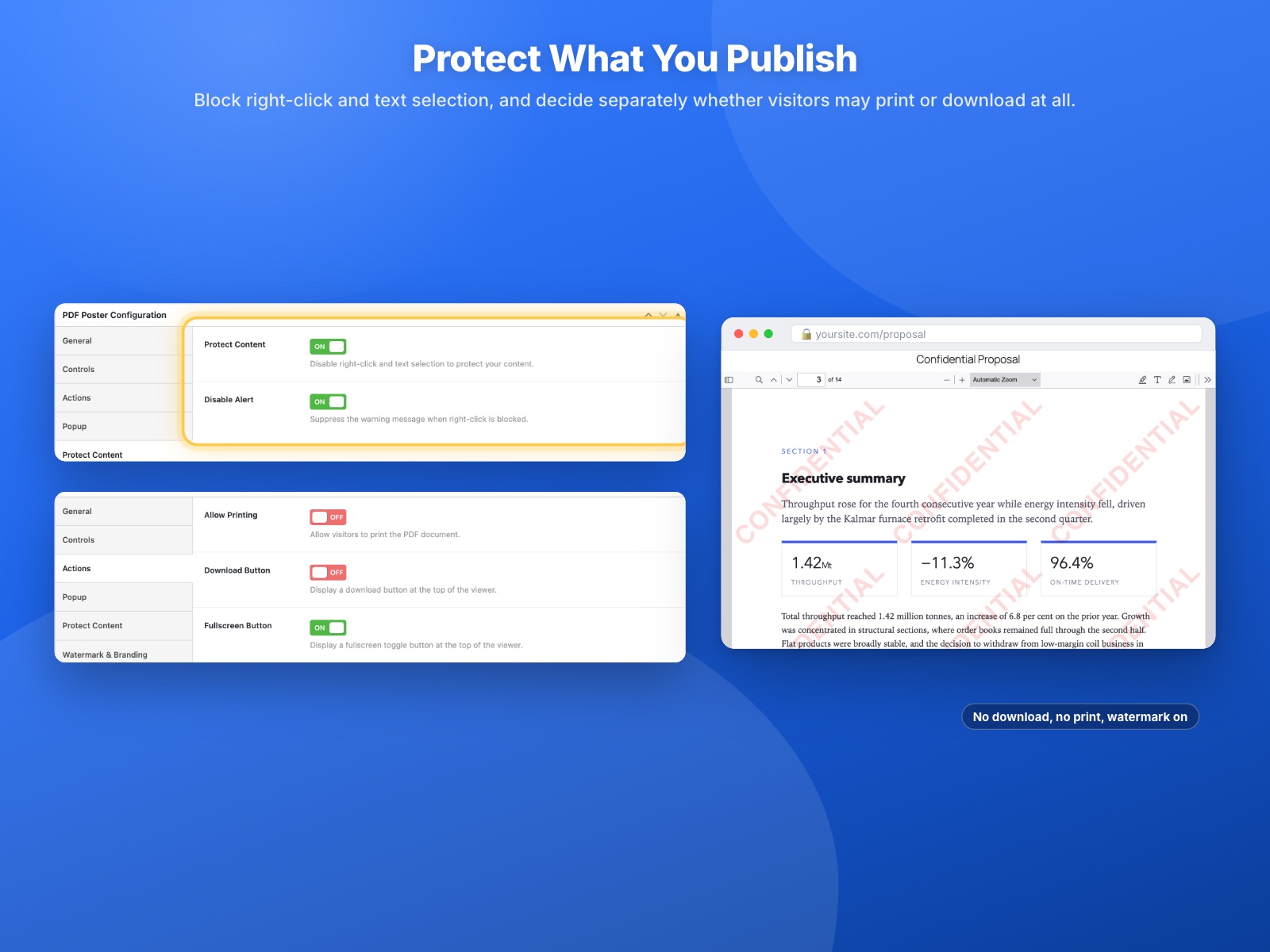
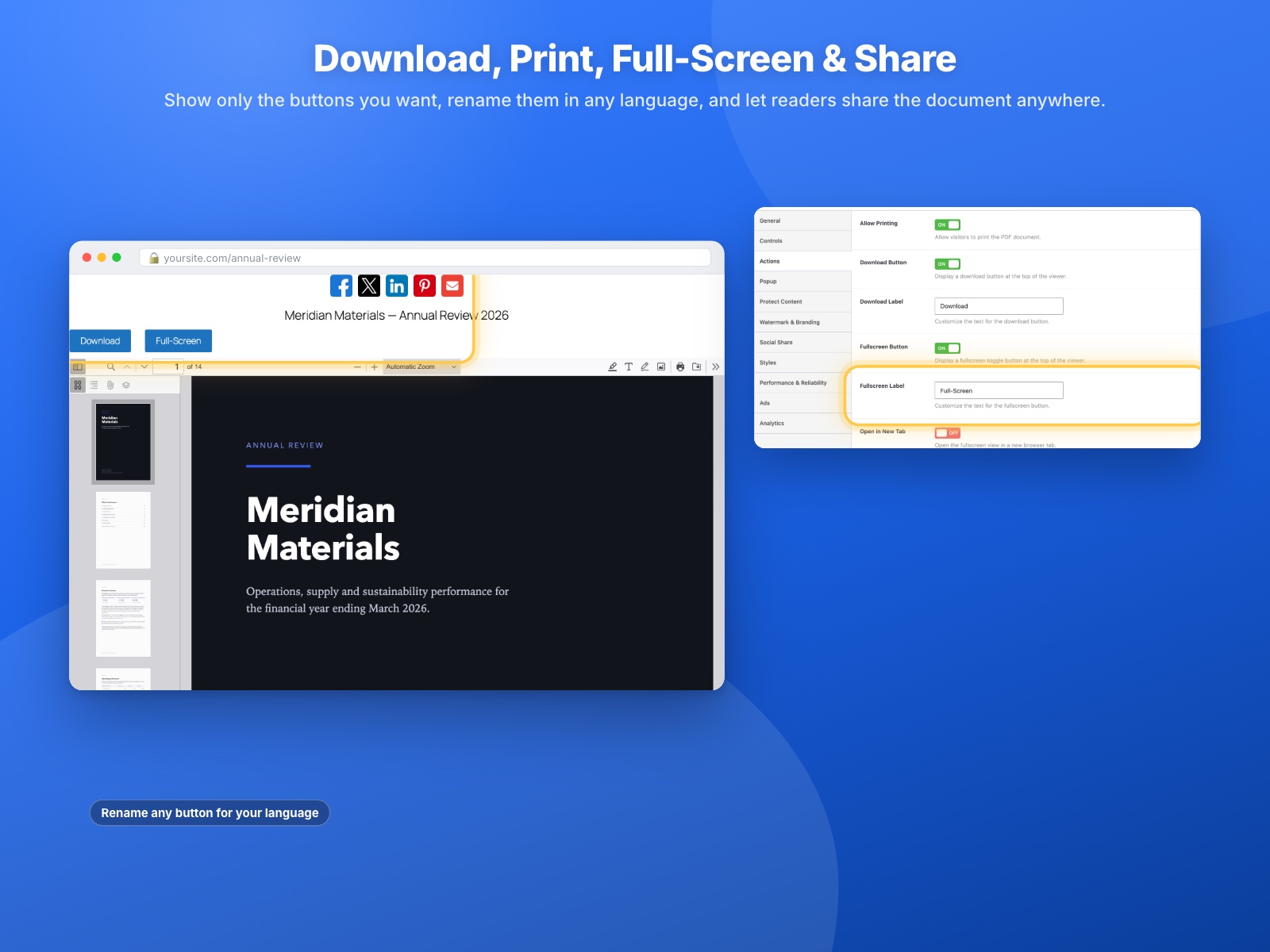
- Print — Let visitors print straight from the viewer, or turn printing off entirely.
- Download button — One-click download above the viewer, or no download at all.
- Full-screen button — Show or hide the full-screen toggle on any embed.
- Social sharing — Facebook, X (Twitter), LinkedIn, Pinterest and email buttons, placed above or below the viewer, each one individually switchable.
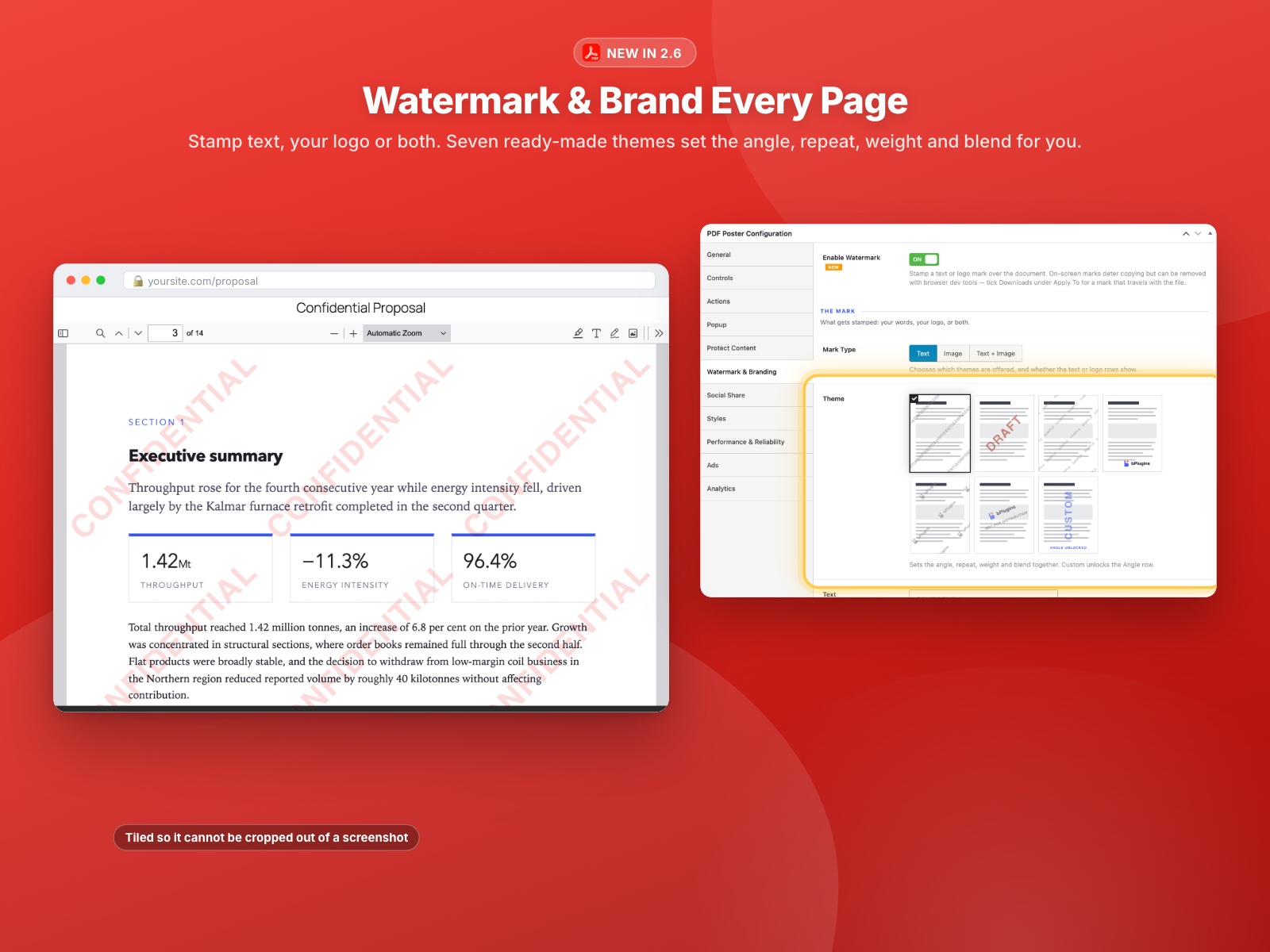
PDF Watermarking — Text Marks Are Free
- Text watermark on every page — Stamp your own wording across the document.
- Three ready-made themes — Confidential, Draft Stamp and Sample Wash, each with its own angle, tiling and weight, so a usable mark is one click away.
- Dynamic placeholders — Drop
{site_name},{post_title},{file_name},{page},{pages},{date},{year},{user_name},{user_email}or{user_ip}into the text and it resolves per page and per visitor. - Choose which pages — All pages, the first page only, or everything except the cover.
- Live preview while you edit — The editor draws the mark with the same builder the front end uses, so what you see is what publishes.
Popup (Lightbox) PDF Viewer — Free
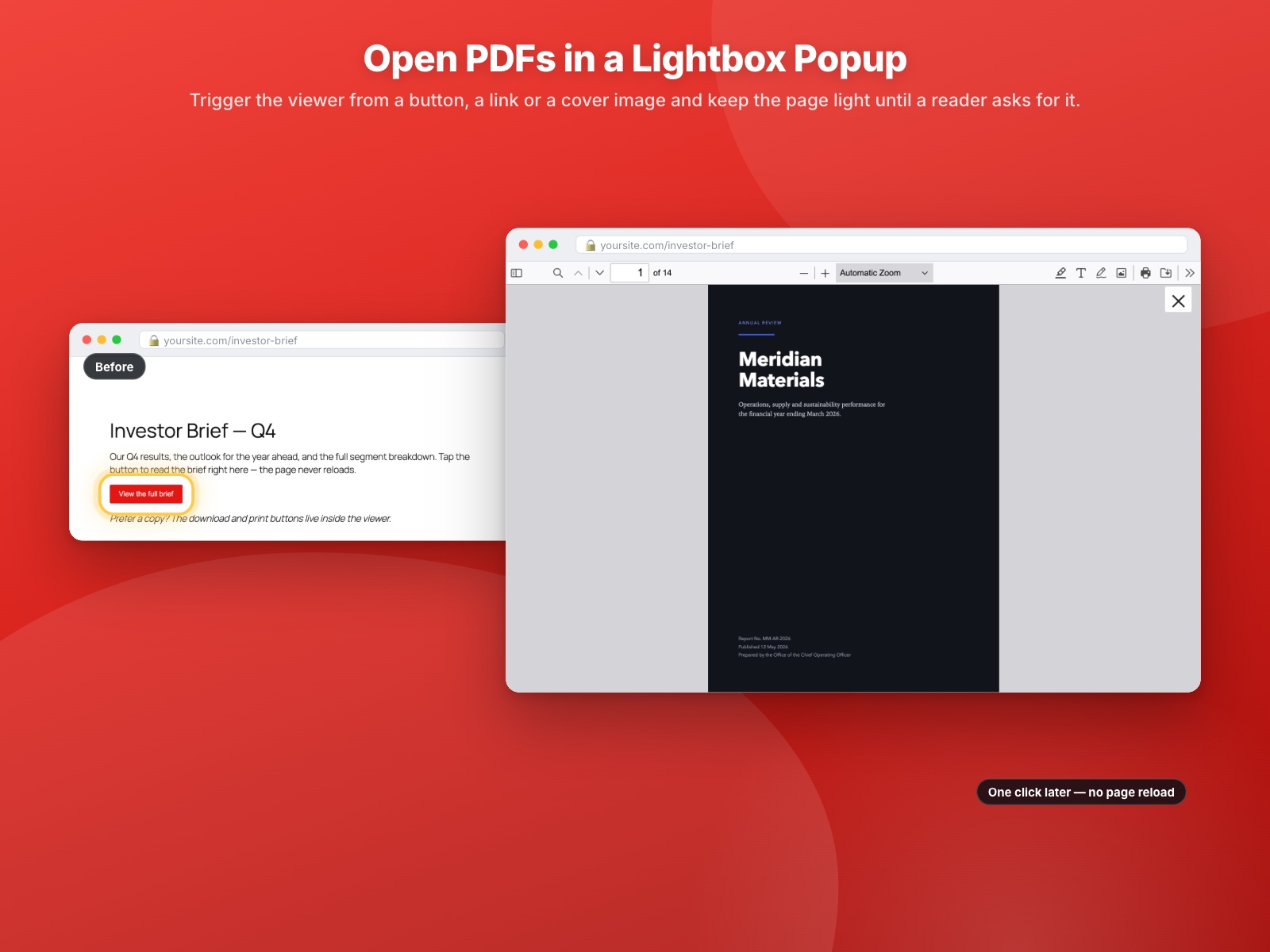
- Open PDFs in a modal — Keep the page clean and load the document only when a reader asks for it.
- Button or image trigger — Trigger from a styled button or from any image, with your own alignment, image dimensions and an optional PDF icon overlay.
PDF Analytics — See Today’s Views and Downloads, Free
- Today’s views and downloads — How many times each document was opened and downloaded today, with no third-party analytics service. The figures appear on the PDF Posters list, beside each document in both editors, and on the Analytics screen.
- Accurate behind a page cache — Counting happens in the visitor’s browser, so figures stay right on sites running WP Rocket, LiteSpeed or Cloudflare instead of recording one view per cached copy.
- Every embed counted — Not only saved PDF Posters: a block placed straight onto a page and
[pdf_embed url="…"]each get their own figures. - Privacy-first by default — No IP address stored, no cookie set, nothing sent to a third party. The rows live in your own database.
- Site-wide controls — Turn counting on or off, keep your own visits out of the numbers, and optionally respect the browser’s Do Not Track header.
A view is recorded once the viewer has genuinely been on screen — not on every page load — and once per visitor per 30 minutes.
Styling and Custom CSS
- Button and title styling — Background colour, text colour, font size and padding for the action buttons, plus the title font size, with no CSS needed.
- Site-wide custom CSS — One stylesheet for every embed, in Settings.
- Per-document CSS and CSS class — Style a single poster or a single block without touching your theme.
Site-Wide Defaults
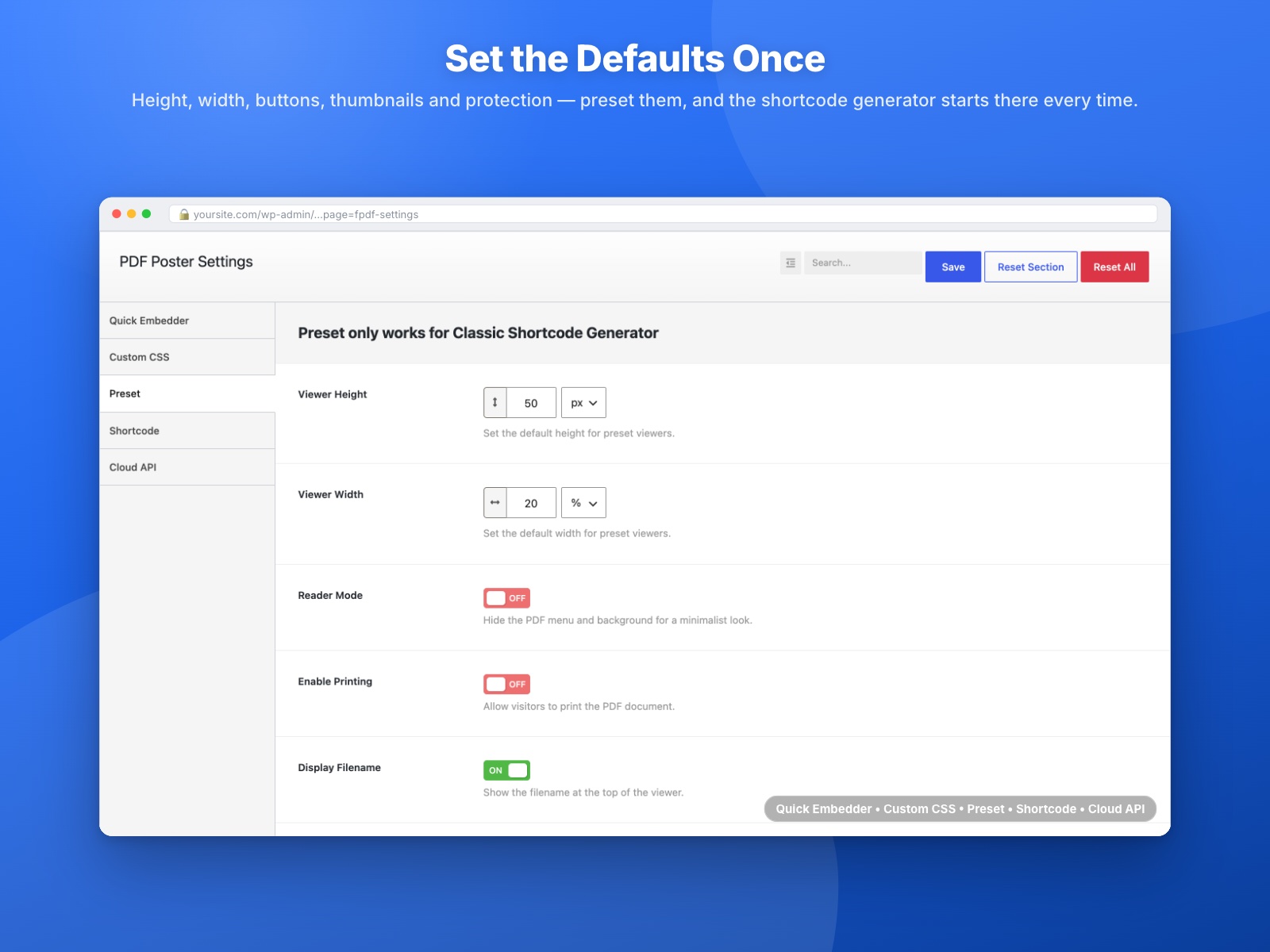
- Presets in Settings — Set the defaults every new PDF Poster starts from, so you configure once instead of on every document. (Changing a preset affects documents you create afterwards.)
Performance and Reliability
- Fast loading (progressive rendering) — Streams large PDFs so the first page appears while the rest is still downloading.
- Google Doc Viewer fallback — An optional second rendering path for browsers that mishandle inline PDFs (recommended for Edge).
In Your WordPress Dashboard
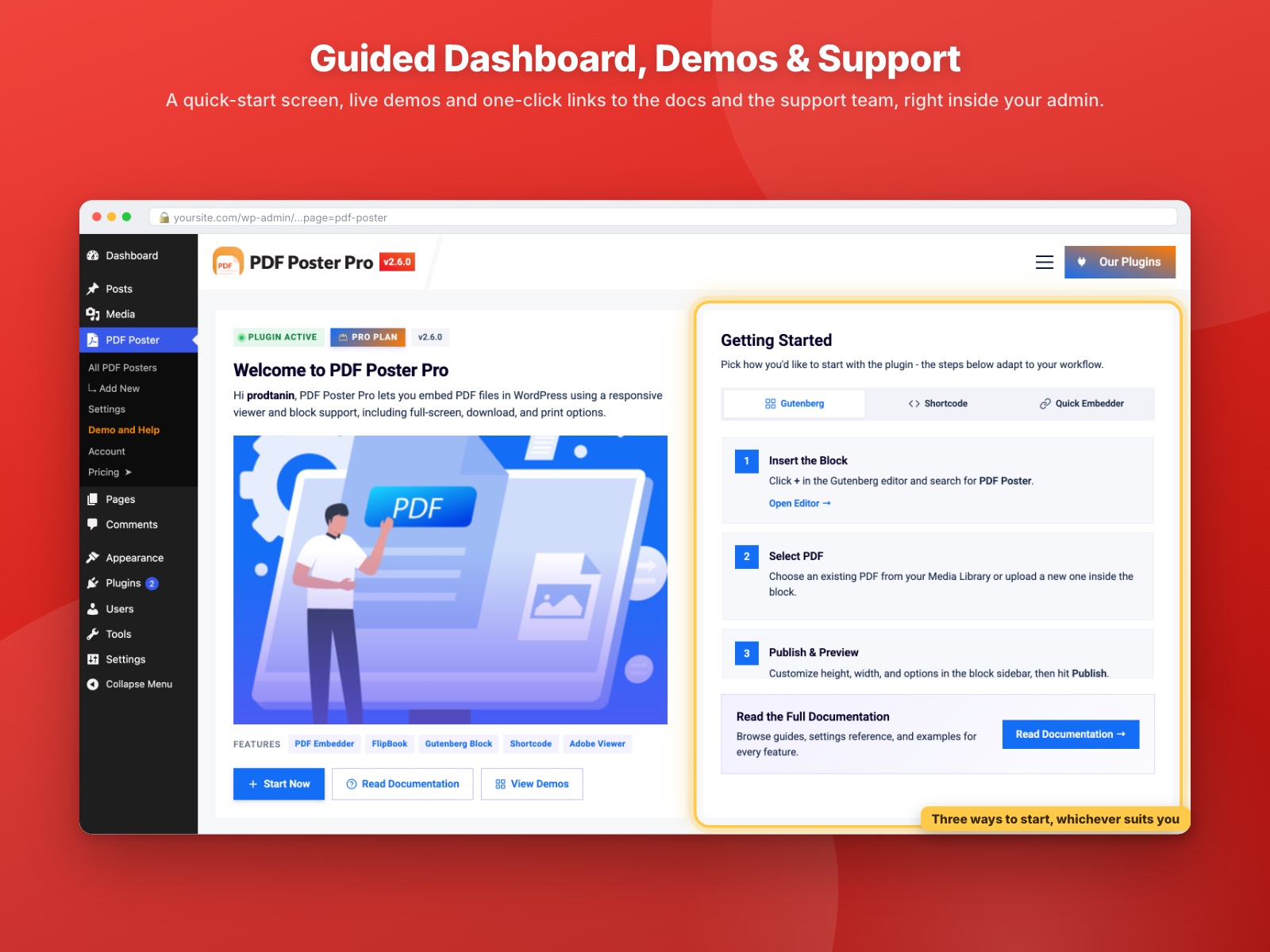
- PDF Poster dashboard — One place for your documents, demos, help and changelog.
- PDF chatbot assistant — Ask setup questions without leaving WordPress.
PDF Poster Pro Features — What Upgrading Adds
Everything above stays exactly as it is. PDF Poster Pro adds the following on top.
Two More PDF Viewers
- Adobe PDF viewer — Rendering by the Adobe PDF Embed API, with Adobe’s own embed and view modes, including its lightbox.
- Continuous Scroll viewer — Every page in one uninterrupted scroll, built for long reports.
Advanced Reading Controls
- Reader Mode — The document and nothing else: no toolbar, no frame, no distractions.
- Thumbnail sidebar — Show the page thumbnails panel, and choose whether it opens by default.
- Initial page and default zoom — Open on page 12 at 125% if that is where the reader should start.
- Vodorovný posuvník — Nastavit vodorovné posouvání jako výchozí pro široké dokumenty.
- Hide the right toolbar — Trim the viewer chrome further.
Button Labels and Placement
- Rename the download button — Your label, your language.
- Rename the full-screen button — Same, for the full-screen toggle.
- Open full screen in a new tab — Send the full-screen view to its own tab.
- Move the action bar — Put print, download and full screen above or below the viewer.
Logo Watermarking and Anti-Leak
- Logo, or logo with text — Stamp your logo over every page, on its own or beside your wording.
- Three more themes — Brand Corner, Logo Wash and Logo + Caption, each with its own angle, tiling and weight.
- Custom theme — Set coverage, position, strength, size and angle yourself: from a single corner mark to a dense tile that cannot be cropped out of a screenshot.
- Choose who sees it — Everyone, everyone except administrators (so you can proof the clean original), or logged-out visitors only.
- Anti-leak options — A per-visitor stamp that identifies whoever opened a leaked screenshot, plus tamper restore that puts the mark back if a visitor deletes it with browser dev tools.
Watermarking is a deterrent, not DRM — an on-screen mark can be removed with browser dev tools, and no browser can prevent a screenshot.
PDF Content Protection
- Disable right-click and copying — Block the context menu and copy shortcuts on your documents.
- Disable text selection — Stop text being dragged out of the viewer.
- Suppress blocked-action alerts — Enforce protection quietly, without warning pop-ups.
Full PDF Analytics History
Every day is recorded on every version, in your own database. The free plugin shows you today; Pro reads the rest back — so there is nothing to import when you upgrade, and the history your site has already built is there waiting.
- All-time totals and history — Total views and downloads for any document, over any period.
- 7, 30 and 90 day reports — Views and downloads over time as a chart, with the change against the previous period.
- Download rate, busiest day and top documents — What people actually read, ranked.
- Per-document reports — Open any single document’s own trend and totals straight from the editor, as a link you can bookmark or share.
- Sortable Views and Downloads columns — On the PDF Posters list, so your most-read documents sort to the top.
- CSV export — Take any range into a spreadsheet.
Import, Reuse and Support
- Google Drive picker and Dropbox import — Pull a PDF straight from cloud storage instead of uploading it twice.
- Preset library for blocks — Save a block’s whole configuration and reuse it across your site.
- Always load the latest version — Replace the file and every embed updates, with no re-linking.
- Priority one-on-one support — Straight to the developers.
Coming soon in Pro: in-viewer Ads, already sketched in the interface and shipping in a later release.
Vyzkoušejte PDF Poster Pro — odemkněte si ještě dnes všechny prémiové funkce.
Jak používat PDF Poster – Průvodce krok za krokem
Začít s PDF Posterem je rychlé a snadné!
Pokyny krok za krokem
-
Po instalaci přejděte do menu „PDF Poster“ ve vaší WordPress administraci
-
Upload one or more PDF documents
-
Copy the Shortcode shown in the editor or PDF list
-
Paste the shortcode into any post, page, or widget area
-
Stiskněte tlačítko Publikovat.
Užijte si své krásně vložené PDF!
Integrace s Gutenberg bloky
Používáte blokový editor? Zde je návod, jak vložit PDF na pár kliknutí:
Otevřete příspěvek nebo stránku v editoru WordPressu
-
Klikněte na ikonu + nebo použijte příkaz s lomítkem (/pdf)
-
Najděte PDF Poster v kategorii Prvky rozložení
-
Klikněte na ikonu pro vložení bloku
-
Vyberte si PDF z knihovny médií
-
Klikněte na Publikovat a je to!
Živé demo | Získat PDF Poster PRO
Shortcode Usage
Shortcode
[pdf_embed url=“https://example.com/document.pdf“ width=“100%“ height=“842px“ print=“true“ title=“Můj PDF dokument“ download_btn=“true“ fullscreen_btn_text=“Zobrazit na celou obrazovku“]
Atributy
-
url (povinné): URL adresa PDF souboru.
- Výchozí:
žádná - Příklad:
url="https://example.com/document.pdf"
- Výchozí:
-
width (volitelné): Šířka PDF prohlížeče.
- Výchozí:
"100%" - Příklad:
width="80%"
- Výchozí:
-
height (volitelné): Výška PDF prohlížeče.
- Výchozí:
"842px" - Příklad:
height="600px"
- Výchozí:
-
print (volitelné): Zobrazí tlačítko pro tisk.
- Přijímané hodnoty:
"true","false" - Výchozí:
"false" - Příklad:
print="true"
- Přijímané hodnoty:
-
title (volitelné): Název zobrazený nad PDF prohlížečem.
- Výchozí:
žádná - Příklad:
title="Název dokumentu"
- Výchozí:
-
download_btn (volitelné): Zobrazí tlačítko pro stažení.
- Přijímané hodnoty:
"true","false" - Výchozí:
"false" - Příklad:
download_btn="true"
- Přijímané hodnoty:
-
fullscreen_btn_text (volitelné): Text pro tlačítko zobrazení na celou obrazovku.
- Výchozí:
"Zobrazit na celou obrazovku" - Příklad:
fullscreen_btn_text="Otevřít na celou obrazovku"
- Výchozí:
Zpětná vazba od uživatelů
⭐⭐⭐⭐⭐ Weronika Zielinska – Empp
❛❛Skvělý plugin, který usnadňuje přidávání potřebných plakátů a pdf! Velmi usnadňuje rychlé vytvoření webové stránky. Rozhodně ho doporučuji a určitě ho budeme vždy používat.❜❜
–empp
⭐⭐⭐⭐⭐ dobrý plugin
❛❛Tento pdf poster plugin opravdu řeší mé požadavky.❜❜
– Did you like this plugin? Dislike it? Have a feature request? Please share your feedback with us
Podívejte se na naše další WordPress pluginy-
Html5 Video Player – Zobrazujte videa jako jednotlivá i v playlistu s různými vzhledy.
Html5 Audio Player – Poslouchejte audio se skvělými vizuálními efekty.
StreamCast – Přizpůsobitelný rádiový přehrávač s různými vzhledy.
3D Viewer – Vkládejte 3D modely a 3D produkty s interakcí.
Advanced Post Block – Zobrazte příspěvky a vlastní typy příspěvků v různých rozloženích.
Snímky obrazovky
Bloky
Tento plugin poskytuje 2 bloky.
- PDF Poster Selector
- PDF Poster Embed PDF in your posts and pages
Instalace
Tato sekce popisuje, jak nainstalovat plugin a zprovoznit ho.
např.
1. Nahrajte adresář-pluginu do adresáře /wp-content/plugins/
2. Aktivujte plugin prostřednictvím menu ‚Pluginy‘ ve WordPressu
3. Použijte shortcode na stránce, v příspěvku nebo ve widgetech.
4. Pokud chcete ve své šabloně použít PHP, vložte <?php echo do_shortcode('VÁŠ_SHORTCODE'); ?> do vašich šablon
Nejčastější dotazy
-
How many PDF files can I embed using PDF Poster plugin?
-
There are no limitations! you can embed an unlimited number of PDF files.
-
Can I embed MS Office document?
-
No, You can’t. But we have another plugin for embedding Office Doc Called Document Embedder
-
Mohu vložit PDF s možností stažení?
-
Ano, můžete uživatelům povolit/zakázat stahování souboru, je to plně ve vaší moci.
-
Bude tento plugin fungovat/být kompatibilní se šablonou, kterou používám?
-
Tento plugin je kompatibilní s většinou šablon. Bohužel ho ale nemůžeme zkontrolovat na kompatibilitu se všemi šablonami třetích stran (zejména placenými), proto se mohou vyskytnout případy, kdy tento plugin s šablonou třetí strany nefunguje. Tento plugin neustále kontrolujeme na kompatibilitu s šablonami třetích stran. Pokud zjistíme, že je tento plugin nekompatibilní s šablonou třetí strany a pokud to můžeme na naší straně opravit, vydáme aktualizaci našeho pluginu, abychom problém vyřešili.
Pokud najdete konflikt mezi naším pluginem a šablonou třetí strany, dejte nám prosím vědět a my určitě vydáme aktualizaci našeho pluginu, abychom problém vyřešili.
-
Bude tento plugin fungovat/být kompatibilní s ostatními pluginy, které používám?
-
Tento plugin je kompatibilní s většinou pluginů. Bohužel ho ale nemůžeme zkontrolovat na kompatibilitu se všemi pluginy třetích stran (zejména placenými), proto se mohou vyskytnout případy, kdy tento plugin s pluginem třetí strany nefunguje. Tento plugin neustále kontrolujeme na kompatibilitu s pluginy třetích stran. Pokud zjistíme, že je tento plugin nekompatibilní s pluginem třetí strany a pokud to můžeme na naší straně opravit, vydáme aktualizaci našeho pluginu, abychom problém vyřešili.
Pokud najdete konflikt mezi naším pluginem a pluginem třetí strany, dejte nám prosím vědět a my určitě vydáme aktualizaci našeho pluginu, abychom problém vyřešili.
-
Kde mohu nahlásit bezpečnostní chyby nalezené v tomto pluginu?
-
Bezpečnostní chyby nalezené ve zdrojovém kódu pluginu PDF Poster prosím hlaste prostřednictvím Programu pro zveřejňování zranitelností Patchstack. Tým Patchstack vám pomůže s ověřením, přidělením CVE a upozorní vývojáře tohoto pluginu.
Recenze


Autoři
PDF Poster – Let visitors read PDF's without leaving the page je otevřený software. Následující lidé přispěli k vývoji tohoto pluginu.
Spolupracovníci


Plugin „PDF Poster – Let visitors read PDF's without leaving the page“ byl přeložen do 4 jazyků. Děkujeme všem překladatelům za jejich pomoc.
Přeložte “PDF Poster – Let visitors read PDF's without leaving the page” do svého jazyka.
Zajímá vás vývoj?
Prohledejte kód, podívejte se do SVN repozitáře, nebo se přihlaste k odběru protokolu vývoje pomocí RSS.
Přehled změn
2.6.1 – 19 Sep 2026
- Fix: Posters could fail to load after a site was moved, imported or cloned — showing a 404, an image instead of the document, or “Unexpected server response.” — most often when the PDF filename was not written in English; the saved address is now repaired against the media library.
2.6.0 – 10 Sep 2026
- New: Document Insights — see how many times every PDF was viewed and downloaded today, free, without adding a third-party analytics service. The figures stay in your own site.
- New: Analytics screen — a new Analytics item under PDF Poster showing today’s figures, and with Pro a 7, 30 or 90 day view: views and downloads over time, change against the previous period, download rate, busiest day, your best-performing documents ranked, and CSV export.
- New: Per-document reports — open any single document’s own trend and totals from the editor, as a link you can bookmark or share with your team.
- New: Analytics panel on every document — today’s views and downloads in the block editor sidebar and beside the Save button in the classic editor, with all-time totals and a 14-day trend in Pro.
- New: Views and Downloads columns on the PDF Posters list — today’s figures for everyone, all-time and sortable in Pro.
- New: Settings > Analytics — turn counting on or off site-wide, keep your own visits out of the numbers, and optionally respect the browser’s Do Not Track setting.
- New: Counting keeps working behind a page cache, so sites on WP Rocket, LiteSpeed or Cloudflare get real figures instead of one view per cached copy.
- New: Every embed is counted, not only saved PDF Posters. A block placed directly on a page and
[pdf_embed url="..."]each get their own figures, and the report links through to the page they sit on. - New: A view is recorded once the viewer has genuinely been on screen — not on every page load — and once per visitor per 30 minutes. Downloads and prints are counted however the reader triggers them.
- New: Private by default. No IP address is stored, no cookie is set, and this release keeps daily totals only — in your own database, never sent anywhere.
- New: Nothing to import if you upgrade later — every day is recorded from the start, so Pro reads back the history your site has already built.
- New: Popup (lightbox) viewer, a text watermark with three ready-made themes, per-block Class and CSS, a site-wide Custom CSS box, the Preset defaults screen and the Fullscreen Button toggle are all free in this release.
- New: WPBakery Page Builder — PDF Poster and PDF Embed (by URL) are now native builder elements, and both draw live in the frontend editor instead of sitting on “Loading Viewer…”. Any builder that previews over AJAX now loads the viewer first time, with no refresh.
- Update: The shortcode columns on the PDF Posters list now show the shortcode itself in a click-to-copy chip, instead of a button whose label hid the value it copied.
- Update: Links out of a report open in a new tab, so your date range and filters stay where you left them.
- Fix: Content protection no longer shows a developer-tools warning while a page is open in Elementor, Divi, Bricks, Beaver Builder, Oxygen or Breakdance. Editing behaves normally again, including Ctrl+S to save and right-click.
- Fix: The plugin dashboard requested a stylesheet that is never generated, producing a 404 on every load.
- Fix: “Missing PDF file.” after a site move — saved links are repaired against the current media library, so posters survive a domain, HTTPS or staging change. Filenames holding a percent sign or an encoded space load too.
- Fix: Retry reloads the document rather than the whole page, and a file that really is gone now names the address that failed.
- Fix: PDF Poster no longer takes over blocks belonging to other plugins that tag their markup the same way.
2.5.6 – 31 Aug 2026
- New: Watermark & Branding — stamp a text or logo mark over any viewer, with six ready-made themes that set the angle, repeat, weight and blend for you.
- New: Watermark mark types — Text, Image (your logo) or both stacked together.
- New: Watermark Coverage — a single positioned mark, or tiled Sparse/Normal/Dense so it cannot be cropped out of a screenshot.
- New: Watermark Image Style — Original, Grayscale, White (for dark pages) or Black.
- New: Watermark Strength and Size as named steps rather than numbers, so the mark stays readable at every zoom level and on mobile.
- New: Watermark page scope (all pages, first page only, or all except the cover) and audience rules (everyone, everyone except admins, or logged-out visitors only).
- New: Watermark „Restore If Removed“ option, which puts the mark back if a visitor deletes it with browser dev tools.
- Note: Watermarking is a deterrent, not DRM — an on-screen mark can be removed with browser dev tools, and no browser can prevent a screenshot. Marks in printouts and downloaded copies arrive in a following release.
2.5.5 – 03 Aug 2026
- New: Added Image Gallery source for the Flipbook viewer — build a page-flip book from an ordered set of images without a PDF.
- New: Added Viewer Theme option (Light/Dark/Auto) that themes the viewer toolbar and background without altering the PDF page content.
- New: Added RTL Layout option (Off/On/Auto) for right-to-left languages, applied across all viewers and the PDF toolbar.
- New: Added Keyboard Navigation option (Left/Right arrow keys to change pages) for all viewers.
- New: Added a Page Flip Sound toggle for Flipbook and Slider viewers (on by default; can now be turned off).
- New: Added Fast Loading (Progressive Rendering) option for all viewers (Default, Adobe, Flipbook, Scroll, Slider) to stream large PDFs so the first page appears sooner.
- Fixed – Shortcodes could render nothing when a PDF Poster carried the isGutenberg flag without a saved block.
- Fixed: Full screen option smooth behaviour.
2.5.4 – 15 Jun 2026
- New: Added interactive PDF Chatbot assistant.
- New: Added Slider and Scroll Viewer options.
- New: Added Annotation Mode configuration for default viewer.
- New: Added Open PDF links in new tab configuration for default viewer.
- New: Added Email (mailto) button to social share options.
2.5.3 – 10 June 2026
- Update: Admin Dashboard aligned with the latest standard and bpl-tools layout.
- Update: Update block.json version.
- Security: Enhanced request validation and sanitized AJAX inputs.
- Security: Secured public REST API endpoints with authentication checks.
- Compliance: Added full uninstall cleanup routine for custom options and database tables.
- Compliance: Standardized translation text domains to match the plugin slug.
- Fixed: Corrected general typos, updated GPL license headers, and added distribution ignore rules.
2.5.2 – 19 May 2026
- New: Added FlipBook Viewer support for a more interactive and realistic PDF reading experience.
- New: Introduced fully responsive Height & Width controls for Desktop, Tablet, and Mobile devices.
- New: Added a Device Preview Switcher in the plugin metabox for easier responsive configuration.
- Improved: Enhanced PDF viewer dimension handling across different screen sizes for better responsiveness.
- Improved: Refactored the entire plugin codebase for better maintainability and cleaner architecture.
- Improved: Removed unused and redundant code to reduce plugin bloat and improve performance.
- Improved: Optimized core functionality for faster loading and smoother user experience.
- Fixed: Resolved existing bugs and minor compatibility issues.
- Security: Strengthened overall plugin security and improved code quality following best practices.
2.5.1 – 25. dubna 2026
- Opraveno: Soubory PDF umístěné na externích doménách nebo v sítích CDN se vůbec nenačítaly
- Fixed: Google Docs Viewer was sending the same request twice and canceling both
- Opraveno: V případě selhání prohlížeče Google Docs nebylo k dispozici žádné náhradní řešení
- Opraveno: Chyby PDF.js nebyly viditelné – uživatelům se zobrazovalo pouze prázdné bílé pole
- Opraveno: Při chybějícím nebo zcela prázdném souboru PDF se nezobrazovala žádná zpráva
- Opraveno: Prohlížeč PDF se neotevíral na zařízeních iPhone a iPad s operačním systémem iOS 16 a 17
- Opraveno: Klepnutí na tlačítko pro přepnutí do režimu celé obrazovky na iPhonu nemělo vůbec žádný účinek
- Opraveno: Soubory PDF se nenačítaly v prohlížeči Chrome pro Android a v prohlížeči Samsung Internet
- Fixed: Chinese, Japanese and Korean characters were showing as random broken symbols
- Fixed: PDFs made with LaTeX or older Adobe tools were showing wrong or unreadable text
- Opraveno: Změny provedené v existujícím záznamu PDF se po stisknutí tlačítka „Aktualizovat“ ztratily
- Fixed: Shortcode was pasting fine but showing nothing at all on the live page
- Fixed: PDFs with spaces or special characters in the filename were crashing the viewer
- Opraveno: U některých šablon se nad prohlížečem zobrazoval neočekávaný nadpis
- Fixed: Embedding a PDF by URL was showing raw code instead of the actual document
- Fixed: PDF viewer was not displaying properly inside Elementor’s preview panel
- Update: Removed unexpected or unnecessary conten & code from the whole plugin.
2.5.0 – 1. března 2026
- Novinka: Typ spouštěče vyskakovacího okna – obrázek
- Novinka: Zarovnání spouštěče vyskakovacího okna
- Novinka: Velikost obrázku pro spuštění vyskakovacího okna
- Novinka: Ikona PDF s obrázkem pro spuštění vyskakovacího okna
- Aktualizace: Stránka s nápovědou a ukázkami
- New: Added an option to move the action buttons (Print, Fullscreen, Download) to the top or bottom.
- Aktualizace: Skrýt postranní panel na mobilních zařízeních
2.4.1 – 9. února 2026
- Fixed: Warning: Attempt to read property „post_type“ on null in WC Orders Add/Edit page
- Opraveno: Chybná kontrola přístupu
- Odstraněno: Sekce „Upgrade“ z bloku Gutemberg (Premium)
- Odstraněno: Sekce „Upgrade“ z nástroje Classic Shortcode Generator (Premium)
2.4.0 – 20. ledna 2026
- Přidáno: Funkce sdílení na sociálních sítích
- Doplněno: Ikony před každým nadpisem PanelBody v bloku Gutenberg
- Přidáno: Nápověda k ovládacím polím
- Vylepšeno: Uživatelské rozhraní nastavení bloků Gutenbergu
- Vylepšeno: Uživatelské rozhraní generátoru klasických zkratek
- Vylepšeno: Celková jednotnost a přehlednost uživatelského rozhraní
- Opraveno: Chybějící ikona služby Google Drive
- Opraveno: Problémy s integrací služby Google Drive
- Opraveno: Problémy s integrací Dropboxu
- Opraveno: Blok pro výběr plakátu ve formátu PDF nefungoval
- Aktualizováno: Ikona nabídky plakátu ve formátu PDF
- Aktualizace: Odstraněn neočekávaný nebo zbytečný obsah
2.3.1 – 22. září 2025
- Opraveno: Problém se zobrazením na celou obrazovku
- Opraveno: Problém s nahráváním obrázků v Divi Builderu
2.3.0 – 13. srpna 2025
- Nová stránka: Nástěnka
- Opraveno: Problém s náhledem přednastavení
- Opraveno: Problém s vkládáním Adobe
- Vylepšeno: Kód
2.2.4 – 14. července 2025
- Opraveno: ACF Pro – WYSIWYG editor – tlačítko „Přidat PDF“ nefunguje
- Opraveno: Možnosti rychlého vložení nefungují
2.2.3 – 11. května 2025
- Opraveno: Problém s nahráváním souboru
2.2.2 – 12. února 2025
- Aktualizace: Viditelný posuvník při výběru ‚zobrazit pouze PDF/čisté PDF‘
- Opraveno: Funkce _load_textdomain_just_in_time() byla volána nesprávně.
2.2.1 – 28. ledna 2025
- Opraveno: váš web nepodporuje blok „pdfp/pdfposter“.
- Aktualizace: WordPress SDK
2.2.0 – 6. října 2024
- Opraveno: Překrývající se obsah
2.2.0 – 6. října 2024
- Opraveno: Překrývající se obsah
2.1.25 – 24. července 2024
- Opraveno: 404 Not Found – PDFPro\Helper\Pipe::checkPipe()
2.1.24 – 29. června 2024
- Opraveno: Problém s iPadem/iPhonem
2.1.23–27. června 2024
- Opraveno: Chyba direktivy
2.1.22 – 24. června 2024
- Opraveno: Zranitelnost
21. – 25. března 2024
- Opraveno: Rozbitý styl v Avada Builderu
2. ledna – 19. února 2024
- Opraveno: Problém se zastaralými funkcemi
2. ledna 2024 – 9. ledna 2024
- Funkce: Zobrazit tlačítko Stáhnout
2.1.18 – 24. prosince 2023
- Bezpečnost: Vylepšena
2.1.17 – 4. prosince 2023
- Odstraněny reklamy
2.1.16 – 28. listopadu 2023
- Opraveno: Nelze upravit newsletter
2.1.15 – 24. listopadu 2023
- Opraveno: Odstraněna reklama v administrátorské liště
2.1.14 – 24. listopadu 2023
- Opraveno: Postranní panel byl stále otevřený
2.–12. září 2023
- Opraven problém s SSL
2.0.10 – 5. 4. 2022
- vyřešeno – „Jejda! Zapomněli jste vybrat soubor PDF.“
2.0.9 – 4. dubna 2022
- Opraven problém s SSL
2.0.8 – 26. 1. 2022
- Opraven problém s responzivitou
2.0.7
- Opraven problém se zakázaným přístupem (Forbidden)
2.0.6
- Zakázání Gutenbergu jako výchozího generátoru shortcodů
2.0.3
- Možnost povolit/zakázat generátor shortcodů v Gutenbergu
2.0.0
- Přidán pokročilý generátor shortcodů
- Vylepšený bezpečnostní výkon
- Opraven problém s výškou na mobilním zařízení
1.6
- Oprava problému a zajištění kompatibility s WordPress verzí 5.5
1.5
- Oprava problému s Gutenberg blokem
- Oprava přepínacího menu v prohlížeči
1.4
- Přidána podpora pro Gutenberg bloky
1.3
- Opravit problém
1.2
- odstraněna reklama.
- oprava problému, který způsoboval centrování obsahu.
- Zlepšený výkon.
1.1
- oprava problému s pozicemi pdf
1.0
- První vydání