

Popis
Admin Safety Guard is a powerful yet lightweight WordPress security plugin that protects your login page and admin dashboard from hackers, bots, and brute-force attacks. It is built for anyone — from first-time bloggers to experienced developers — with a clean interface, clear settings, and features that work from the moment you activate it.
WordPress is the most popular website platform in the world, which also makes it the most targeted. Every day, thousands of automated bots scan WordPress sites looking for weak passwords, exposed login pages, and unpatched vulnerabilities. Admin Safety Guard closes those doors quickly and reliably, without slowing down your site or requiring any technical expertise.
Why WordPress Sites Get Hacked — And How Admin Safety Guard Stops It
Most successful WordPress attacks follow the same pattern:
- A bot finds your login page at the default
wp-login.phpaddress. - It tries thousands of username and password combinations (brute-force attack).
- Once inside, it installs malware, steals data, or takes over your site.
Admin Safety Guard blocks every step of this attack chain — for free.
Free Features
Limit Login Attempts (Active by Default)
Automatically block any IP address that fails too many login attempts. You control the number of allowed attempts, the lockout duration, and the message shown to blocked users. Brute-force attacks become impossible when attackers are locked out after 3 failed tries. Login Limit Attempts is the only feature enabled by default on fresh install, so your site is protected the moment you activate the plugin.
Custom Login URL
Move your login page away from the default wp-login.php address. Bots and automated scanners will never find your login page because it simply does not exist at the expected location. You can set any slug you like, and the plugin handles redirect rules automatically. You can also set a custom redirect URL for after login and after logout.
Two-Factor Authentication (2FA) via Email OTP
After a user enters their correct password, a one-time passcode (OTP) is sent to their email address. They must enter that code to complete the login. Even if a hacker steals a password, they cannot get in without also accessing the user’s email inbox. You can customise the OTP email subject and body to match your brand.
Google reCAPTCHA (v2 & v3)
Add Google reCAPTCHA to your login form to block automated bots in real time. Both reCAPTCHA v2 (the familiar checkbox) and v3 (invisible, score-based) are supported. Simply enter your site key and secret key from Google, choose your version, and reCAPTCHA will handle the rest silently in the background.
IP Blocking
Manually block specific IP addresses from accessing your login page entirely. If you notice a suspicious IP in your activity log or receive repeated failed login alerts, add that IP to the block list and it will be turned away immediately. Perfect for stopping known bad actors before they become a problem.
Login Logs & Activity Tracking
See exactly who is logging in to your site and when. The activity dashboard shows successful logins, failed login attempts, IP addresses, user agents, and timestamps in a clear, searchable table. You will always know if something unusual is happening on your site, and you have the evidence to act on it.
Security Analytics Dashboard
The built-in analytics dashboard gives you a real-time overview of your site’s security health. It shows your overall Security Score (based on how many features you have enabled), recent login activity, failed login trends, and a breakdown of which security features are active versus inactive. It is the first page you see when you open the plugin, giving you immediate situational awareness.
Hide Admin Bar (by Role)
Choose which user roles see the WordPress admin bar on the front end of your site. For example, you can hide the admin bar from subscribers and customers while keeping it visible for editors and administrators. This reduces information leakage and gives non-admin users a cleaner experience.
Password Protection (Site-Wide)
Lock your entire website behind a password. Visitors must enter the correct password before they can view any content. This is ideal for staging sites, coming-soon pages, client previews, or any situation where you want to restrict public access temporarily. You can set the access duration and exclude specific user roles from the password requirement.
Privacy Hardening — Disable XML-RPC
The WordPress XML-RPC interface is a common target for brute-force and DDoS amplification attacks. With one toggle, you can disable it completely. Unless you rely on XML-RPC for mobile app publishing or specific third-party integrations, disabling it is a safe and recommended step for almost every WordPress site.
Login Page Customisation & Branding
Replace the default WordPress logo on the login page with your own logo. Set the logo width, height, and URL. Choose from pre-built login page templates to give your login form a professional, branded appearance. This is especially useful for agencies delivering client sites and for anyone who wants a polished, consistent look.
Firewall & Malware Overview
The Firewall & Malware section gives you a central view of your site’s firewall and malware protection status. It shows all related features in one place so you can see what is active and what still needs attention, making it easy to build up your security layer by layer.
Pro Features
Admin Safety Guard Pro extends the plugin with advanced security tools designed for agencies, developers, and high-traffic sites.
Passwordless Login (Magic Links)
Let users log in with a secure, one-time link sent to their email — no password needed. Magic links expire after a single use, making them more secure than passwords for many workflows.
2FA via Mobile Authenticator App
Add Google Authenticator or Authy-compatible two-factor authentication to your login flow. Users scan a QR code once, then generate time-based OTP codes from their phone app. This is the same method used by banks and enterprise software.
Social Login
Allow users to log in with their existing Google, Facebook, or other social media accounts. Reduce friction at sign-up and login, while keeping full control over which providers are allowed.
Database Table Prefix Check
The default WordPress database prefix wp_ is well-known to attackers and makes SQL injection easier. This Pro tool detects your current prefix and guides you through changing it to a unique, random value to close that vulnerability.
Strong Password Enforcement
Set a minimum password strength policy for your users. When they update their password, it must meet your requirements — rejecting weak, guessable passwords before they become a security risk.
Advanced Firewall & Malware Scanner
Scan your WordPress files and database for known malware signatures, suspicious code injections, and modified core files. Get alerts when threats are detected and take action directly from the plugin dashboard.
Upgrade to Pro to unlock all Pro features.
Who Is Admin Safety Guard For?
Bloggers & Content Creators
You focus on writing — not on managing server security. Admin Safety Guard protects your login page and admin area quietly in the background with zero ongoing maintenance required.
Small Business Owners
Your website is your business. A hack can bring it down, damage your reputation, and cost you money. Admin Safety Guard gives you enterprise-level login protection without the enterprise price tag.
WooCommerce Store Owners
An online store holds customer data, payment details, and order history. Limit login attempts, add 2FA, and lock down your admin area so only you and your trusted team can get in.
Freelancers & Web Designers
Deliver more secure sites to clients out of the box. Customise the login page with the client’s branding, lock down the admin bar by role, and hand over a professional, secure WordPress installation every time.
Agencies & Development Teams
Manage security across multiple client sites with a consistent, repeatable setup. All features are toggle-based and clearly documented, making it easy to onboard new team members and maintain a security standard across your portfolio.
Developers & Site Administrators
Fine-tune every setting — login attempt limits, lockout durations, OTP email templates, reCAPTCHA version, redirect URLs, IP block lists, and more. Admin Safety Guard is built on WordPress hooks and filters, so it plays well with the rest of your stack.
What Makes Admin Safety Guard Different?
- Lightweight by design. Assets are loaded only on the pages that need them. The plugin has no impact on your site’s front-end load time.
- No configuration required to get started. Limit Login Attempts is enabled automatically on install. Your site is more secure the moment you activate the plugin.
- All features are clearly labelled Free or Pro. You can see exactly what is available and what requires the Pro version before making any decisions.
- Clean, modern dashboard. The settings UI is built with React for a fast, app-like experience. Finding and configuring features takes seconds, not minutes.
- Built to WordPress standards. Every input is sanitised, every output is escaped, all AJAX requests use nonce verification, and every database query uses prepared statements.
Support
For any issues, questions, or feature requests, please reach out via Support.
External Services
This plugin uses the following third-party and external services:
1) Google reCAPTCHA (Google LLC)
Purpose:
Used to protect forms from spam and automated abuse.
When it is used:
– When reCAPTCHA is enabled in plugin settings
– On login forms and support forms protected by reCAPTCHA
What data is sent:
– User IP address
– reCAPTCHA response token generated by Google
– Browser information as required by Google reCAPTCHA
Service provider:
Google LLC
Terms of Service:
https://policies.google.com/terms
Privacy Policy:
https://policies.google.com/privacy
2) ThemePaste API (Plugin Author Service)
Purpose:
Used for:
– Collecting optional admin email addresses for plugin updates and notifications
– Sending support requests from the plugin support form
– Collecting optional feedback when a user attempts to deactivate the plugin
– Managing plugin-related notifications (only if the user provides contact details)
When it is used:
– When a user submits the built-in support form
– When a user opts to send diagnostic information
– Submitting the optional deactivation feedback form
What data is sent:
– Name
– Email address
– Phone number (if provided)
– Message content
– Site URL
– Plugin name
– Feedback text (if provided)
– Support message content
– Deactivation reason (if provided)
No data is sent without user action.
Service provider:
ThemePaste.com
Terms of Service:
https://themepaste.com/terms-condition
Privacy Policy:
https://themepaste.com/privacy-policy
Development / Source Code
This plugin includes compiled JavaScript bundles in:
– assets/admin/build/*.bundle.js
The original (human-readable) source files are included in this plugin under:
– spa/admin/
Build Tools
– Node.js (LTS recommended)
– npm
– Webpack + Babel
Source Entry Points
The admin SPA bundles are built from the following entry points:
- spa/admin/login-template/Main.jsx -> assets/admin/build/loginTemplate.bundle.js
- spa/admin/login-logs-activity/Main.jsx -> assets/admin/build/loginLogActivity.bundle.js
- spa/admin/analytics/Main.jsx -> assets/admin/build/analytics.bundle.js
- spa/admin/security-core/Main.jsx -> assets/admin/build/securityCore.bundle.js
- spa/admin/firewall-malware/Main.jsx -> assets/admin/build/firewallMalware.bundle.js
- spa/admin/privacy-hardening/Main.jsx -> assets/admin/build/privacyHardening.bundle.js
- spa/admin/monitoring-analytics/Main.jsx -> assets/admin/build/monitoringAnalytics.bundle.js
Install Dependencies
From the plugin root directory (or the directory where package.json exists):
1) Install dependencies:
npm install
Build (Production)
To generate the production bundles:
npm run build
Output Location
Webpack outputs the compiled bundles to:
- assets/admin/build/[name].bundle.js
Important Notes
– Do not edit files in assets/admin/build/ directly. They are generated files.
– Edit the source files under spa/admin/ and re-run the build command.
– For WordPress.org distribution, production builds should be used (mode=production).
Links
Website
Documentation
Pro Version
Facebook
Pinterest
LinkedIn
Instagram
Snímky obrazovky
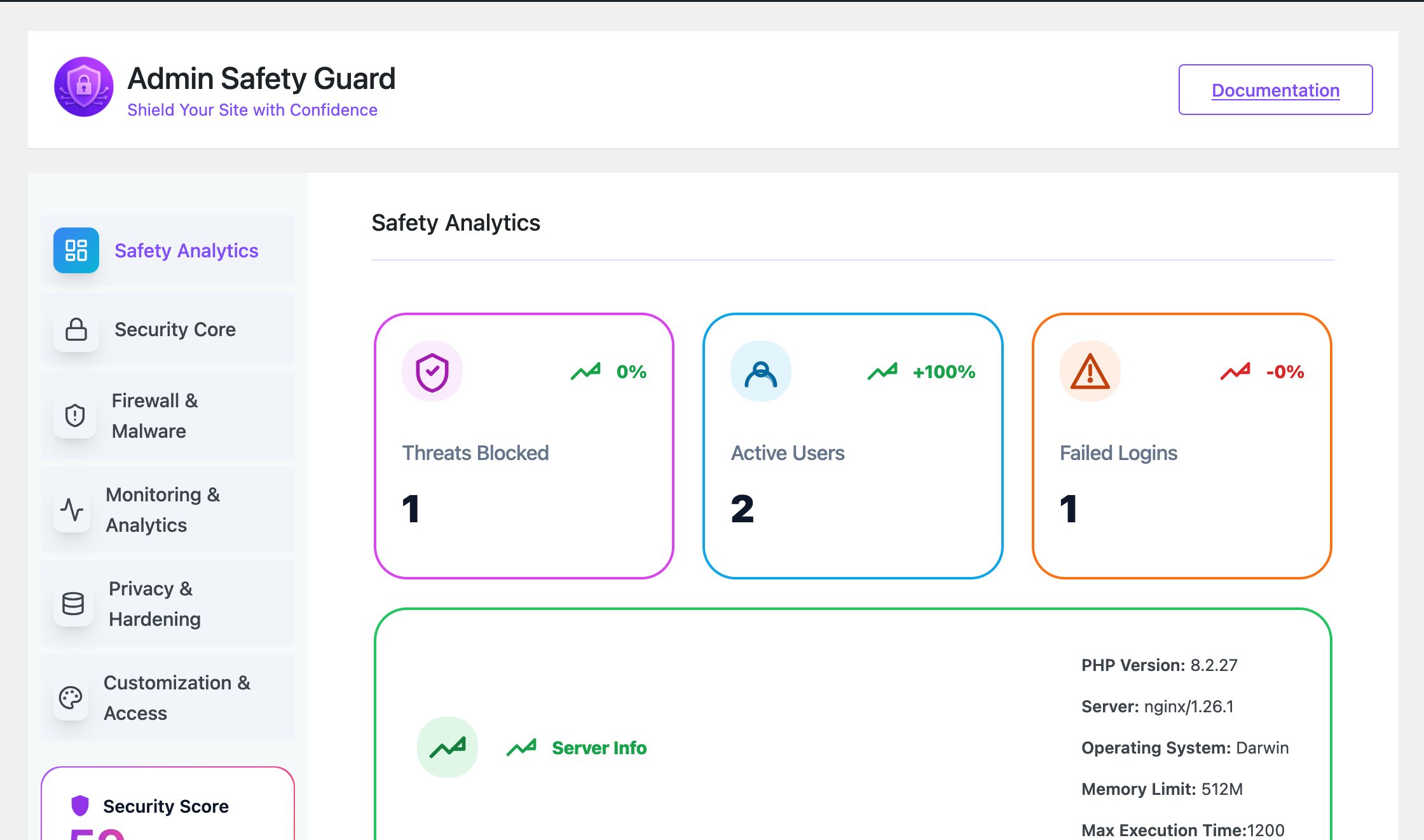
Security Analytics Dashboard — overview of your security score and recent login activity 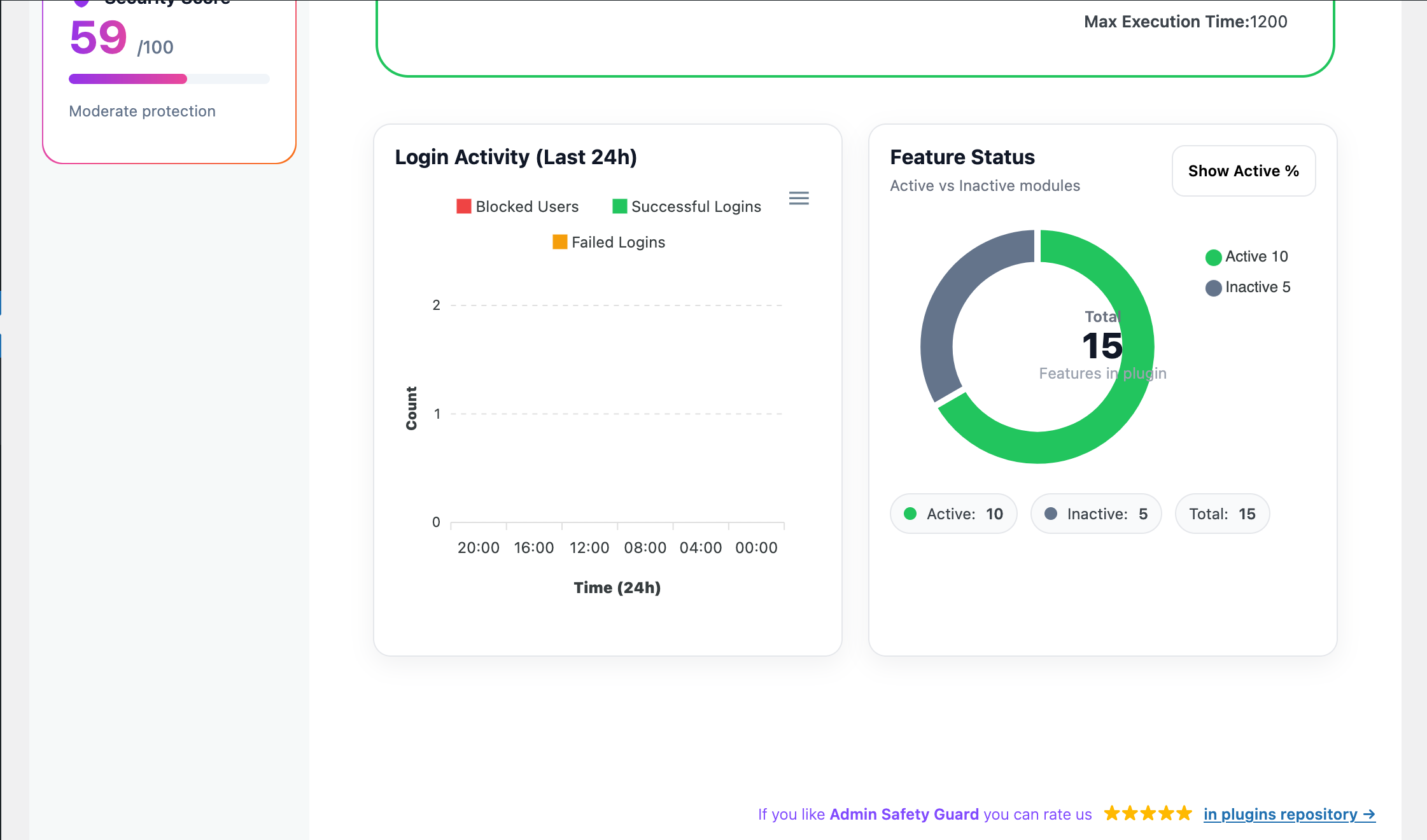
Security Analytics Dashboard — feature status and login attempt trends 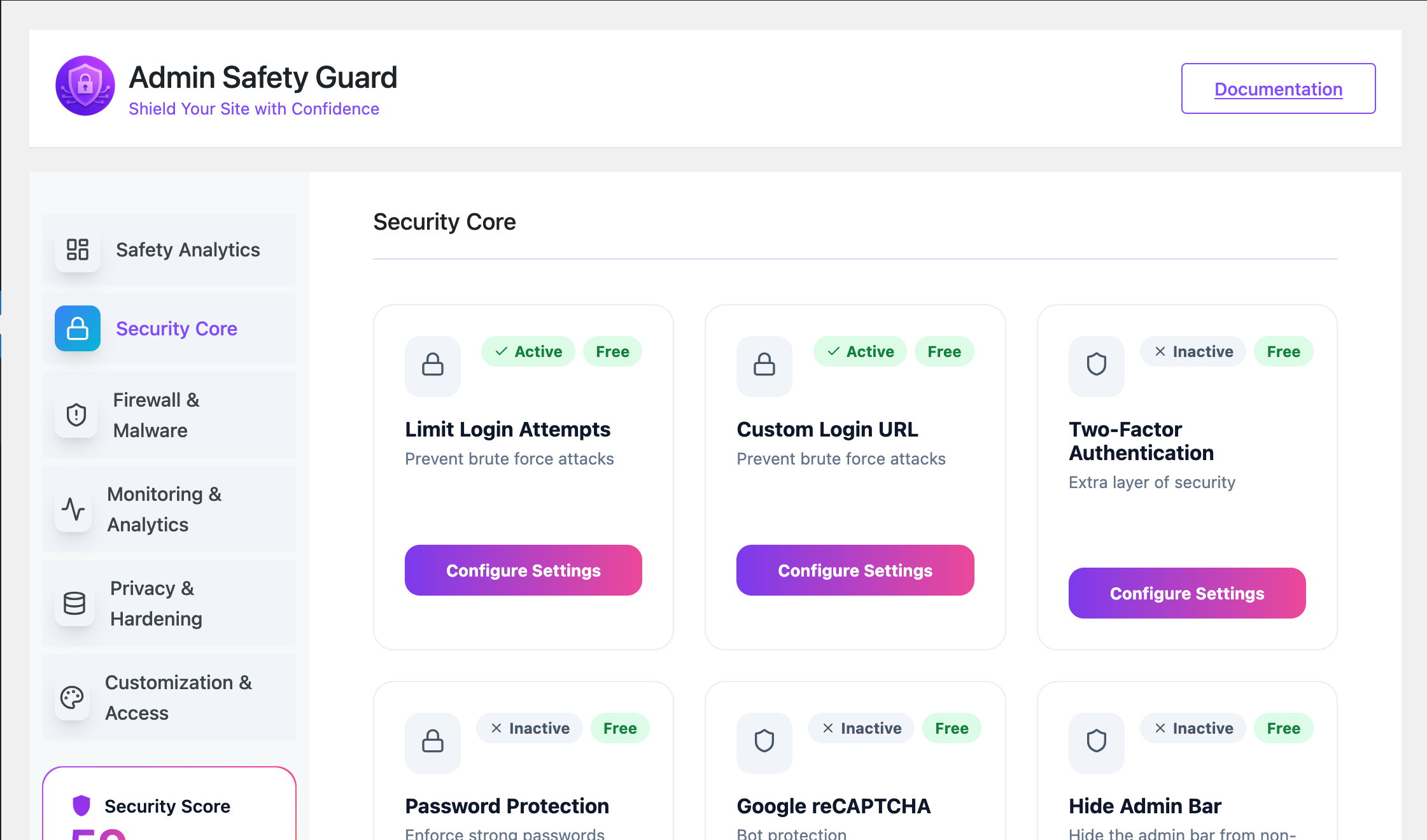
Security Core — full list of free and pro security features with Active/Inactive status 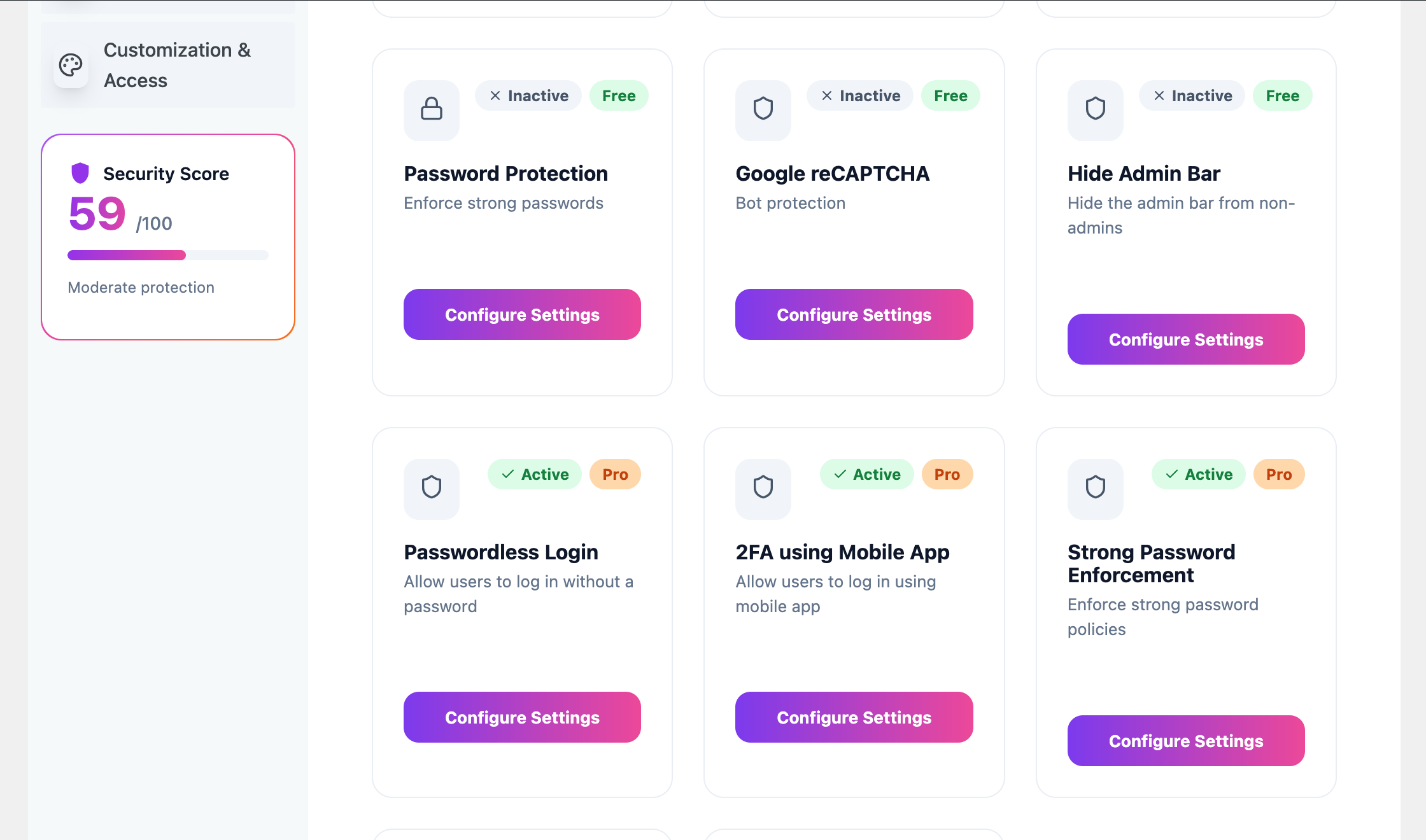
Security Core — feature detail view with Configure Settings option 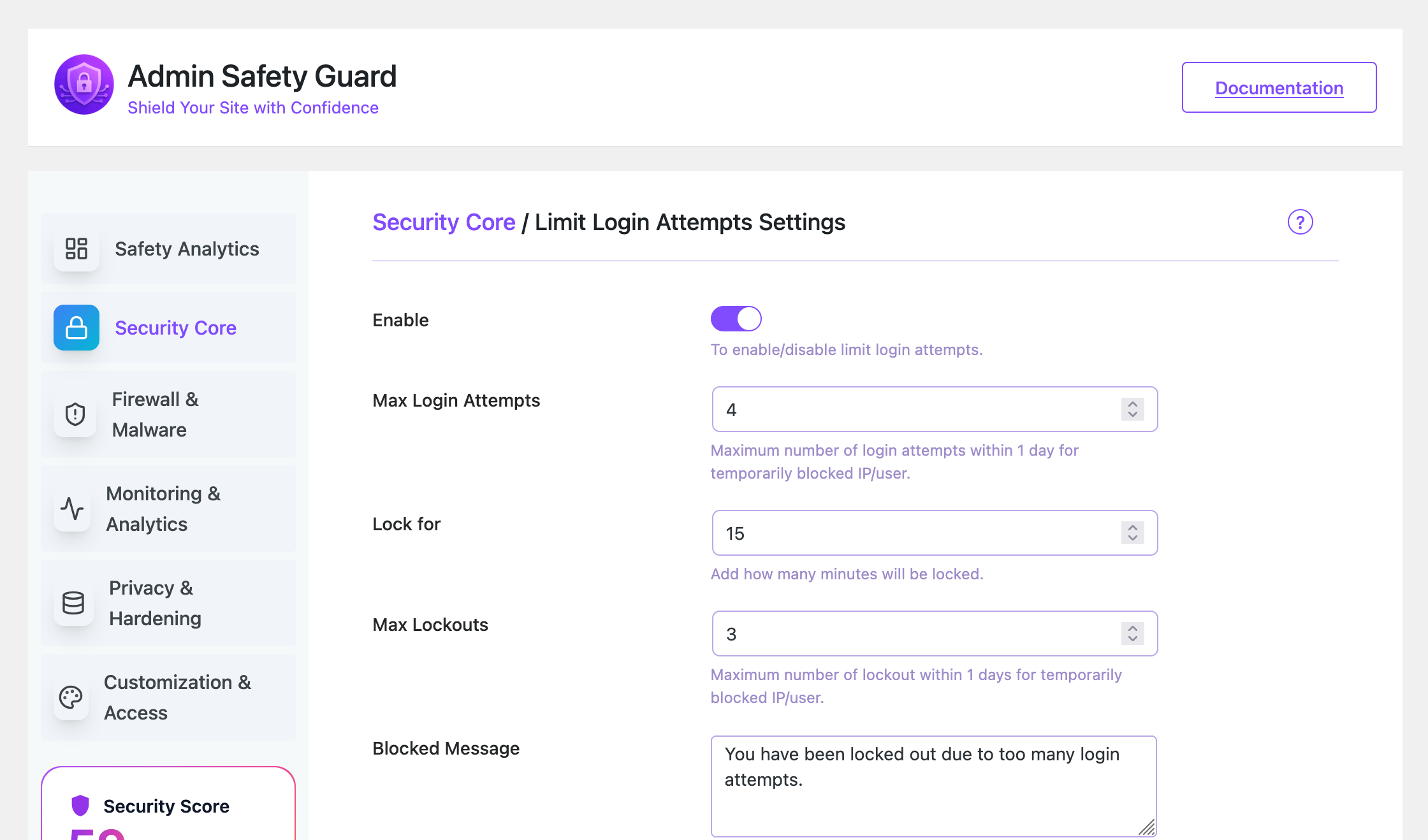
Limit Login Attempts settings — configure max attempts, lockout duration, and blocked message 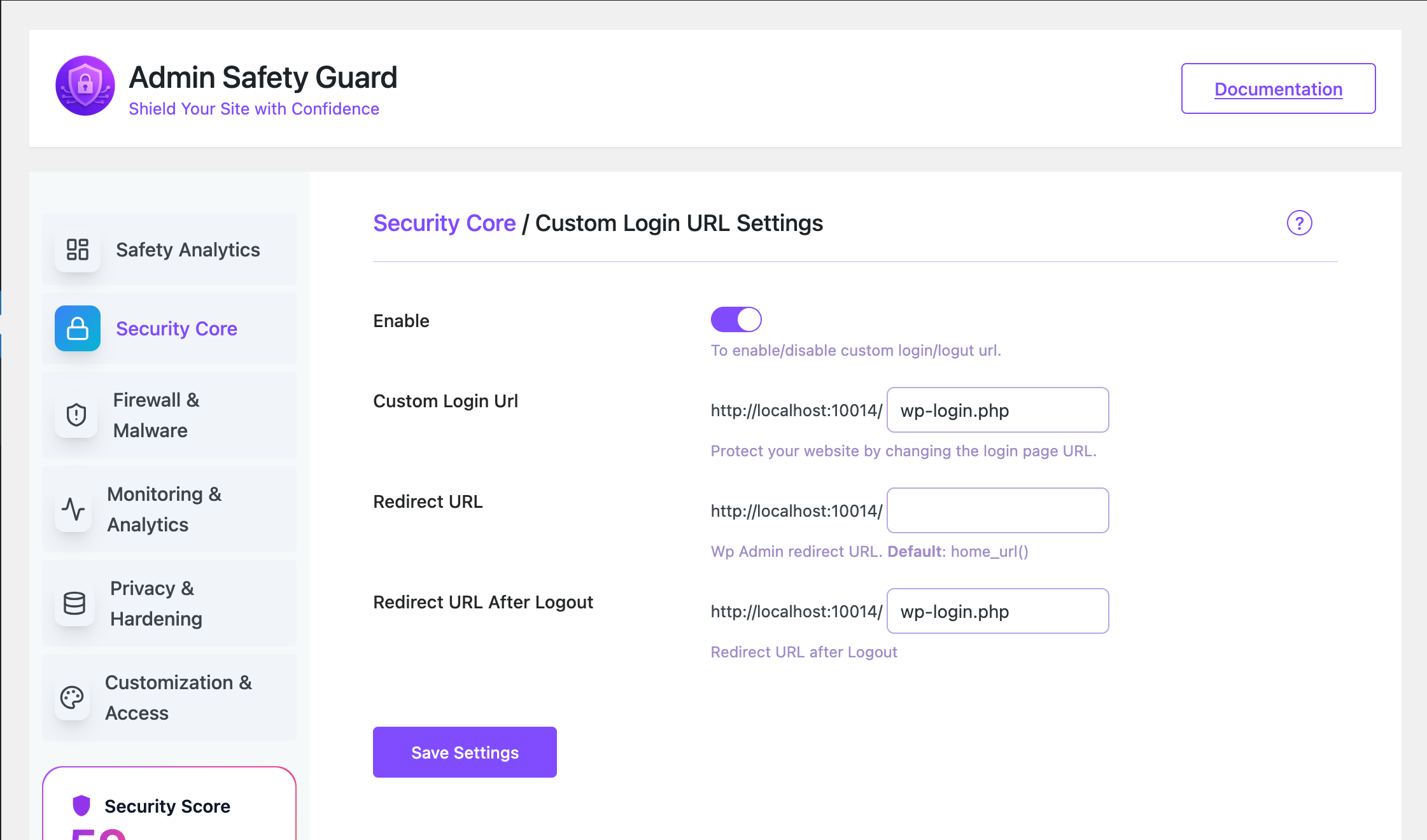
Custom Login URL settings — set a hidden login slug, redirect URL, and logout redirect 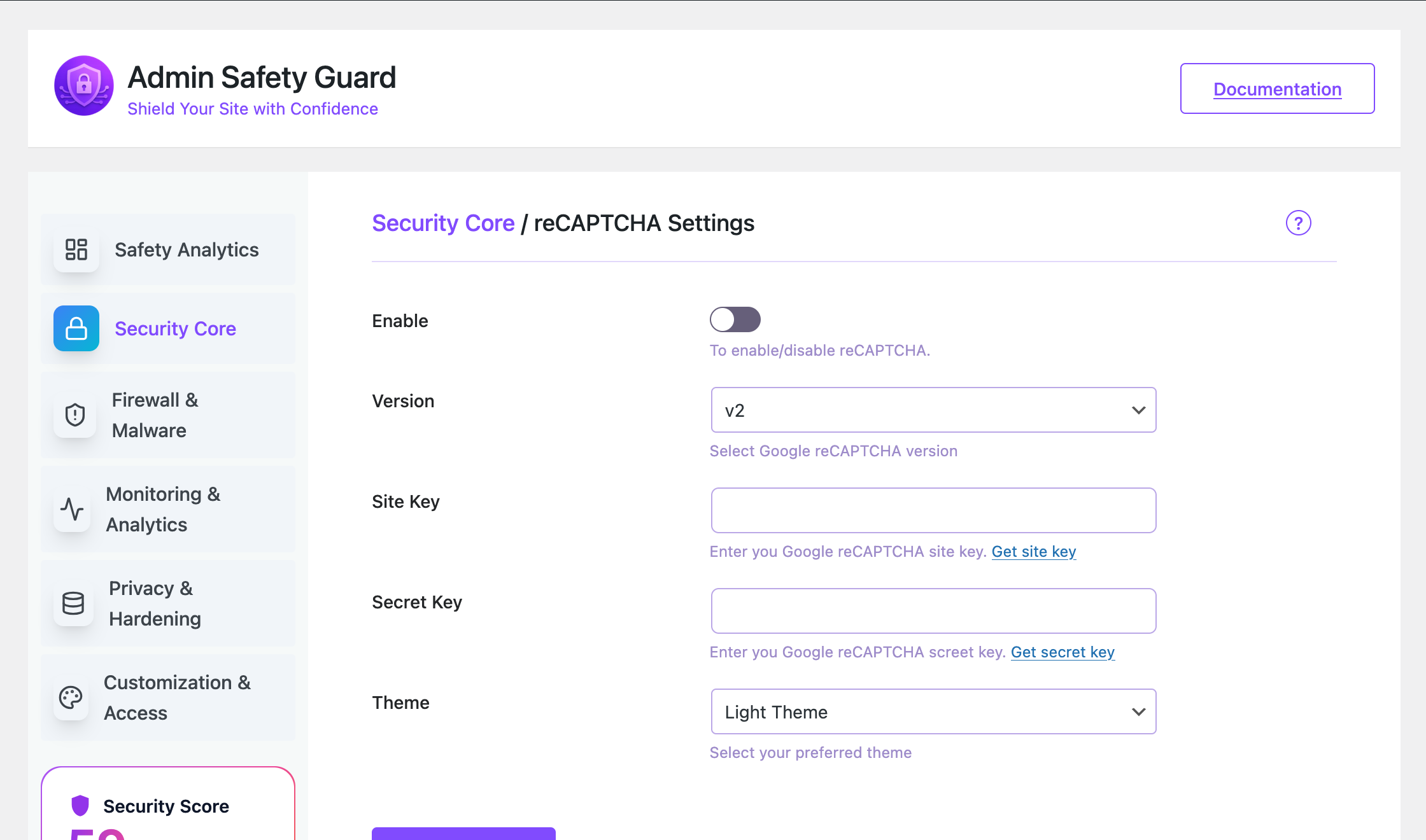
Google reCAPTCHA settings — choose v2 or v3, enter site key and secret key 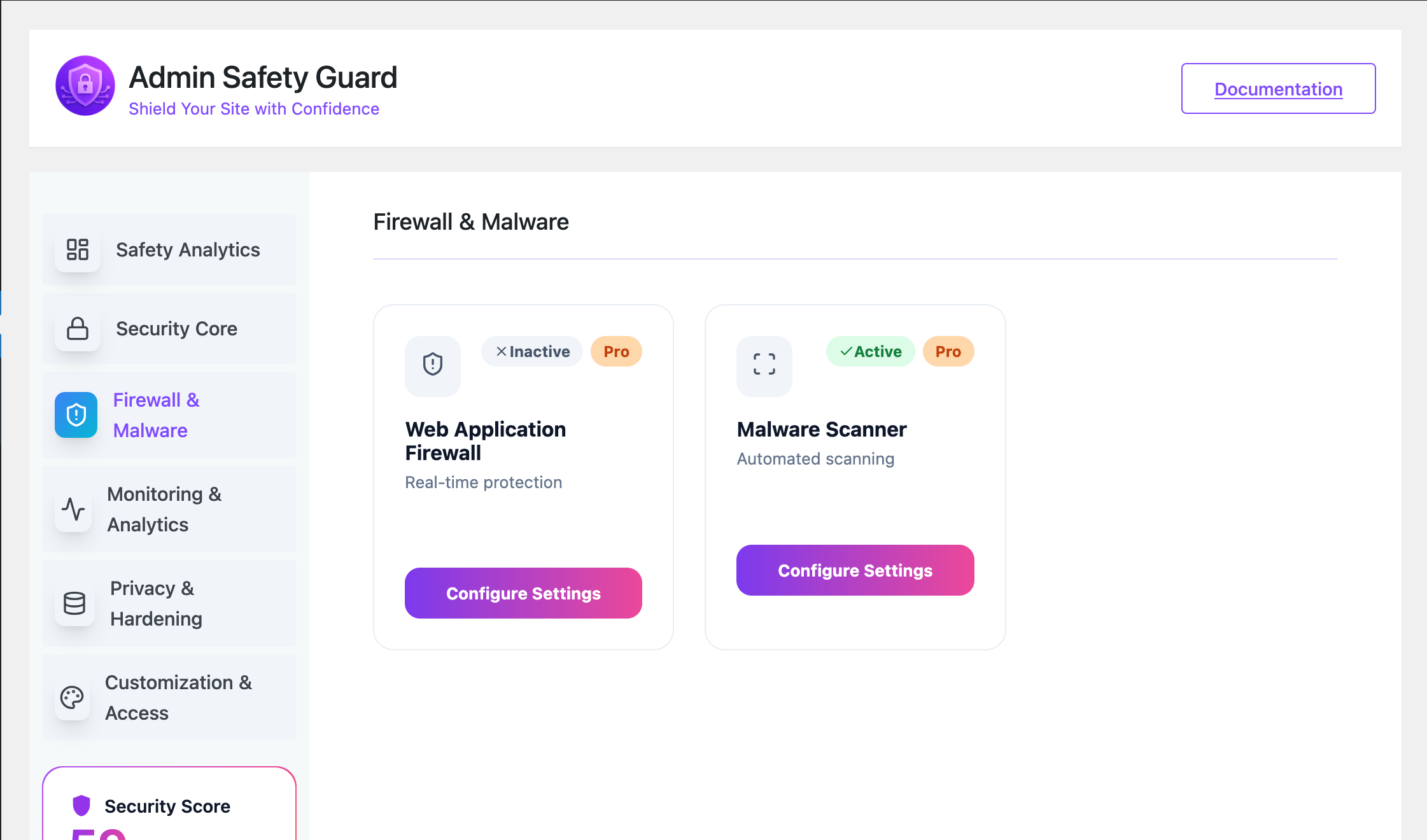
Firewall & Malware overview — central view of firewall and malware protection status 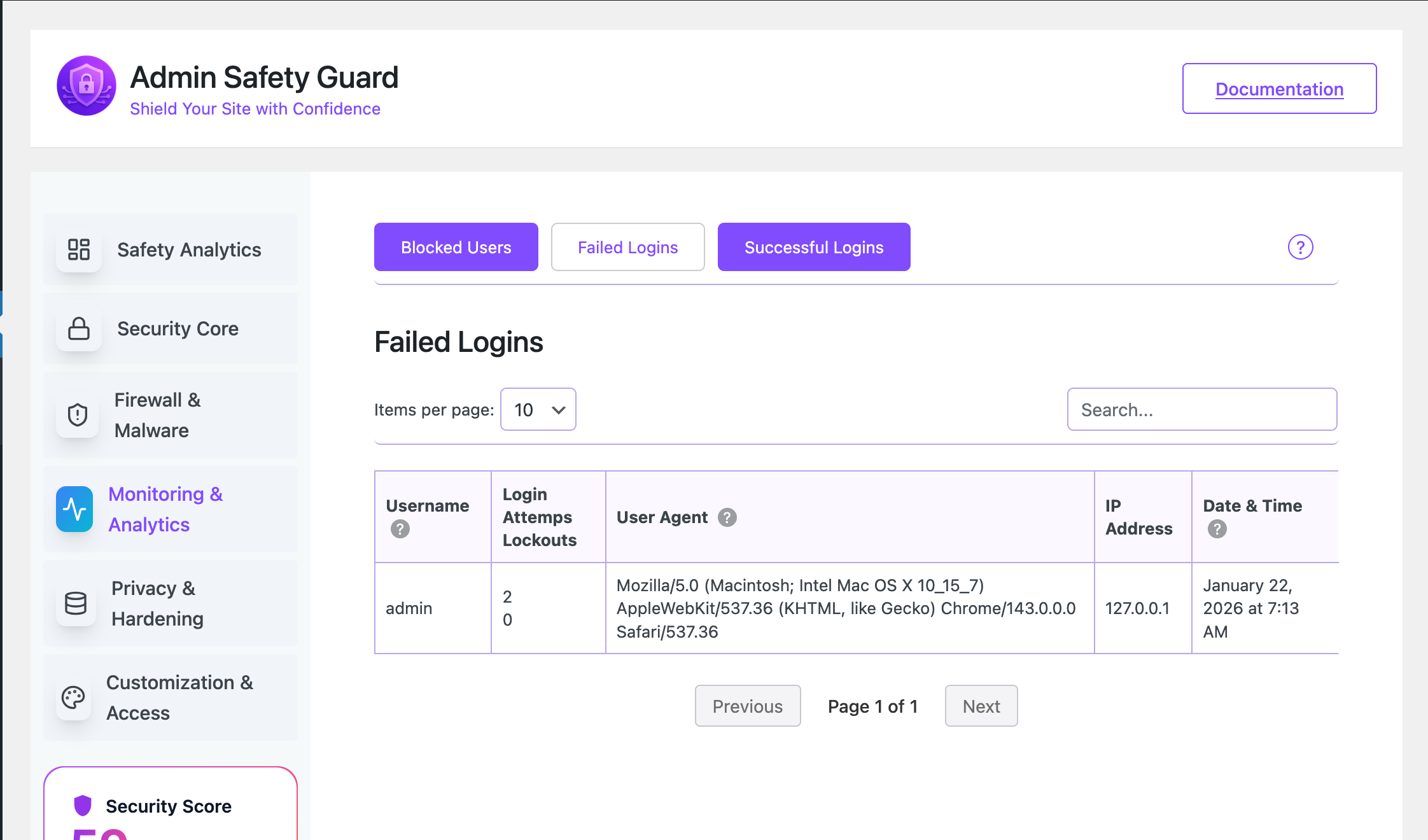
Login Logs & Activity Tracking — searchable table of successful and failed logins with IP and timestamp 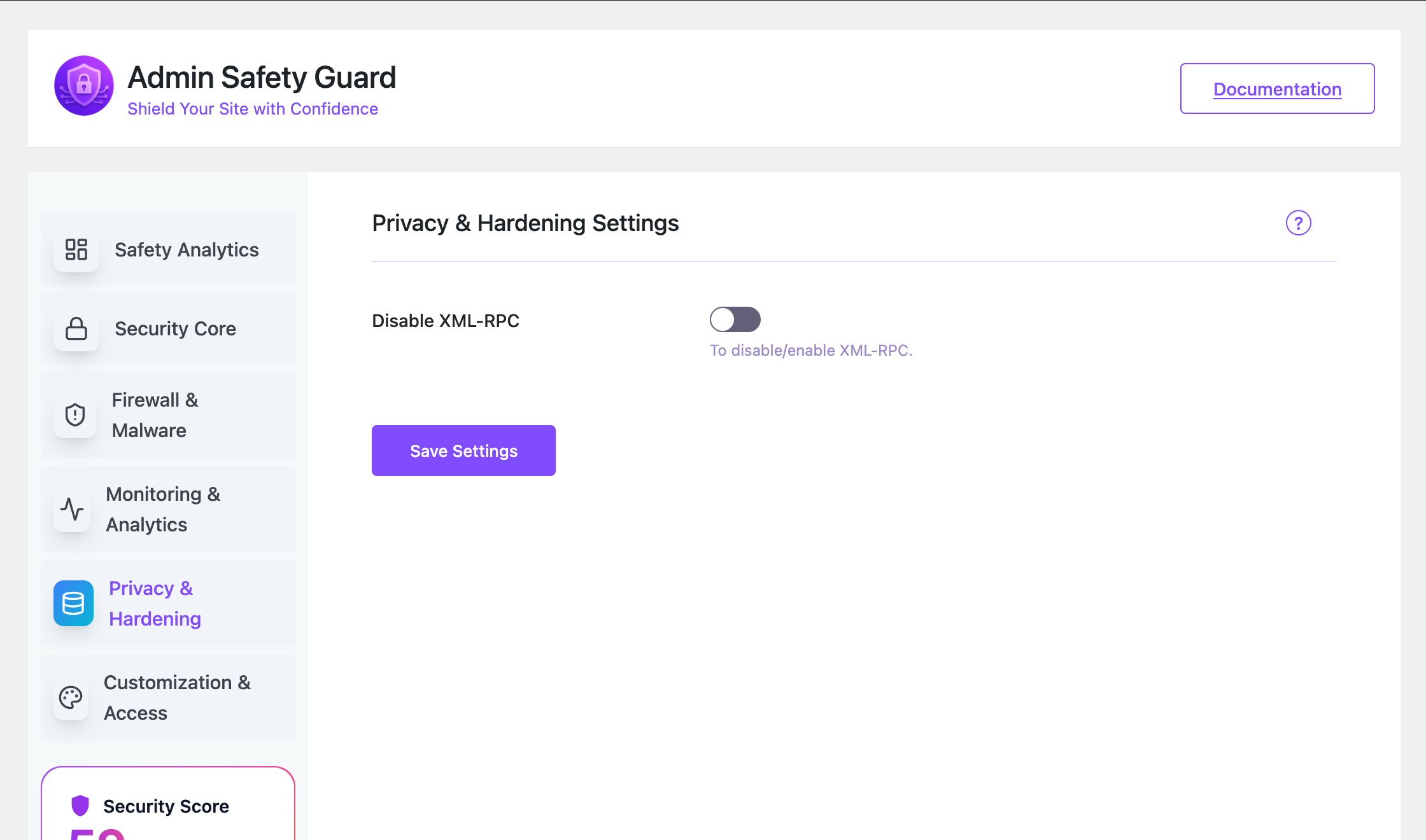
Privacy Hardening — one-click toggle to disable XML-RPC 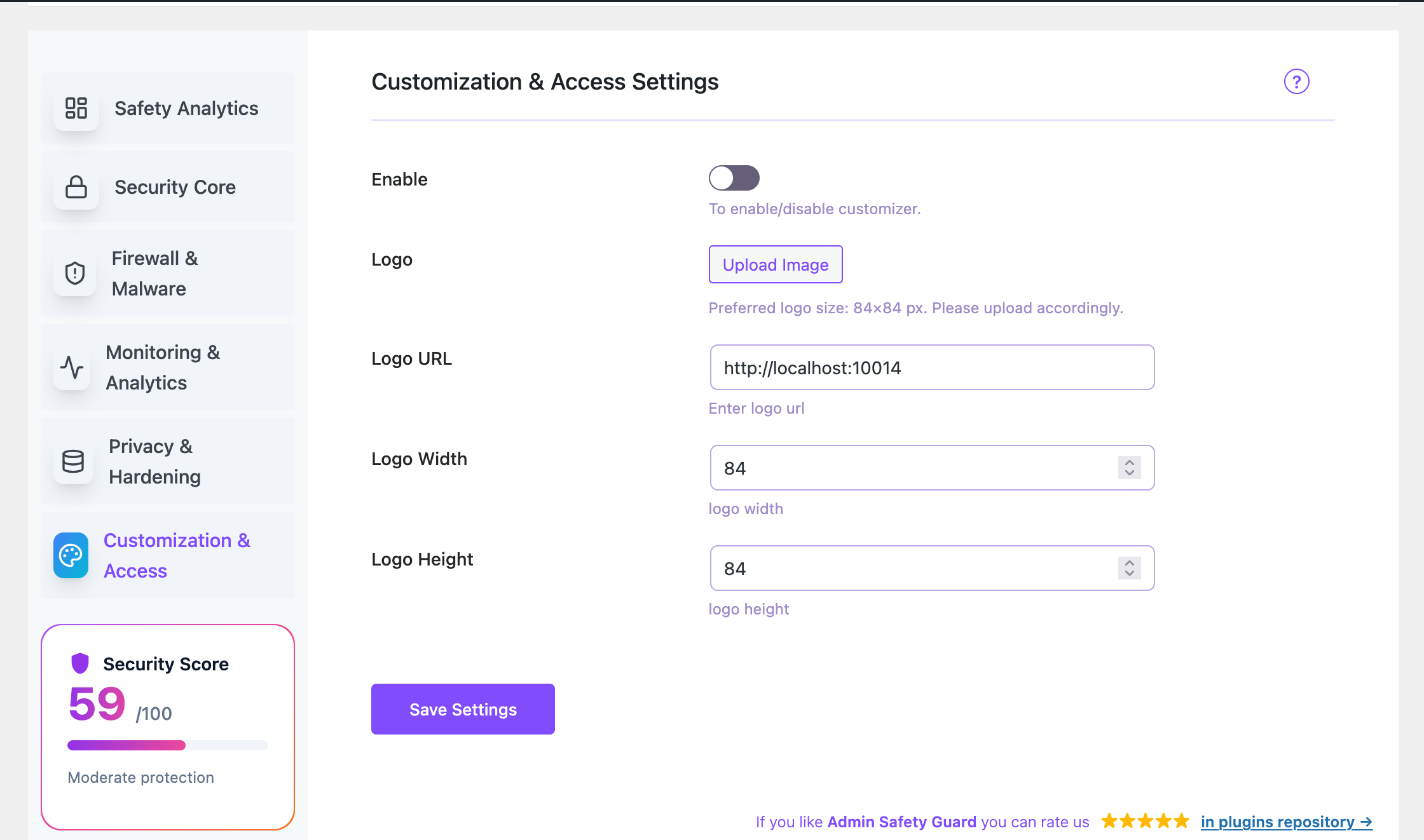
Login Page Customisation — upload your logo, set dimensions, and choose a login template
Instalace
Option 1 — Install from the WordPress Plugin Directory (Recommended)
- Log in to your WordPress admin area.
- Go to Plugins Add New.
- Search for Admin Safety Guard.
- Click Install Now, then click Activate.
Option 2 — Upload Manually
- Download the plugin
.zipfile from WordPress.org. - Go to Plugins Add New Upload Plugin.
- Choose the
.zipfile and click Install Now. - Click Activate Plugin.
After Activation
The plugin will automatically enable Limit Login Attempts with sensible defaults (3 attempts, 15-minute lockout) so your site is protected immediately. Head to Admin Safety Guard in your WordPress menu to explore and configure the rest of the features.
Nejčastější dotazy
-
Q: Is Admin Safety Guard free?
-
A: Yes. All features listed under „Free Features“ above are completely free with no usage limits or hidden costs. A Pro version is available for advanced features such as magic link login, mobile app 2FA, social login, and malware scanning.
-
Q: Will this plugin slow down my WordPress site?
-
A: No. Admin Safety Guard only loads its JavaScript and CSS assets on the plugin’s own settings pages inside the admin area. It adds zero weight to your site’s front-end pages. Security checks (like login attempt limits and custom URL routing) are handled in PHP with minimal overhead.
-
Q: What happens when I change my login URL?
-
A: The plugin sets a custom rewrite rule that points your new login slug (e.g.
/my-login) to the WordPress login system. The oldwp-login.phpURL will redirect visitors away. Your existing bookmarks will need to be updated to the new URL. The plugin flushes WordPress permalink rules automatically when you save the setting. -
Q: Does the custom login URL work in a WordPress subdirectory install?
-
A: Yes. The plugin detects subdirectory installs and builds the correct URL for your setup automatically.
-
Q: How does Limit Login Attempts work?
-
A: Every time a user enters the wrong password, the plugin records the attempt against that IP address. Once the number of failed attempts reaches your configured limit (default: 3), that IP address is locked out for the duration you set (default: 15 minutes). After the lockout period, they can try again. You can also manually block IP addresses permanently from the IP Blocking settings.
-
Q: Does Limit Login Attempts work against bots that change their IP address?
-
A: Limit Login Attempts blocks on a per-IP basis, which stops the vast majority of automated attacks. For more sophisticated threats, enabling a custom login URL so bots cannot even find your login page adds a second layer of defence.
-
Q: Is Two-Factor Authentication (2FA) required for all users?
-
A: No. You enable the OTP via Email toggle in the Two-Factor Authentication settings. Once enabled, it applies to all login attempts on your site. If you want role-specific or user-specific control, that is available in the Pro version.
-
Q: Can I customise the 2FA email that gets sent to users?
-
A: Yes. In the Two-Factor Authentication settings you can edit both the email subject line and the email body. Use the
{otp}placeholder where you want the code to appear, and{site_name}for your site’s name. -
Q: What does disabling XML-RPC do, and is it safe?
-
A: XML-RPC is an older interface that lets external apps communicate with WordPress. It is frequently used in brute-force and DDoS amplification attacks because it allows multiple login attempts in a single request. Disabling it is safe for most sites. The only time you need XML-RPC is if you use the official WordPress mobile app for publishing, or a specific third-party service that requires it. Check with your tools before disabling.
-
Q: Does reCAPTCHA v2 or v3 work better for login pages?
-
A: It depends on your preference. reCAPTCHA v2 shows a visible checkbox („I’m not a robot“) which users must tick — straightforward and clear. reCAPTCHA v3 is invisible and runs silently in the background, scoring visitors based on behaviour. v3 offers a better user experience but requires you to set a score threshold. Both are fully supported.
-
Q: Will Password Protection affect my logged-in users?
-
A: No. You can exclude specific user roles (e.g. Administrator, Editor) from the password requirement. Users in excluded roles will access the site normally without being shown the password gate. You can also choose to exclude all logged-in users at once.
-
Q: Can I see who has been trying to log in to my site?
-
A: Yes. The Login Logs & Activity Tracking section shows a detailed table of all login events — both successful and failed — including the username, IP address, browser/device (user agent), and timestamp. You can use this information to identify suspicious activity and block problem IPs.
-
Q: What is the Security Score shown on the dashboard?
-
A: The Security Score is a percentage (0–100) calculated based on how many available security features you have enabled. The more features you activate, the higher your score. It gives you a quick, at-a-glance understanding of your site’s current protection level and shows which areas still need attention.
-
Q: Can I hide the admin bar from certain user roles?
-
A: Yes. In the Hide Admin Bar settings, you choose which roles should have the admin bar hidden on the front end of your site. For example, you might hide it from Subscribers and Customers while keeping it visible for Editors and Administrators.
-
Q: Is Admin Safety Guard compatible with WooCommerce?
-
A: Yes. The plugin is fully compatible with WooCommerce. All features — login limits, 2FA, custom login URL, IP blocking, and activity logs — work alongside WooCommerce without any conflicts.
-
Q: Is Admin Safety Guard compatible with other security plugins like Wordfence or iThemes Security?
-
A: Yes, in most cases. Admin Safety Guard focuses specifically on login security and admin area protection. It does not interfere with firewall rules or malware scanning from other plugins. If you use another plugin that also offers limit login attempts or custom login URLs, disable that specific feature in one of the two plugins to avoid conflicts.
-
Q: How do I get support if something is not working?
-
A: Post in the WordPress.org support forum for free support. For priority email support and Pro features, visit themepaste.com/contact.
Recenze


Autoři
Admin Safety Guard — Login Security, Limit Logins, 2FA & Brute Force Protection je otevřený software. Následující lidé přispěli k vývoji tohoto pluginu.
Spolupracovníci

Zajímá vás vývoj?
Prohledejte kód, podívejte se do SVN repozitáře, nebo se přihlaste k odběru protokolu vývoje pomocí RSS.
Přehled změn
1.2.8 – Bug Fixes & Default Feature Activation
- [fix] Fixed PHP warnings on fresh install: „Undefined array key sub“ and „Trying to access array offset on value of type null“ in layout.php.
- [fix] All features (free and pro) now correctly default to Inactive on fresh install, giving users full control over what is enabled.
- [feature] Limit Login Attempts is now automatically enabled with sensible defaults on first install to provide immediate brute-force protection out of the box.
- [improve] Feature status detection now correctly handles features without a master enable switch (Two-Factor Auth, Privacy Hardening) by checking their individual toggle fields.
1.2.7 – UI & Content Update
- [improve] Updated plugin layout to be more user-friendly and easier to use.
- [improve] Optimized code for better performance and smoother experience.
- [update] Updated readme content for better clarity and documentation.
- [update] Changed plugin banner and refreshed screenshots with a new layout.
- [feature] Added visibility of all Pro features in free version (requires Pro plugin to use).
- [fix] Minor UI improvements and general stability fixes.
1.2.6 – Performance & Security Update
- [improve] Optimized React rendering by loading React assets in the head for faster UI initialization.
- [feature] Added Login Attempt Limiter to help prevent brute-force login attacks.
- [fix] Fixed React render delay issue on slow client sites.
- [fix] Resolved minor UI and stability issues.
- [improve] General performance improvements.
1.2.5 – Security & Stability Update
- Improved deactivation process
- Added nonce verification for AJAX security
- Fixed cross-origin (CORS) issue during API request
- Enhanced server-side API handling
1.2.4 – Maintenance Update
- Deactivation issue fixed
1.2.3 – Maintenance Update
- Enhanced stability and performance
- General bug fixes and cleanup
- Added a deactivation modal
1.2.2 – Maintenance Update
- Fixed critical errors and PHP warnings
- Improved WordPress coding standards compliance
- Optimized long descriptions and code structure
- Enhanced stability and performance
- General bug fixes and cleanup
1.2.1 – Security & Compliance Update
- Fixed security issues reported by WordPress Plugin Review Team
- Improved data sanitization and escaping across plugin files
- Updated code to follow WordPress coding standards and best practices
- Replaced unsafe database queries with prepared statements
- Improved nonce verification and permission checks
- Removed unused and deprecated functions
- Updated plugin documentation and inline comments
- Updated „Tested up to“ version to latest WordPress release
- General code cleanup and optimization
1.2.0
- [Fix] fixed the taxdomain and esc issues.
1.1.9
- [New] Added breadcrumb navigation for better page clarity and navigation.
- [New] All major pages are now fully dynamic.
- [Improved] Updated UI/UX with refined layouts, spacing, and design elements.
- [Improved] Enhanced responsiveness and overall page behavior.
- [Fix] Fixed multiple minor issues from previous versions.
- [Fix] Resolved layout and alignment inconsistencies.
- [Maintenance] Refactored code for better performance and maintainability.
- [Maintenance] General stability improvements and internal optimizations.
1.1.8
- [New] Introduced a fully redesigned, modern admin UI for a cleaner and more intuitive experience.
- [New] Added colorful visual elements and icons across the plugin for better clarity and usability.
- [Improved] Improved overall navigation to make all features easier and faster to access.
- [Improved] Enhanced layout consistency and spacing for a more polished look.
- [Improved] Optimized UI responsiveness across different screen sizes.
- [Update] Updated iconography and color scheme to improve visual hierarchy and readability.
- [Maintenance] Refactored UI-related code for better performance and maintainability.
- [Maintenance] Minor internal improvements and stability enhancements.
1.1.7
- [Fix] Active license URL now shows correctly based on the Pro plugin status.
- [Fix] Fixed the documentation link on the plugin page.
1.1.6
- [New] – Introduced a dynamic Security Score system based on overall site protection status.
- [New] – Added Login Activity Rate Limiting (maximum 6 login attempts within 24 hours).
- [New] – Implemented Login & Activity Status React-based graphs for better visual insights.
- [Update] – Improved dashboard UI/UX for clearer security data presentation.
- [Update] – Enhanced activity monitoring layout and responsiveness.
- [Fix] – Resolved minor issues in login activity tracking.
- [Fix] – Fixed UI alignment and styling inconsistencies in the admin dashboard.
- [Maintenance] – Internal code optimization and performance improvements.
- [Maintenance] – Security hardening and internal consistency checks.
1.1.5
- [Maintenance] – Release preparation and version alignment.
- [Maintenance] – Internal consistency checks.
- [Maintenance] – No code or feature changes in this version.
1.1.4
- [new] – [New] All Pro features are now available in the free version.
- [New] – Added a Purchase / Upgrade button to allow users to unlock premium support and future enhancements.
- [Improved] – Updated plugin UI and feature visibility for better clarity between free and premium offerings.
- [Improved] – Minor UX and performance optimisations.
- [Fixed] – Small stability issues and internal clean-ups.
1.1.3
- Fixed an issue where OTP-verified logins could result in session cookies instead of persistent cookies.
- Refactored OTP verification to run earlier in the login flow via
login_init. - Updated the authentication process to use
wp_signon()so WordPress handles Remember Me cookies correctly. - Tested across multiple environments and browsers to confirm expected cookie expiration behavior.
- Minor improvements and stability adjustments.
1.1.2
- [fix] – 2FA login cookie session issue when OTP verification completed.
- [Improved] –
wp_set_auth_cookie()now uses correct $remember flag for persistent login. - [Improved] – OTP authentication flow now respects the user’s „Remember me“ choice.
- [new] – Added a phone number field to the in-plugin support form, including country code.
1.1.0
- [fix] – Resolved several important WordPress admin warnings.
- [new] – Added an in-plugin support system.
1.0.9
[new] Added deactivation email feature on plugin activation
1.0.6, 1.0.8
[new] Release the pro version
[new] Compotable with pro version
1.0.5
[new] Added extendable action and filter hooks
[new] Ready to integrate Pro version
[new] Conditionally loaded all assets
[new] Added default logo URL, width, and height
[fix] Fixed logo issue from customizer
[fix] General improvements and bug fixes
1.0.4
[new] Auto permalink flush for custom login/logout URLs
[new] Admin Notice added
[new] Setup Wizard
[new] Documentation link added
1.0.3
[new] Subdirectory support
[new] Tooltip in failed login table
[new] Auto-redirect after max login attempts
[fix] Custom login/logout URLs
[fix] Lockout message
[fix] Failed login table issues
1.0.2
[fix] Minor bug fixes
1.0.1
[fix] Build issue resolved
1.0.0
- Initial release featuring 2FA, CAPTCHA, Limit Login Attempts, IP Blocking, Custom Login URL, Password Protection, and Login Logs.