
Popis
Your customers are asking AI now. Find out if AI can answer with your website.
More and more people get answers from ChatGPT, Gemini, Perplexity and Google AI Overviews instead of a list of links. These systems quote pages that answer clearly, back facts with sources and are easy for machines to read. Classic SEO plugins don’t check any of this. Optimizing for it is called GEO – Generative Engine Optimization.
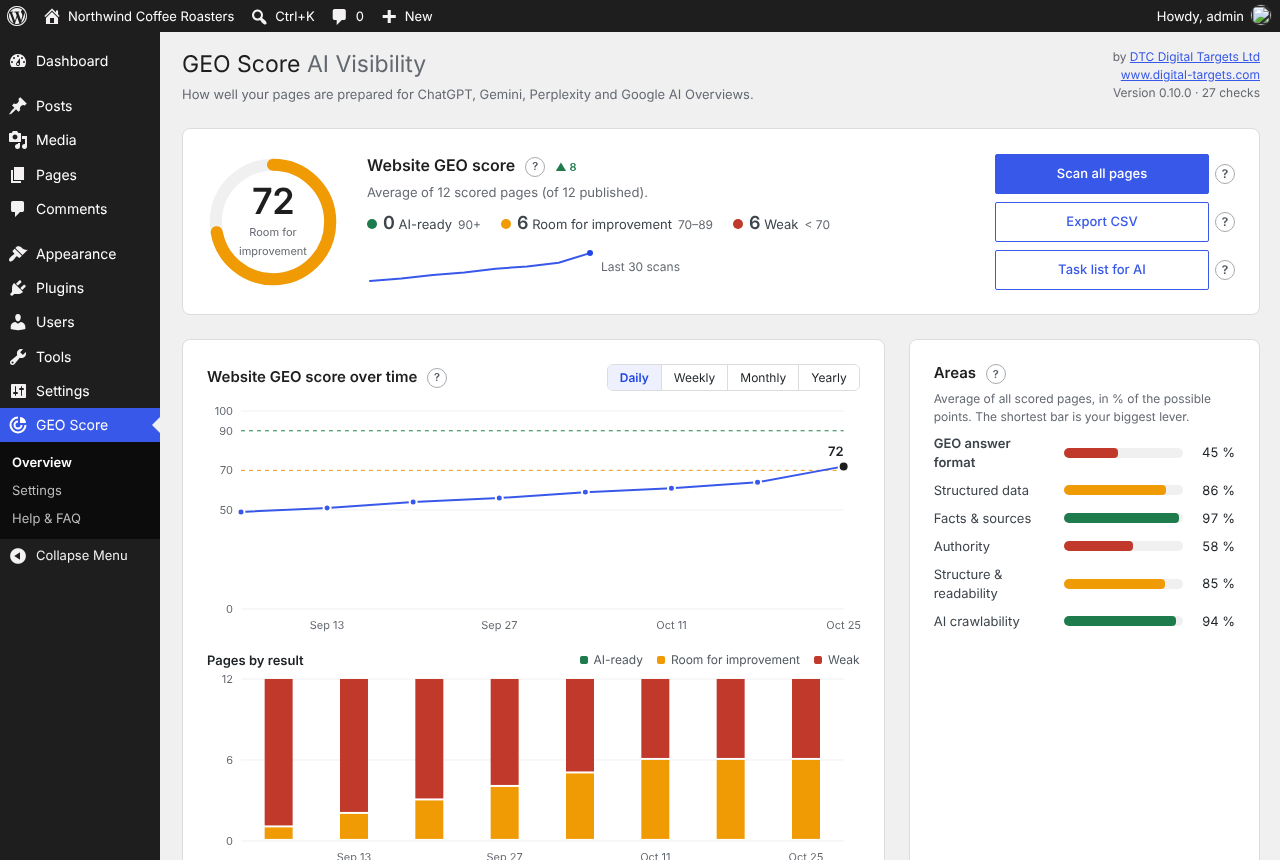
GEO Score checks every page of your WordPress site against 27 rules in six areas: answer format, structured data, facts & sources, authority, readability and AI crawlability. Each page gets a score from 0 to 100, your whole website gets one too, and every finding comes with a concrete fix – sorted by the points it brings, so you know where to start.
It doesn’t stop at the check: GEO Score adds missing structured data (alongside Yoast SEO or Rank Math, or on its own), generates your llms.txt, scans your site in the background, e-mails you a report and exports a task list you can work through yourself or hand to any AI assistant.
Built for multilingual sites: every WPML and Polylang language is checked in its own language, with a score per language. The interface is available in 17 languages. Everything runs on your own server – no account, no API key, no data sent to third parties.
What GEO Score checks
- GEO answer format: a short answer at the top, questions as headings, a direct answer under every heading, self-contained sections.
- Structured data: basic schema graph, schema for the page type, FAQ with FAQPage, valid and visible schema.
- Facts & sources: concrete figures, sources for claims, an update date, no outdated years.
- Authority: author, consistent company name, reachable contact details, profiles linked with sameAs.
- Structure & readability: one H1, clean heading levels, tables and lists, readability, length.
- AI crawlability: indexable, AI crawlers allowed in robots.txt, llms.txt, content in the HTML, hreflang and correct page language on multilingual sites.
Every check can be turned off, and every limit and area weight can be changed under GEO Score Settings.
More than a check
- Adds missing structured data, alongside Yoast SEO or Rank Math, or as a complete set without an SEO plugin.
- Generates /llms.txt from your pages, with one block per language on multilingual sites.
- Shows your proofs to AI systems: certificates, approvals, lab tests, test seals and review profiles (e.g. Trusted Shops, Trustpilot, Google) go into your structured data and llms.txt.
- Scans your whole website in the background and e-mails a report after every automatic scan.
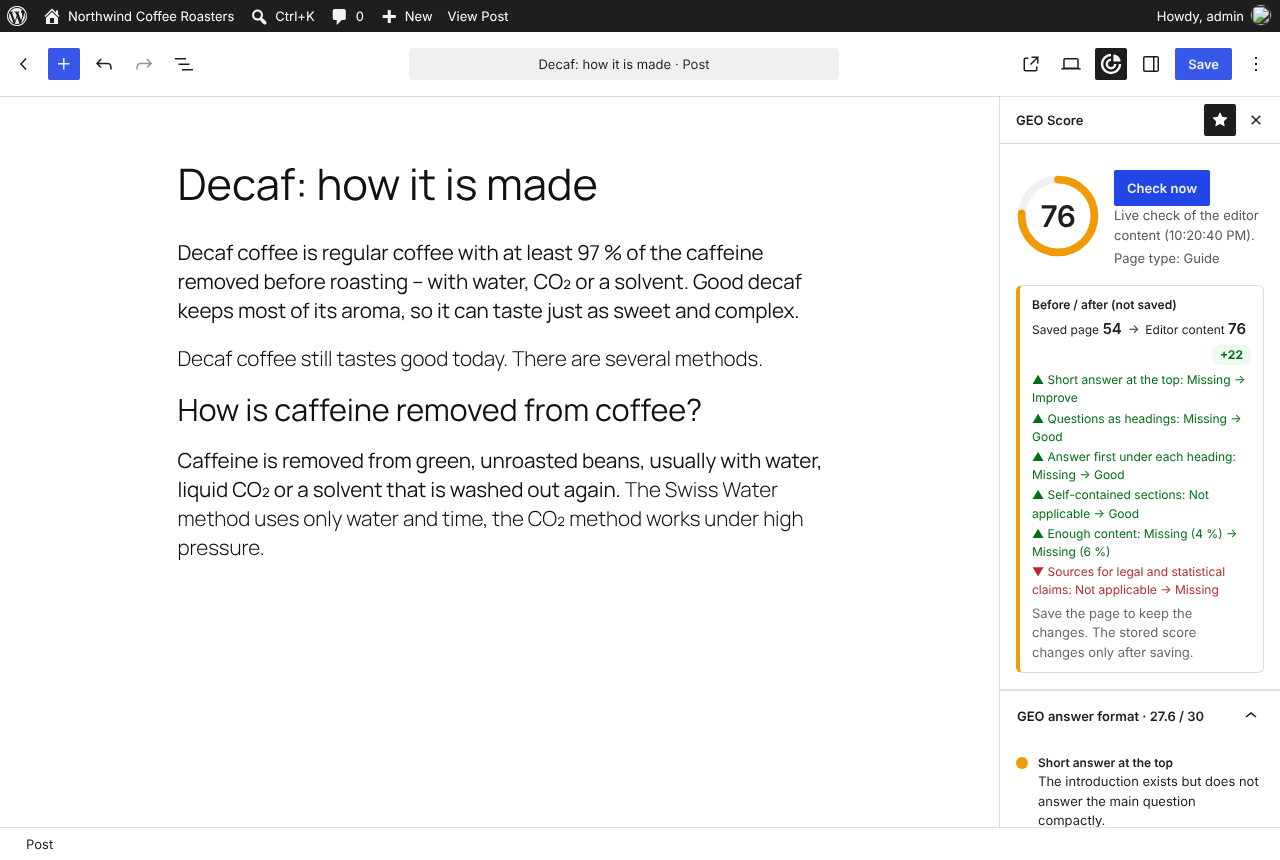
- Shows the score directly in the editor, with a before/after comparison when you edit a page.
- Exports a task list you can work through yourself or hand to an AI assistant.
Multilingual websites
Works with WPML and Polylang. Every language version is checked in its own language, with a score per language and a list of pages that are not translated yet.
Private by design
GEO Score runs entirely on your own server. It needs no external service, no account and no API key. The only requests it makes go to your own website (the public page, robots.txt and llms.txt).
Works alongside any SEO plugin (Yoast SEO, Rank Math, SEOPress) and needs none.
Developed by DTC Digital Targets Ltd, a digital marketing agency in Larnaca, Cyprus.
Trademarks
ChatGPT, Gemini, Perplexity and Google AI Overviews are trademarks of their respective owners. This plugin is made by DTC Digital Targets Ltd and is not affiliated with or endorsed by them; it checks pages for these services but does not connect to them.
Privacy
GEO Score does not connect to any external service and does not track visitors.
- The checks run on your own server. The only HTTP requests go to your own website: the public page being checked, /robots.txt and /llms.txt.
- No personal data of visitors is collected, stored or sent. No cookies are set on the front end.
- Stored data: the check results per page (post meta), the settings and the history of the website score (options). The company and author details you enter in the settings are output in the structured data and llms.txt of your public pages.
- The optional e-mail report is sent with your WordPress mail settings to the addresses you enter.
- The task list for AI is a file you download yourself. GEO Score sends nothing to an AI service.
- Deleting the plugin removes all of its data, on every site of a multisite network.
Snímky obrazovky

Instalace
- Install the plugin under Plugins Add New and activate it.
- GEO Score Settings Company & author: enter your company and the author.
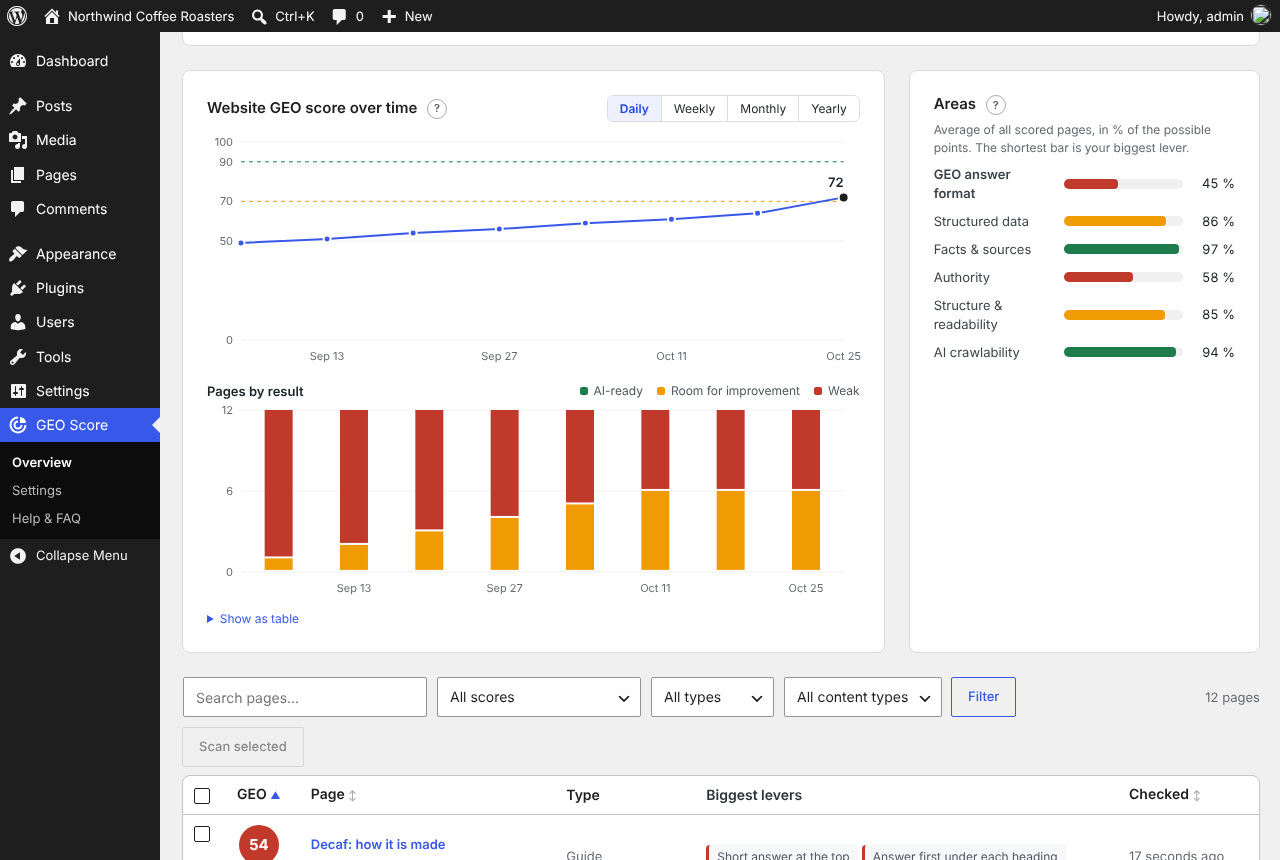
- GEO Score Overview „Scan all pages“. The scan runs in the background.
- Open the weakest page and follow the suggestions in the GEO Score panel of the editor.
Nejčastější dotazy
-
Does GEO Score need an AI service or an API key?
-
No. All checks run on your own server.
-
Does GEO Score replace Yoast SEO or Rank Math?
-
No. It works alongside them and uses their structured data. SEO plugins optimise for classic search results; GEO Score checks what AI answers need.
-
Does it work with WPML and Polylang?
-
Yes. Every language version is checked in its own language, with a score per language, hreflang check and llms.txt per language.
-
Does GEO Score guarantee that ChatGPT or Google will quote my website?
-
No tool can guarantee that. GEO Score checks whether your pages meet the conditions AI systems prefer when they choose sources – clear answers, facts with sources, structured data and access for AI crawlers – and shows you what is missing.
-
Is the free version limited?
-
No. All 27 checks, the overview, the charts, the editor view, structured data, llms.txt, background scans, the e-mail report, the task list and multilingual support are included, without time or page limits.
-
Will GEO Score change my content?
-
No. It never edits your texts. It only adds structured data and llms.txt if you switch that on, and both can be turned off at any time.
-
Is GEO just another name for SEO?
-
They overlap, but GEO looks at different signals: does a page answer the question in the first sentences, can a section be quoted on its own, are claims backed by sources, can AI crawlers read the content? Good GEO usually helps classic SEO too.
-
Does the scan slow down my website?
-
No. It runs in the background in small batches with pauses (adjustable under Settings General Scan speed) and loads each page once, like a visitor.
-
How can I support GEO Score?
-
If GEO Score helps you, please write a short review on WordPress.org – it helps other website owners find the plugin. If something does not work, please ask in the support forum first – we answer every question.
Recenze
Pro tento plugin nejsou žádné recenze.
Autoři
Digital Targets GEO Score – AI Visibility Check je otevřený software. Následující lidé přispěli k vývoji tohoto pluginu.
Spolupracovníci
Plugin „Digital Targets GEO Score – AI Visibility Check“ byl přeložen do 2 jazyků. Děkujeme všem překladatelům za jejich pomoc.
Přeložte “Digital Targets GEO Score – AI Visibility Check” do svého jazyka.
Zajímá vás vývoj?
Prohledejte kód, podívejte se do SVN repozitáře, nebo se přihlaste k odběru protokolu vývoje pomocí RSS.
Přehled změn
0.11.10
- Review profiles: the language checkboxes all have the same size, language codes such as „PT-PT“ no longer wrap.
0.11.9
- Review request: shown on the overview after 7 days of use, once a page has reached 80 points or 10 pages have been analysed – with the page and its score, at most twice per website („Remind me later“ once, then never again). It also links the support forum for problems. A line in the footer of GEO Score’s screens and „Write a review“ in the plugin list. Nothing is sent anywhere.
- Uninstall also removes the first-steps, review and settings-transfer data.
0.11.8
- Translations: the new texts (settings transfer, review profiles per language) reviewed in all 15 languages against the style guides and glossaries of the WordPress translation teams; terms aligned with SEO GEO Suite Pro.
0.11.7
- New: Settings „Transfer settings“ – export all settings as a file and import them on another website (e.g. from a test copy to the live website). Pages are matched by their address, addresses of the old website are adapted, the import can be undone. API keys and licences are never exported.
- Review profiles can be assigned to any number of languages (e.g. one Trusted Shops profile per country): every language version links only its own profile. Without ticked languages a profile counts for all.
- Translations reviewed in all 15 languages against the style guides and glossaries of the WordPress translation teams.
0.11.1
- New settings tabs „Proofs“ and „Review profiles“ (after „Company & author“): every entry in a list – edit, delete or add. Certificates, approvals, lab tests, test seals and awards become credentials in the structured data, review profiles are linked with sameAs (never as stars), both get their own section in llms.txt. A link to one of these proofs counts as a source. Expired proofs are left out automatically.
- Overview: after two weeks of use, a short and optional request for a review on WordPress.org – with „Remind me later“ and „Don’t show again“. It never appears on other admin screens.
0.10.0
- First steps: a short guide on the overview (company and author scan all pages improve the weakest page) and a notice after activation.
- Overview: „Edit“ in every row and „Improve in the editor“ below the details of a page; the editor shows the same biggest levers as the overview.
- Settings: options for test copies and developers are folded under „Advanced“.
- New look of all screens: light header, cards with more room, calm notices, the WordPress system font and the admin accent colour; settings tabs as a segmented bar.
- The history chart waits for the second scan instead of showing a single dot.
- Tables scroll inside the page on phones.
- When the plugin language differs from the profile language, the editor sidebar, buttons and chart dates follow the plugin language.
- For add-ons: actions „geoscore_after_header“ and „geoscore_overview_after_summary“, filter „geoscore_scan_primary“.
0.9.6
- Content rules for Russian and Turkish pages: question headings (also with the question word or particle inside the sentence: „ne kadar“, „mi“, „ли“), FAQ headings, abbreviations, dates, sources, legal, guide, service, about and contact pages, theme texts in the wrong language.
- Turkish capitals „İ“ and „I“ are compared correctly (e.g. „SIKÇA SORULAN SORULAR“).
0.9.5
- New languages: Greek, Swedish, Danish, Czech and Romanian (16 translations in total).
- Content rules for Swedish, Danish, Czech, Romanian and Greek pages: question headings (Greek „;“ counts as a question mark), FAQ headings, abbreviations, dates, sources, legal, guide, service, about and contact pages, theme texts in the wrong language.
- CSV export uses „;“ as separator for all languages with a decimal comma.
0.9.4
- Translations: German (du), German (Sie), Dutch, English, French, Italian, Polish, Portuguese (Portugal), Russian, Spanish, Turkish – plus Portuguese (Brazil). All screens, buttons, notices, messages, Help & FAQ and e-mail reports.
- Language setting lists the languages in a fixed order; Polish, Russian and Turkish sites get their language automatically.
0.9.3
- New: test copy mode (Settings General). On a copy that is locked for search engines (e.g. for a relaunch), the scan scores the pages as if the website were live – with canonical link, without noindex and with the normal robots.txt. Visitors and search engines still see the locked copy. Ignored on public websites.
0.9.2
- Slow servers: a scan step no longer waits twice 20 seconds for a page that does not answer (the page is scanned again at the end), so the host does not stop the request. If one answer is an error page instead of JSON, the scan screen keeps going and shows „The server is answering slowly“.
- The scan job records how long the public pages take to load.
0.9.1
- WPML and Polylang: „Check all pages“ now scans the pages of all languages, not only the current (or default) language.
0.9.0
- New name: Digital Targets GEO Score – AI Visibility Check (folder and text domain digital-targets-geo-score). Settings, scores and history of „GEO Score“ are kept. If the old plugin is still active, this plugin waits and explains how to switch.
- Structured data: the JSON-LD is printed with the default escaping of wp_json_encode().
0.8.14
- Translations are loaded again after a temporary language switch (switch_to_locale), so admin texts stay in the chosen language.
0.8.13
- WPML: after a language switch for a page address, the plugin loads its translations again, so the admin no longer mixes languages („Bearbeiten | View“).
0.8.12
- Multilingual sites (WPML, Polylang): the address of a translated page is built in its own language – before, the admin could get the address of the original (task list, CSV, schema, llms.txt, page check).
- Concrete facts and figures: ranges („2 or 3 days“ counts once) and list counts („4 elements“, „3 things“) no longer count as facts.
- Content in the HTML: when the public page shows other content (e.g. a cache being rebuilt), it is loaded once more a few seconds later before the page checks are skipped.
0.8.11
- Wording: „Website score“ is now called „Website GEO score“ everywhere (overview, charts, e-mail report, task list, help).
0.8.10
- For developers: the page list of the overview can get extra columns from add-ons (filter geoscore_overview_columns, action geoscore_overview_column).
0.8.9
- Overview: action hook geoscore_overview_top for add-ons.
0.8.8
- Block editor: the GEO Score panel in the page settings has a „Check now“ button that opens the sidebar and checks the editor content in one click, next to „Open GEO Score“.
0.8.7
- Block editor: extension point for add-ons (JavaScript filter geoScore.editor.ruleActions and window.geoScoreEditorApi), so add-ons can offer actions under a finding.
0.8.6
- New: „Ignore on this page“ for a single finding (overview and editor). An ignored check no longer counts for that page, stays visible as „ignored“ and can be switched on again.
- FAQ structured data is only generated for real FAQ sections (FAQ container or heading, or questions as summaries), no longer for a table of contents or „show more“ folds.
- Overview and task list on large multilingual sites: untranslated pages and translation groups come from two queries and a 10-minute cache instead of several queries per page.
- For developers: tips adapt to the platform (PageAnalyzer detects WordPress; other systems get neutral wording instead of „your SEO plugin“).
0.8.5
Results of an independent code review:
* Fixed: a page that answers with an empty body (firewall, broken cache) crashed the scan; it is now reported as „page not checked“.
* Fixed: „max-image-preview:none“ in the robots meta tag was treated as noindex.
* Fixed: PHP warnings when structured data contains lists instead of texts.
* Up to 50× faster analysis of long pages with many headings (600 sections: 8.7 s 0.2 s).
* Saving many posts at once (imports) no longer creates one cron event per post: one shared queue, scanned in small batches with the configured pause.
* The background scan lock is now atomic, so a browser and WP-Cron can no longer scan the same batch twice.
* Language packs from translate.wordpress.org are used when installed (also for languages the plugin does not ship).
* Loopback requests use wp_safe_remote_get; CSV export escapes spreadsheet formulas; llms.txt is only rebuilt for the checked content types.
0.8.4
- For developers: PageAnalyzer checks any page from its HTML alone (page type, company, author and language read from the page), without WordPress data.
0.8.3
- For developers: I18n::in_locale() runs code with the plugin texts in another language.
0.8.2
- Header: shows „27 checks“, or „26 of 27 checks active“ with a link to the turned-off checks when checks are switched off in the settings.
0.8.1
Fixes from live use on a multilingual site:
* Test check before saving: the page is now built in its own language (theme and plugin texts like „Learn more“ no longer appear in the admin language).
* Language detection: sentences under 12 words (image texts under 6) are no longer checked, and words that exist in several languages („no“, „a“, „I“, „de“, „la“) no longer count as evidence. Short English sentences with „no“ are no longer reported as Spanish.
0.8.0
Quality and performance – preparing the WordPress.org release:
* Official Plugin Check (incl. experimental and low-severity checks): no errors, no warnings.
* Security review: every REST route, form and action is protected by capability checks and nonces; automated test that subscribers and authors cannot use any GEO Score route for pages of others.
* Large sites, tested with 1,200 pages: llms.txt now lists all pages (before: max. 500), is built about twice as fast and is prepared in the background after changes; area averages are cached (chart and e-mail report load in milliseconds instead of a second); memory stays constant during a full scan.
* Multisite: settings, results and history per site; network deactivation and uninstall clean up every site.
* Compatible with PHP 8.1–8.4 and WordPress 6.5–7.1 (checked against the WordPress 6.5 source).
* Accessibility (WCAG 2.1 AA, checked with axe-core): settings tabs with full keyboard support (arrow keys, Home, End) and linked panels, better contrast in the page list, visible focus.
* Privacy: new section in the readme and a suggested text for the privacy policy page (Settings Privacy).
* New FAQ in the readme.
0.7.7
- Languages are always shown with the short code as in hreflang: DE, EN, FR – also when WPML uses a regional code such as „en-gb“ (overview, task list, llms.txt, settings, REST „label“). The regional code is only shown when two languages share the same base (EN-GB and EN-US).
- Fix (WPML): the start URL of a language is taken from WPML’s language list („/en/“, „/fr/“). Before, it could fall back to „/“ in REST and cron requests, so the English and French home pages were compared with the German one („content not in the HTML“).
- /en/llms.txt also works when the language code differs from the directory (en-gb under /en/).
- Correct spellings per language („en: Larnaca“) also apply to regional codes such as en-gb.
0.7.6
- Fix (WPML, Polylang): the editor content is rendered in the language of the page. Before, a „latest posts“ block or query loop could show the posts of the language WPML was last switched to – e.g. French blog titles on the German home page („text in another language“) and „the public page shows other content“ on the English and French home pages.
- Post lists (latest posts, query loops, pagination) no longer count for „content in the HTML“, the comparison with the public page and „everything in the page language“.
- Sources: French „arrêt“ (also „stop“, „break“) and Dutch „uitspraak“ only count as a legal claim together with a figure, date or law.
0.7.5
Found while checking digital-targets.com in German, English and French:
* Readability: FAQ answers no longer count as „paragraphs with more than 4 sentences“ – the FAQ check asks for 40–80 words, so both checks no longer contradict each other.
* Sources: „case study“, „Fallstudie“, „étude de cas“ (and the same in ES, PT, IT, NL, PL) are no study claims.
0.7.4
Fixes from real-world use on a multilingual site (DE/EN/FR with WPML):
* Home page: the page set as home page and its translations are checked at the start URL of their language („/“, „/en/“) – no more false „canonical points elsewhere“ or „missing in llms.txt“ for /home/.
* Sources: „selon“, „according to“, „laut“, „statistique“ only count as a claim together with a figure, a study or a law. „Selon votre offre“, „according to your …“ never count.
* Server errors: 429/5xx answers and hoster error pages are reported as „server error“ (no more „a crawler does not see the content“), tried again after a pause, and the page goes to the end of the scan queue. A single 503 no longer switches on the maintenance notice.
* New setting „Scan speed“: fast, gentle (default, 2 pages with pauses) or slow (one page every 15 seconds).
* Update date: more wordings per language („Aktualisiert im“, „Stand vom“, „Mise à jour :“ …); freshness also from dateModified in the structured data or article:modified_time.
* Fairer scoring: correct spellings per language (e.g. „en: Larnaca“); profiles (sameAs) are a website-wide check on the home and About us page only, and the author’s own profiles count; step numbers and the author line are no facts; the facts target is adjusted per language (French, Spanish, Italian, Portuguese, English need more words); „Answer first“ names the reason for every section and skips checklist and step sections.
* New check „Everything in the page language“ (multilingual sites): theme texts such as „mehr lesen“ or „Startseite“ in the breadcrumbs, untranslated paragraphs, alt texts, share image text, og:locale, inLanguage and descriptions in the structured data.
* llms.txt: one block per language with its name and start URL.
* REST /site: score per language („languages“), ?lang=en for one language.
* Messages appear in the admin language (profile, WPML admin language or main language) – no longer in the language of the page.
* Editor: before/after comparison of the „Check now“ result with the saved page – score and changed checks, nothing is saved.
0.7.3
- Multilingual websites (WPML, Polylang):
- Page types, excluded pages, About us page, home page and posts page apply to all translations automatically – choose them in the main language.
- New settings card „Texts per language“: short description, author job title, service area and llms.txt introduction per language, used in the structured data and llms.txt of that language.
- Structured data of a translated page carries its own language (inLanguage) and the texts of that language.
- New check „Language versions linked (hreflang)“ (AI crawlability, 2 points): hreflang to all language versions incl. the page itself, and a matching . Only on multilingual sites.
- Overview: website score per language, pages without translation, language filter, language tag per page, task list per language (also REST /todo?lang=en).
- llms.txt: grouped by language with an introduction per language, plus one file per language (e.g. /en/llms.txt). Fix: with WPML only the pages of the current language were listed.
- New help section „Multilingual websites“.
0.7.2
- Notices such as „Settings saved.“ now appear clearly below the header (green, bold) instead of inside the dark header.
- Header: company website www.digital-targets.com below the company name, linked.
0.7.1
- Fix: on the posts page (Settings Reading) and on pages whose text comes from the theme template, the content checks now read the rendered main area of the published page instead of the empty editor content. Post lists, pagination and comments are left out. Previously „Short answer at the top“ wrongly reported a missing introduction.
- Fix: structured data output by GEO Score (without SEO plugin) now also appears on the posts page.
0.7.0
- Plugin screens in French, Spanish, Portuguese (Brazil), Italian and Dutch, in addition to English and German (Sie/du).
- Content rules for Italian, Dutch and Polish pages (question headings, pronoun starts, update dates, sources, legal and contact pages). Pages in other languages are checked with the general rules.
- Regional fallbacks: e.g. fr_BE, es_MX, pt_PT, it_CH or nl_BE use the closest shipped translation.
- Multilingual sites (Polylang, WPML): llms.txt groups pages by language; every page is checked in its own content language.
- More tests per language.
0.6.6
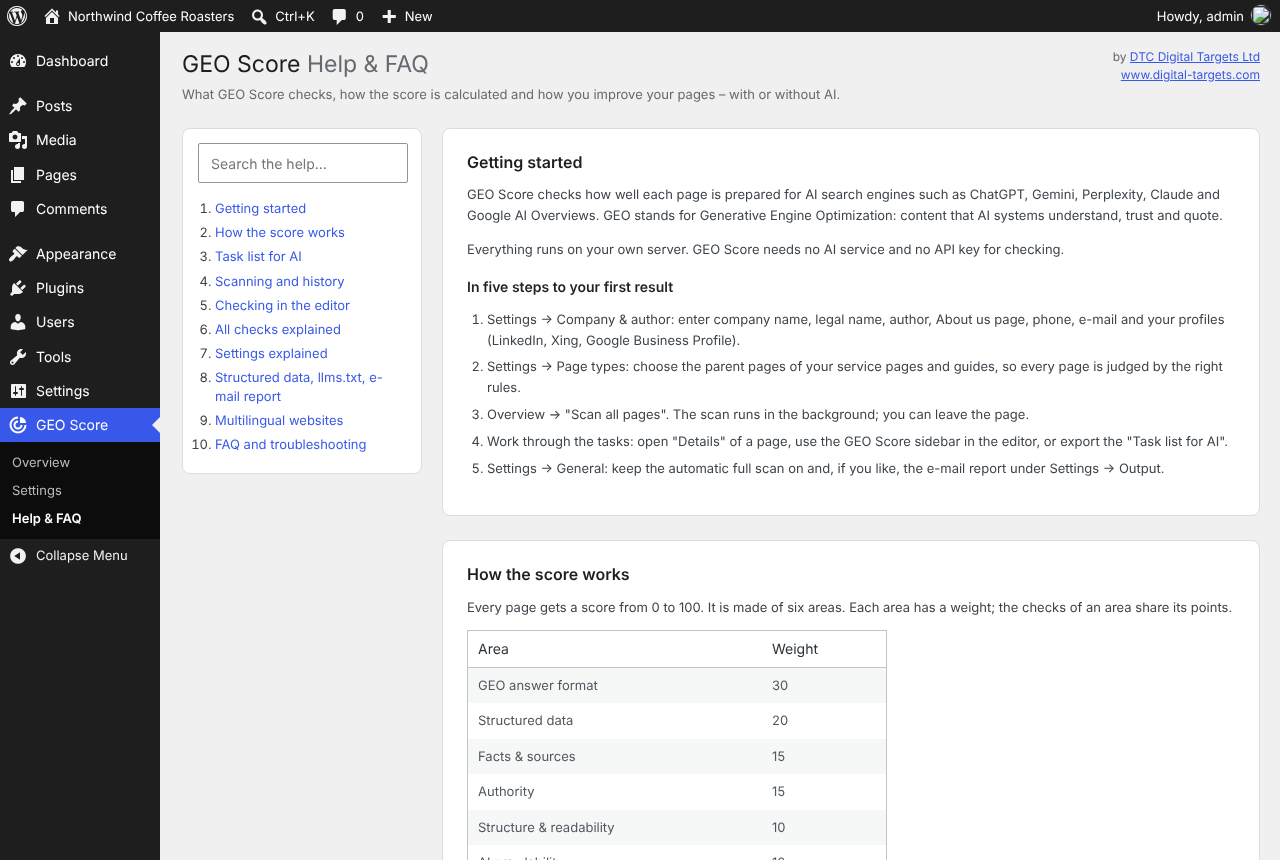
- New menu item „Help & FAQ“: getting started, how the score works, the task list for AI (with a prompt to copy), scanning and history, the editor, all 25 checks with reasons and examples, every setting, structured data / llms.txt / e-mail report, FAQ and troubleshooting. Searchable; every section can be linked.
- „?“ explanations next to „Scan all pages“, „Export CSV“ and „Task list for AI“, with a link to the matching help section. „?“ links next to the headings of the overview and of every settings card.
0.6.5
- Visible FAQ check: umlauts in both Unicode forms (composed and decomposed), soft hyphens, zero-width characters and HTML in the schema no longer cause false „not visible“ warnings.
- Sources check: table cells and short fragments are no claims; „percent“ only counts together with a number.
- Fact density no longer counts FAQ answers, so longer FAQ answers (40–80 words) do not lower it.
0.6.4
- Task list for AI: one Markdown file with every open task of every page, sorted by the points it brings – to work through by hand or with any AI assistant (button „Task list for AI“ in the overview).
- REST API: GET /geo-score/v1/todo returns all open tasks in one request (also as Markdown); GET /report/{id}?compact=1 returns only open checks without help texts. AI assistants connected to WordPress need one request instead of one per page.
0.6.3
- Structured data with HTML entities (e.g. „Können“) is read correctly; no more false „FAQ question not visible“.
- Step numbers of numbered lists and process blocks no longer count as concrete figures.
0.6.2
- Links to the new company website www.digital-targets.com.
0.6.1
- Consistent names: the legal name (e.g. „DTC Digital Targets Ltd“) and the company name both count as correct spellings.
- Maintenance mode (LightStart, SeedProd and others, or HTTP 503) is detected and explained on the overview and the dashboard widget.
0.6.0
- Charts on the overview: website score over time and pages by result, switchable daily, weekly, monthly and yearly, with tooltips and a table view. History is kept for three years.
- Area bars: average result per area over all pages, the weakest area is highlighted.
- Structured data output (Settings Output): adds missing Service, Article with author and dates, Person, FAQPage and organization details. With Yoast SEO or Rank Math the nodes go into their graph (no duplicates); without an SEO plugin GEO Score outputs the complete set.
- llms.txt generator: /llms.txt with company profile and one line per page (services, guides, company, other pages). A real llms.txt file takes precedence.
- E-mail report after every automatic full scan, with test button and several recipients.
- New company fields: legal name, short description, address, service area, author job title and profiles.
- „Scan all pages“ on the dashboard: immediate progress, visible errors, and a fallback that works without JavaScript.
- Company name „DTC Digital Targets Ltd“ in the plugin header and author line.
0.5.0
- Block editor sidebar: score, all checks by area, live check of unsaved changes („Check now“), click a finding to jump to the block, page type and exclusion right in the sidebar. Automatic check after saving.
- Background scan: „Scan all pages“ runs in batches via WP-Cron and continues when you leave the page; progress with cancel button in the overview and the dashboard widget.
- Automatic full scan every night or once a week (Settings General).
- Website score history with a chart, and a trend arrow per page (change since the previous scan).
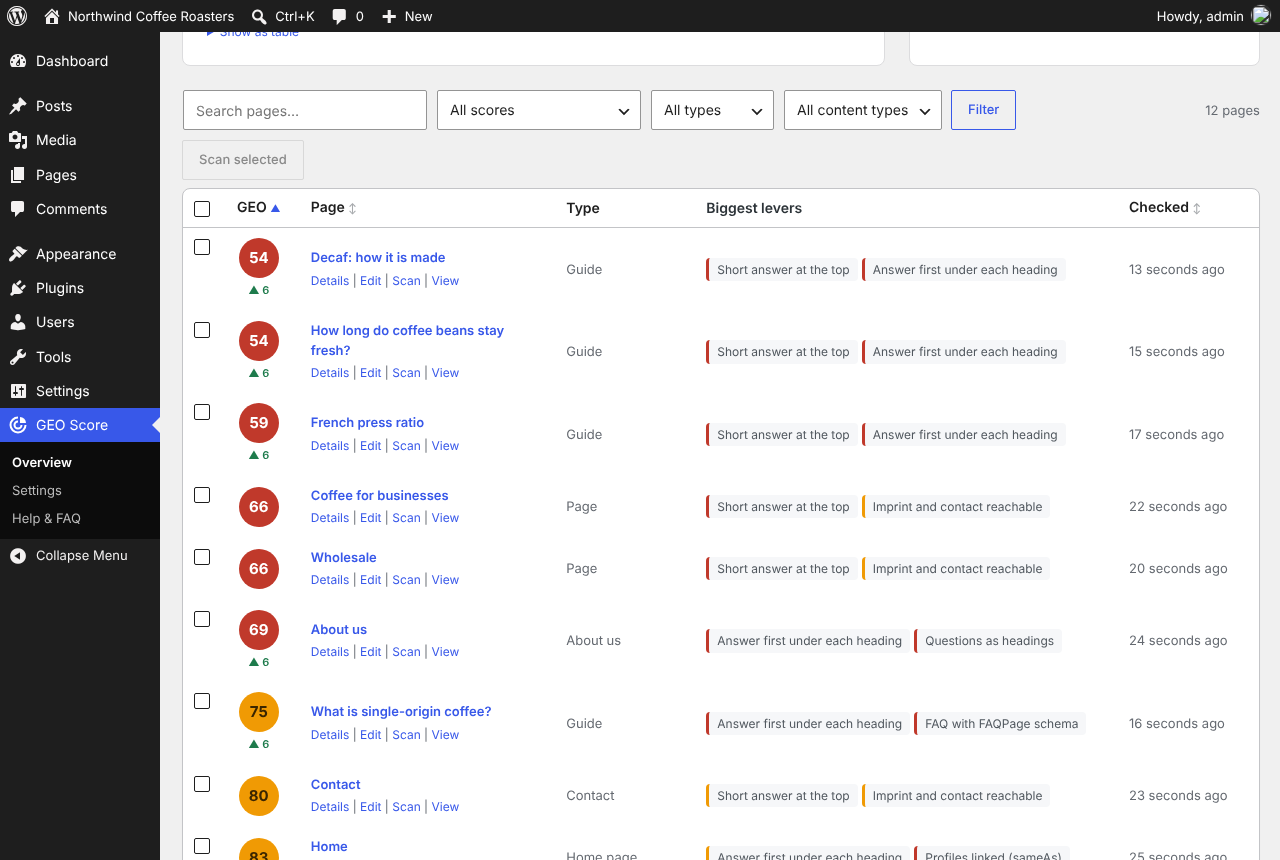
- Overview: search, filter by score, page type and content type, sorting, paging, select pages and „Scan selected“.
- Bulk action „Check GEO Score“ in the page and post lists.
- CSV export of all results (opens directly in Excel).
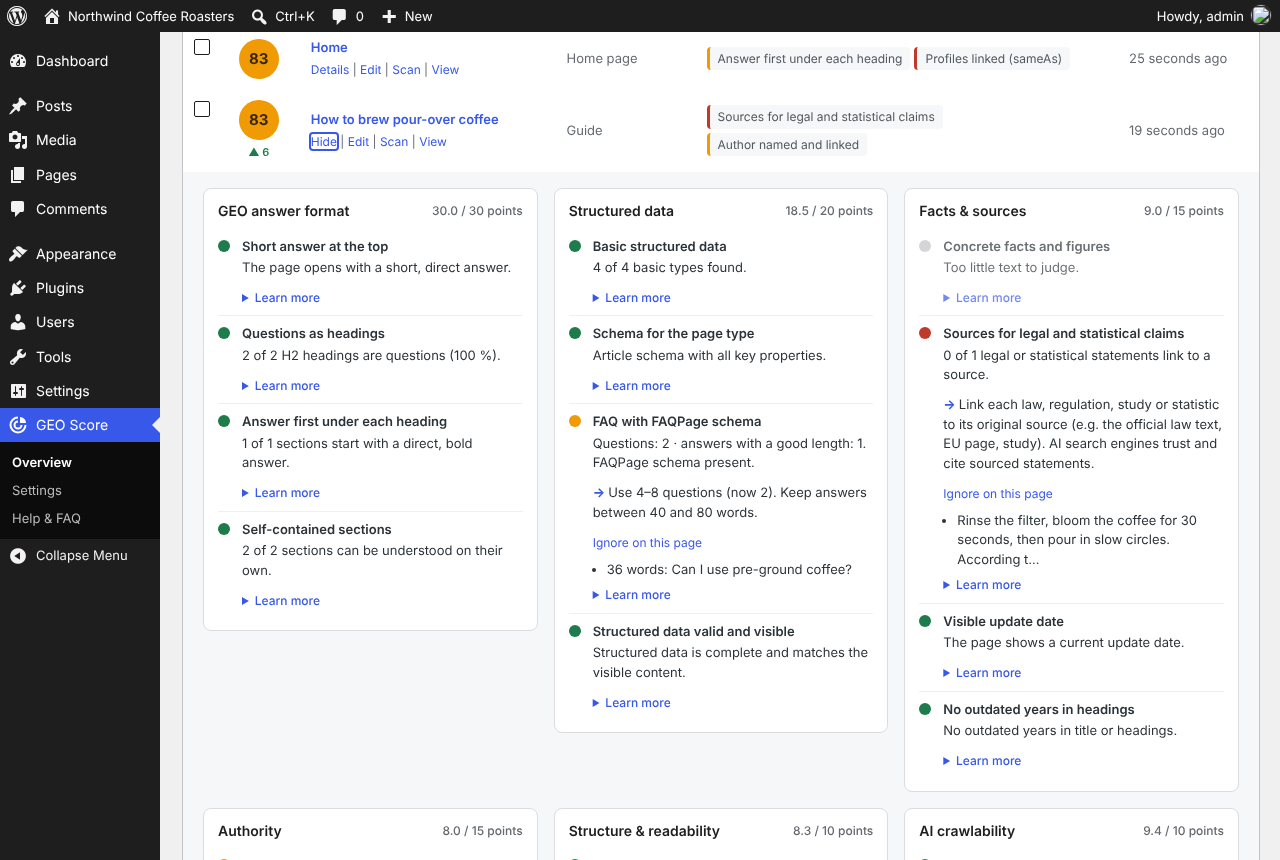
- „Learn more“ for every check: why it matters, a good and a weak example.
- Findings are stored language-neutral and shown in the current language, no rescan after switching the language.
- Checks in the editor compare the public page with the saved version, so unsaved text is not reported as missing.
- Code checked against the WordPress Coding Standards; integration tests for scan, editor check and export.
0.4.0
- 8 new checks: basic structured data, schema for the page type, FAQ with FAQPage, valid and visible schema, profiles via sameAs, AI crawlers in robots.txt, llms.txt entry, content in the HTML.
- Settings in five tabs: General, Company & author, Page types, Checks & thresholds, AI crawlers.
- Turn single checks on and off, change area weights, score bands and all limits.
- Page types by section (guide and service parent pages) and excluded pages.
- „GEO Score“ box in the editor: score, page type override, exclude page.
- Automatic rescan after saving can be turned off. „Reset all settings“ restores the defaults.
- robots.txt and llms.txt are loaded once per scan and cached for one hour.
0.3.0
- 12 new checks for answer format, facts & sources, authority (E-E-A-T) and structure.
- Settings: company name, wrong spellings, author, About us page, phone, e-mail.
- FAQ titles are recognised by the FAQ block that follows, not only by their wording.
- Language data for the new checks in German, English, French, Spanish and Portuguese.
0.2.0
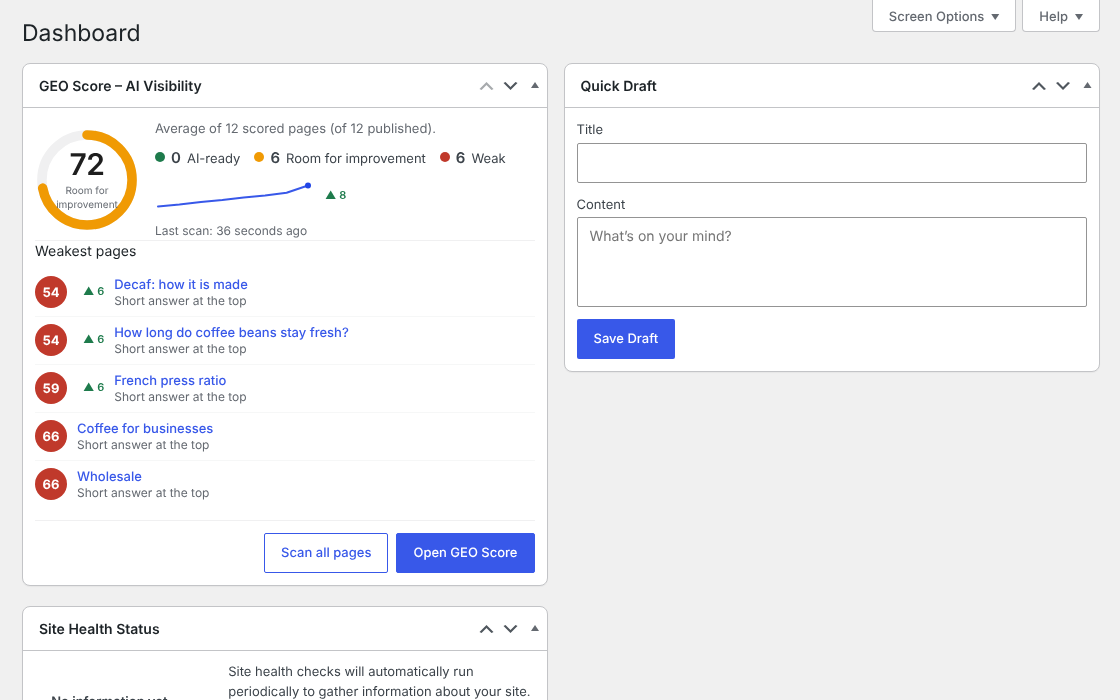
- Dashboard widget on Dashboard Home: website score, distribution, five weakest pages with their biggest lever, last scan, „Scan all pages“ and a link to the overview.
- Admin bar on the front end: GEO Score of the page you are viewing, biggest levers, „Show details“ and „Scan this page now“.
- Links from widget and admin bar open the page’s details in the overview.
0.1.1
- Settings screen: plugin language, scanned content types, public page check, ignored CSS classes.
- German in two variants: formal (Sie, de_DE_formal) and informal (du, de_DE). Regional variants (de_AT, de_CH) fall back to German.
- Language setting also applies to the JavaScript strings.
0.1.0
- Rule engine with scoring by six areas.
- Five core checks.
- Overview screen, GEO column in page and post lists, background rescan after saving.
- REST API (geo-score/v1) and WP-CLI command (wp geo-score).
- German translation.