

Popis
Fake accounts come with fake addresses: mailboxes that do not exist, domains without a mail server, throwaway inboxes. CAPTCHAs stop some robots, not the addresses. MailProbe checks the address itself, in real time, without sending any email to it.
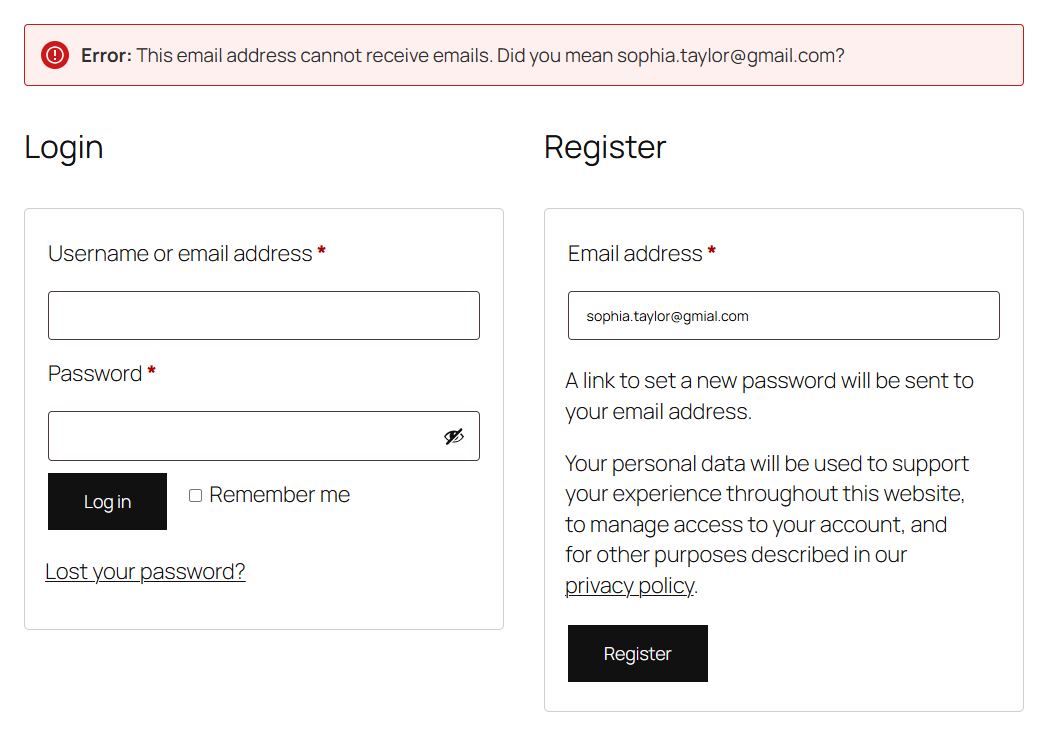
At registration (the WordPress registration form and the WooCommerce „My account“ form), the address is checked before the account is created. The visitor is refused, with a clear message, when the address:
- cannot receive emails: no mail server for the domain, mailbox that does not exist, bad format;
- is disposable (a throwaway inbox);
- is a shared address such as info@ or contact@, if you choose to refuse those (off by default).
When the address looks like a typo, the message suggests the fix: „Did you mean john@gmail.com?“.
Your real customers get through. Some addresses cannot be confirmed by anyone: domains that accept every address, and providers that do not allow checks, such as Outlook and Hotmail. They are never refused, because most of them belong to real people. The visitor waits three seconds at most, and if MailProbe cannot answer in time or cannot be reached, the registration goes through. No code is sent to the visitor’s inbox, so nobody is lost to a code that lands in spam.
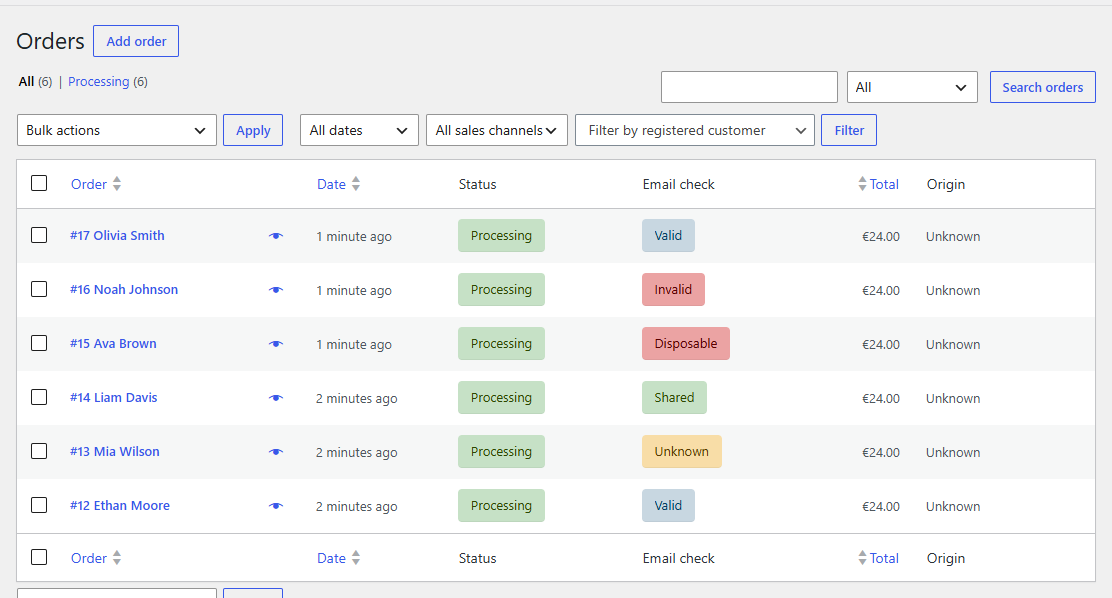
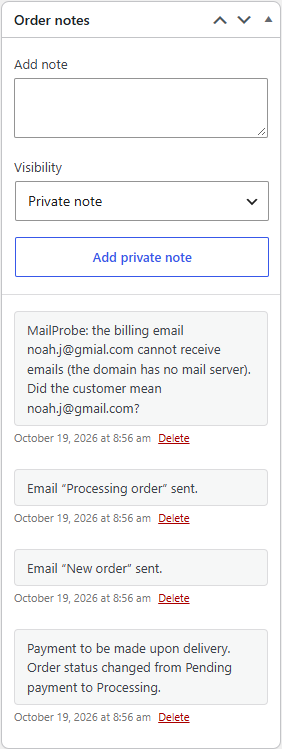
WooCommerce orders are never blocked. After each order, the billing email is checked in the background. The customer does not wait. When the address cannot receive emails or is disposable, the order gets a private note (with the corrected address when it looks like a typo) and a red mark in the orders list, so you can check before you ship or before your follow-up emails bounce.
Works with the classic checkout and the block checkout, and with the WooCommerce orders tables (HPOS) as well as the older storage. WooCommerce is optional: without it, the plugin protects the WordPress registration form.
Pricing
The plugin is free. Each check uses one MailProbe credit. A MailProbe account comes with 100 free checks; after that, credits are prepaid, with no subscription, from $5 for 1,000 checks. See mailprobe.dev/pricing.
Privacy
MailProbe is run by Iris Digital and hosted in the EU (France). Addresses sent for a check are processed in real time and not stored once the check is done. The plugin adds a suggested paragraph to your site’s privacy policy page (Settings > Privacy).
External services
This plugin relies on MailProbe (https://mailprobe.dev), an email verification service run by Iris Digital, France. It is what decides whether an address can receive emails.
What is sent, and when:
- When someone submits the WordPress registration form or the WooCommerce „My account“ registration form, and the form has no other error: the email address entered.
- After each WooCommerce order, if „Check orders“ is on: the billing email of the order.
- When you open the settings page or save a new API key: nothing but the key, to read the credit balance.
Each call carries your MailProbe API key and identifies the plugin and the versions of WordPress and WooCommerce. It does not carry your site’s address or any other customer data. Nothing is sent until you add an API key.
MailProbe terms of service: https://mailprobe.dev/terms/
MailProbe privacy policy: https://mailprobe.dev/privacy/
Snímky obrazovky
Instalace
- Install and activate the plugin.
- Create a MailProbe account on mailprobe.dev (100 free checks).
- In your MailProbe dashboard, open the Developer tab and create an API key.
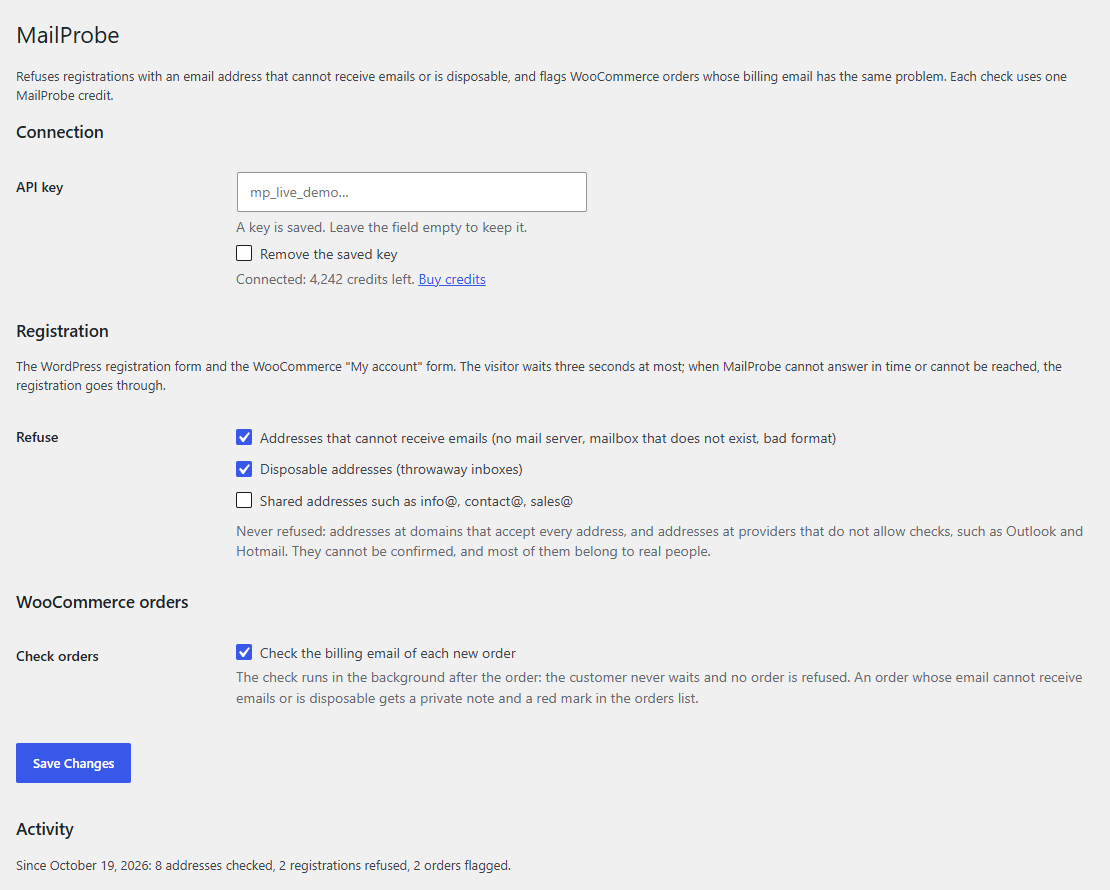
- Paste the key in Settings > MailProbe. The page shows your credit balance once the key is accepted.
You can also set the key in wp-config.php instead: define( 'MAILPROBE_API_KEY', 'mp_live_...' );
Nejčastější dotazy
-
Does it slow down my checkout?
-
No. Orders are checked in the background, after the order is placed. Only registration waits for the check, three seconds at most; most checks answer in under a second.
-
What happens when I run out of credits?
-
Nothing is blocked: registrations and orders go through unchecked, and a notice in your admin tells you so, with a link to buy credits. Checks resume as soon as credits are added.
-
Will it block real customers?
-
It refuses only addresses that cannot receive emails, disposable addresses, and (if you ask) shared addresses. Addresses that cannot be confirmed are always accepted. You can turn each rule off in Settings > MailProbe.
-
Can I hold flagged orders instead of only flagging them?
-
The plugin fires the
mailprobe_order_checkedaction with the order, the verdict and the full result, so a few lines of code can put flagged orders on hold. The message shown at registration can be changed with themailprobe_registration_messagefilter, and the time a visitor waits withmailprobe_registration_wait. -
Does it check addresses already in my database?
-
No, this version checks new registrations and new orders. To clean an existing list, upload it in your MailProbe dashboard.
Recenze
Pro tento plugin nejsou žádné recenze.
Autoři
MailProbe – Stop Fake Signups je otevřený software. Následující lidé přispěli k vývoji tohoto pluginu.
Spolupracovníci

Přeložte “MailProbe – Stop Fake Signups” do svého jazyka.
Zajímá vás vývoj?
Prohledejte kód, podívejte se do SVN repozitáře, nebo se přihlaste k odběru protokolu vývoje pomocí RSS.
Přehled změn
0.1.3
- The settings page links to the plugin’s support forum and to its reviews on WordPress.org.
0.1.2
- The activity line of the settings page uses the singular for one: „1 registration refused“, not „1 registrations refused“.
0.1.1
- The plugin takes its full name: MailProbe – Stop Fake Signups. No change in behaviour.
0.1.0
- First version: check at registration (WordPress and WooCommerce forms), background check of WooCommerce orders, settings page, credit balance and alerts.