

Popis
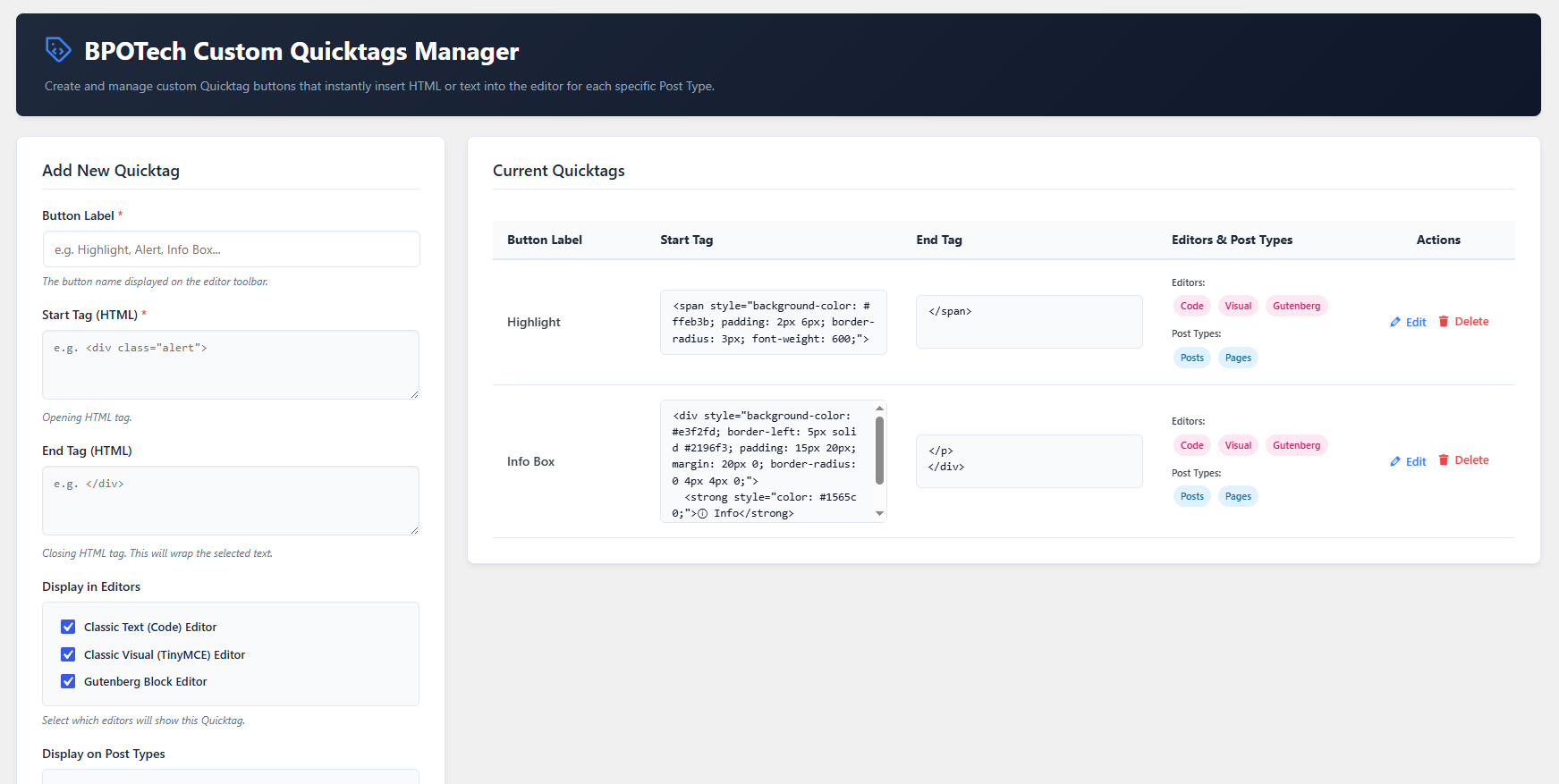
BPOTech Custom Quicktags Manager allows WordPress administrators to create and manage custom Quicktags — quick action buttons that insert custom HTML or text into the editor. Each quicktag can be selectively assigned to specific post types so it only appears where needed.
Key Features
- Custom Quicktags Management: Add, edit, and delete quicktags from a clean, modern admin dashboard.
- Per Post-Type Controls: Assign each quicktag to specific post types (posts, pages, or any custom post type).
- Full HTML Content: Define complete HTML content (opening and closing tags) to insert at cursor position in one click.
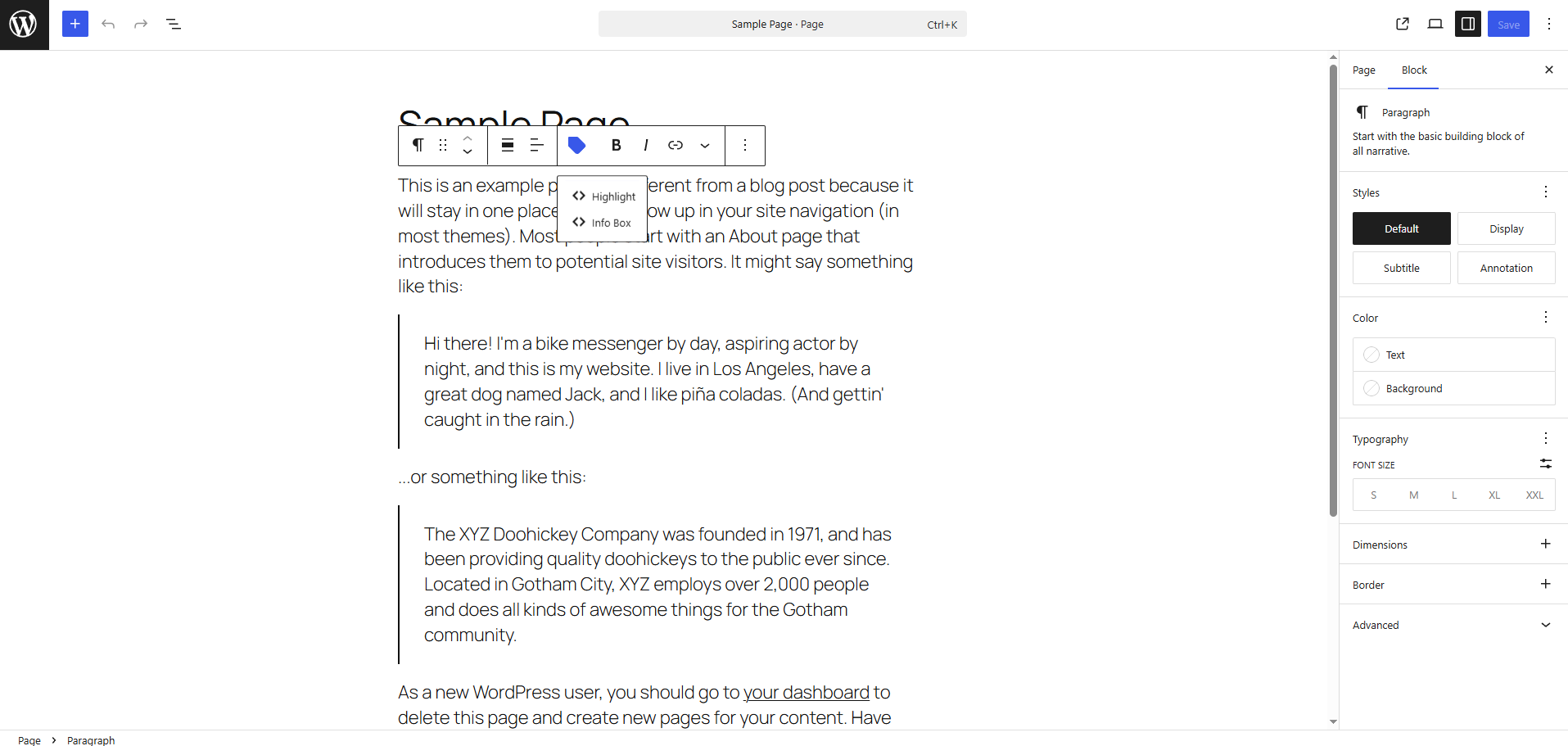
- Multi-Editor Support: Works with the Classic Editor (Text and Visual tabs) and the Gutenberg Block Editor.
- Select All Toggle: Quickly select or deselect all post types with a single checkbox.
- Default Samples: Ships with sample quicktags (Highlight, Info Box) to get you started immediately.
- Multilingual Ready: Fully translatable with English, Vietnamese, and Japanese translations included.
Developer Hooks
This plugin provides several action and filter hooks to allow third-party developers to extend and customize the Quicktags manager without editing the plugin core files.
Filter Hooks
-
bpotech_custom_quicktags_manager_data(array $quicktags)
Filters the list of quicktags retrieved from the database before rendering them in the editor or admin list.
Example:add_filter( ‚bpotech_custom_quicktags_manager_data‘, function( $quicktags ) {
// Dynamically inject a custom quicktag from code
$quicktags[] = array(
‚id‘ => ‚custom_code_block‘,
‚label‘ => ‚Code Block‘,
‚start_tag‘ => ‚`
‚,
‚end_tag‘ => ‚
‚,
‚post_types‘ => array( ‚post‘ ),
‚editors‘ => array( ‚gutenberg‘, ‚text‘ )
);
return $quicktags;
} );- bpotech_custom_quicktags_manager_post_types` (array $post_types)
Filters the list of public post types displayed on the settings screen.
Example:
add_filter( ‚bpotech_custom_quicktags_manager_post_types‘, function( $post_types ) {
// Remove ‚attachment‘ or add custom ones
unset( $post_types[‚attachment‘] );
return $post_types;
} ); - bpotech_custom_quicktags_manager_post_types` (array $post_types)
-
bpotech_custom_quicktags_manager_editors(array $editors)
Filters the list of editors displayed in the settings form checkboxes. -
bpotech_custom_quicktags_manager_default_data(array $default_tags)
Filters the initial default quicktags set on plugin activation or reset.
Action Hooks
-
bpotech_custom_quicktags_manager_admin_form_bottom(array|null $edit_tag)
Fires at the bottom of the quicktag creation/edit form. Useful for adding custom input fields.
Example:add_action( ‚bpotech_custom_quicktags_manager_admin_form_bottom‘, function( $edit_tag ) {
$note = $edit_tag ? get_option( ‚qt_note_‘ . $edit_tag[‚id‘], “ ) : “;
echo ‚‚;
echo ‚ Developer Note‘;
echo ‚ ‚;
echo ‚‚;
} ); -
bpotech_custom_quicktags_manager_after_save_tag(array $new_tag, array $all_tags, bool $is_new)
Fires after a quicktag is saved or updated. You can use this to save custom form inputs.
Example:add_action( ‚bpotech_custom_quicktags_manager_after_save_tag‘, function( $new_tag, $all_tags, $is_new ) {
if ( isset( $POST[‚qt_dev_note‘] ) ) {
update_option( ‚qt_note‚ . $new_tag[‚id‘], sanitize_text_field( wp_unslash( $_POST[‚qt_dev_note‘] ) ) );
}
}, 10, 3 ); -
bpotech_custom_quicktags_manager_after_delete_tag(string $tag_id, array $updated_tags)
Fires after a quicktag is deleted. Useful for clearing out custom metadata linked to the deleted tag ID.
Other available actions:
* bpotech_custom_quicktags_manager_before_save_tag (array $new_tag, bool $is_new)
* bpotech_custom_quicktags_manager_before_delete_tag (string $tag_id)
* bpotech_custom_quicktags_manager_reset_defaults (array $default_tags)
Snímky obrazovky
Instalace
- Upload the plugin files to the
/wp-content/plugins/bpotech-custom-quicktags-managerdirectory, or install the plugin through the WordPress plugins screen directly. - Activate the plugin through the ‚Plugins‘ screen in WordPress.
- Navigate to BPOTech Custom Quicktags Manager in your WordPress admin menu to start creating and managing your custom quicktags.
Nejčastější dotazy
-
Does this plugin support Gutenberg?
-
Yes. Quicktag buttons appear in a dedicated sidebar panel in the Gutenberg Block Editor. Clicking a button inserts the full HTML content as a Custom HTML block.
-
Does this plugin support the Classic Editor?
-
Yes. Quicktag buttons are added to both the Classic Text Editor (Code tab) toolbar and the TinyMCE Visual Editor toolbar automatically.
-
Absolutely. The plugin detects all public post types on your site and lets you choose which ones display each quicktag.
-
What happens when I uninstall the plugin?
Recenze
Pro tento plugin nejsou žádné recenze.
Autoři
BPOTech Custom Quicktags Manager je otevřený software. Následující lidé přispěli k vývoji tohoto pluginu.
Spolupracovníci
Přeložte “BPOTech Custom Quicktags Manager” do svého jazyka.
Zajímá vás vývoj?
Prohledejte kód, podívejte se do SVN repozitáře, nebo se přihlaste k odběru protokolu vývoje pomocí RSS.
Přehled změn
1.0.0
- Initial release of BPOTech Custom Quicktags Manager.