
Popis
Experience a better way to translate your WordPress site and go multilingual, directly from the front-end using a visual translation interface.
TranslatePress je plugin pro překlad pro WordPress, který může použít kdokoli.
The interface allows you to easily translate the entire page at once, including output from shortcodes, forms and page builders. It also works out of the box with WooCommerce.
Built the WordPress way, TranslatePress – Multilingual is a GPL and self hosted translation plugin, meaning you’ll own all your translations, forever. It’s the fastest way to create a bilingual or multilingual site.
Multijazykové & Překladatelské Funkce
- Translate all your website content directly from the front-end, in a friendly user interface (translations are displayed in real-time).
- Plně kompatibilní se všemi šablonami a pluginy
- Live preview of your translated pages, as you edit them.
- Podpora překladu obrázků pro překlad obrázků, posuvníků a ostatních médií.
- Support for both manual and automatic translation
- Ability to translate dynamic strings (gettext) added by WordPress, plugins and themes.
- Integrates with Google Translate, allowing you to set up Automatic Translation using your own Google API key.
- Translate larger html blocks by merging strings into translation blocks.
- Place language switchers anywhere using shortcode [language-switcher], WP menu item or as a floating dropdown.
- Editorial control allowing you to publish your language only when all your translations are done
- Conditional display content shortcode based on language [trp_language language=“en_US“] English content only [/trp_language]
- Possibility to edit gettext strings from themes and plugins from English to English, without adding another language. Basically a string-replace functionality.
- Translate only certain paths and exclude content from being translated
- Translation Block feature in which you can translate multiple html elements together
- Native Gutenberg support, so you can easily translate Gutenberg blocks
- Out of the box WooCommerce compatibility
- Use our FREE Website Translation tool/widget to browse any website into your own language.
Note: this plugin uses the Google Translation API to translate the strings on your site. This feature can be enabled or disabled according to your preferences.
Uživatelé s administrátorským oprávněním mají přístup k následujícím nastavením:
- vybrat výchozí jazyk webu a jeden překladový jazyk pro dvojjazyčné weby
- zvolit, zda má přepínač jazyků zobrazit jazyky ve svých nativních nebo anglických názvech
- force custom links to open in current language
- povolit nebo zakázat podadresář url pro výchozí jazyk
- povolit automatický překlad přes Google Translate
Powerful Translation Add-ons
TranslatePress – Multilingual has a range of premium Add-ons that allow you to extend the power of this WordPress translation plugin:
Pro Add-ons (available in the premium versions only)
- Extra jazyky – umožňuje přidat neomezený počet překladatelských jazyků s možností publikovat jazyky později po dokončení překladu
- SEO Pack – lets you translate meta information (like page title, description, url slug, image alt tag, Twitter and Facebook Social Graph tags & more) for boosting your multilingual SEO and increase traffic. Works with all popular SEO plugins.
- Účty překladatele – vytvořit nebo umožnit stávajícím uživatelům překládat web bez administrátorských práv
- Procházet podle uživatelské role – zobrazit a překládat obsah, který je viditelný pouze pro určitou uživatelskou roli
- Navigace na základě jazyka – konfigurovat a zobrazovat různé položky nabídky pro různé jazyky
- Automatická detekce jazyka uživatele – přesměrovat první návštěvníky na jejich preferovaný jazyk na základě nastavení prohlížeče nebo IP adresy
- DeepL automatický překlad – Doplněk DeepL umožňuje automatický překlad Vašich webových stránek prostřednictvím rozhraní DeepL API
Klávesové zkratky
- CTRL ( ⌘ ) + S – Uložit překlad pro aktuálně upravující řetězce
- CTRL ( ⌘ ) + ALT + Z – Zahodit všechny změny pro aktuálně upravující řetězce
- CTRL ( ⌘ ) + ALT + → (Šipka vpravo) – Přejděte na následující řetězec
- CTRL ( ⌘ ) + ALT + ← (Šipka vlevo) – Přejděte na předchozí řetězec
Webová stránka
Dokumentace
Visit TranslatePress WordPress Translation plugin documentation page
Doplňky
Ukázkový web
Plugin TranslatePress – Multilingual můžete vyzkoušet na našem demonstračním webu
Snímky obrazovky
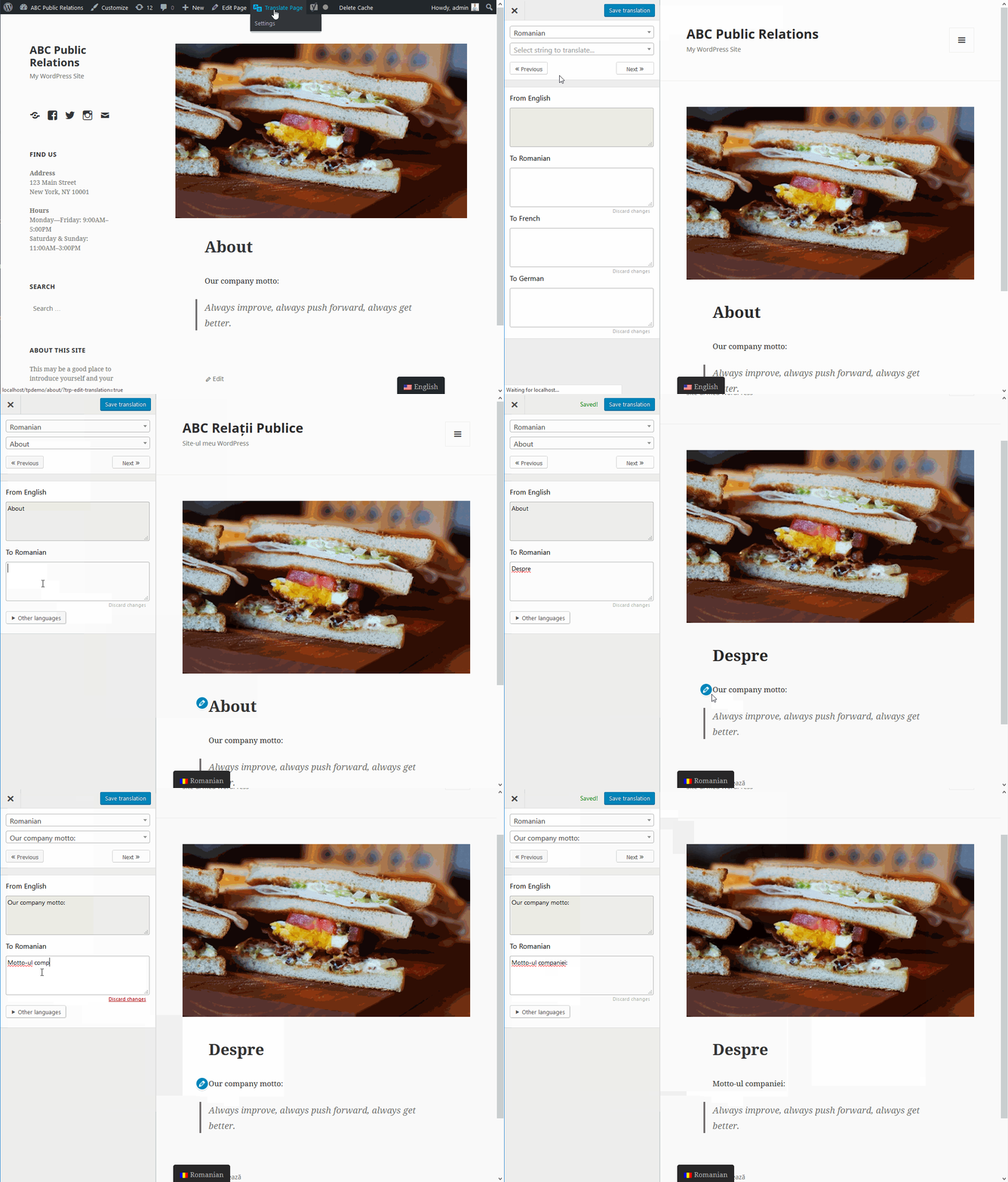
TranslatePress front-end visual translation editor in action 
Front-end translation editor used to translate the entire page content 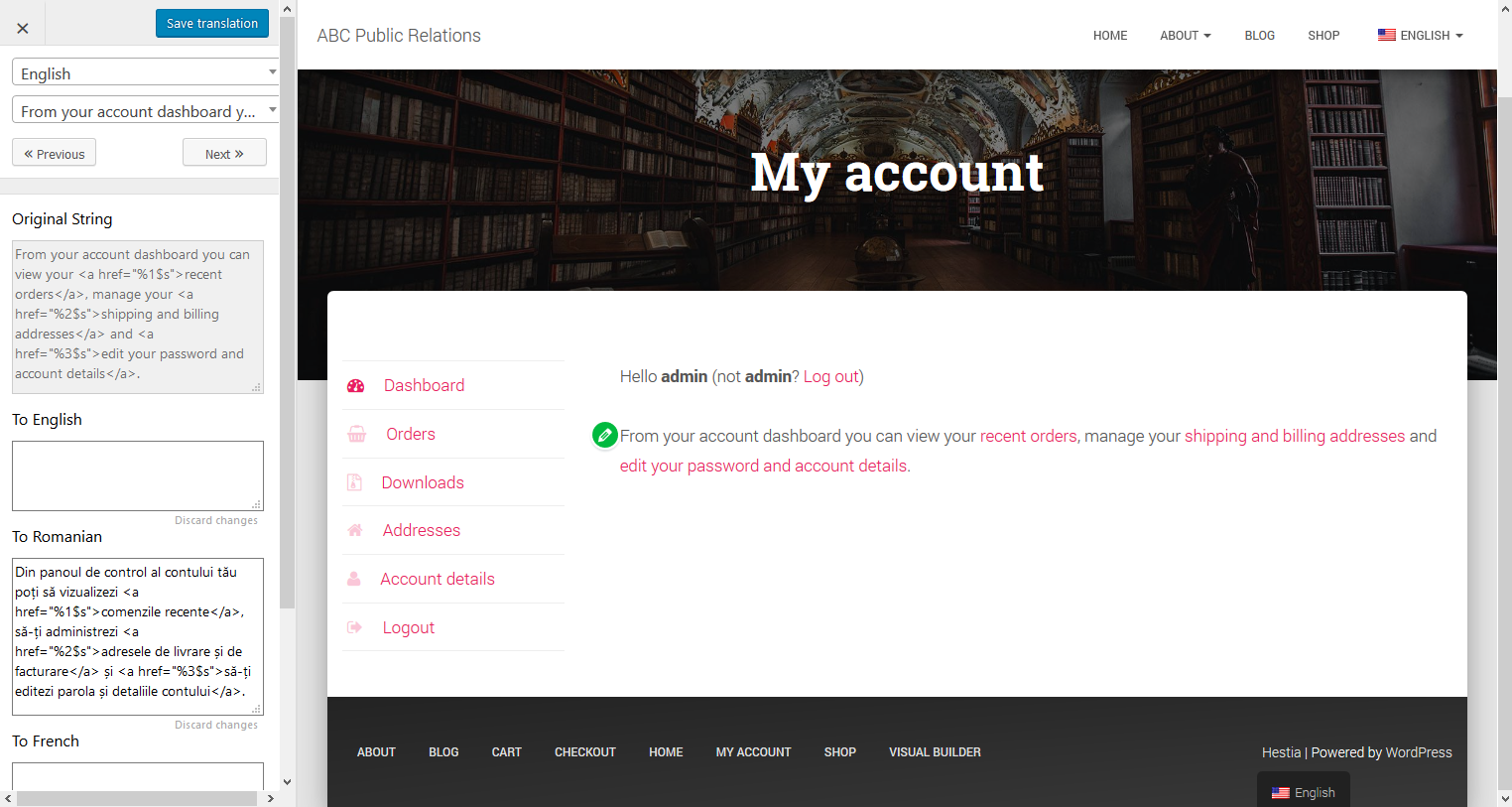
How to translate a dynamic string (gettext) 
Translating WooCommerce Products for your multilingual store 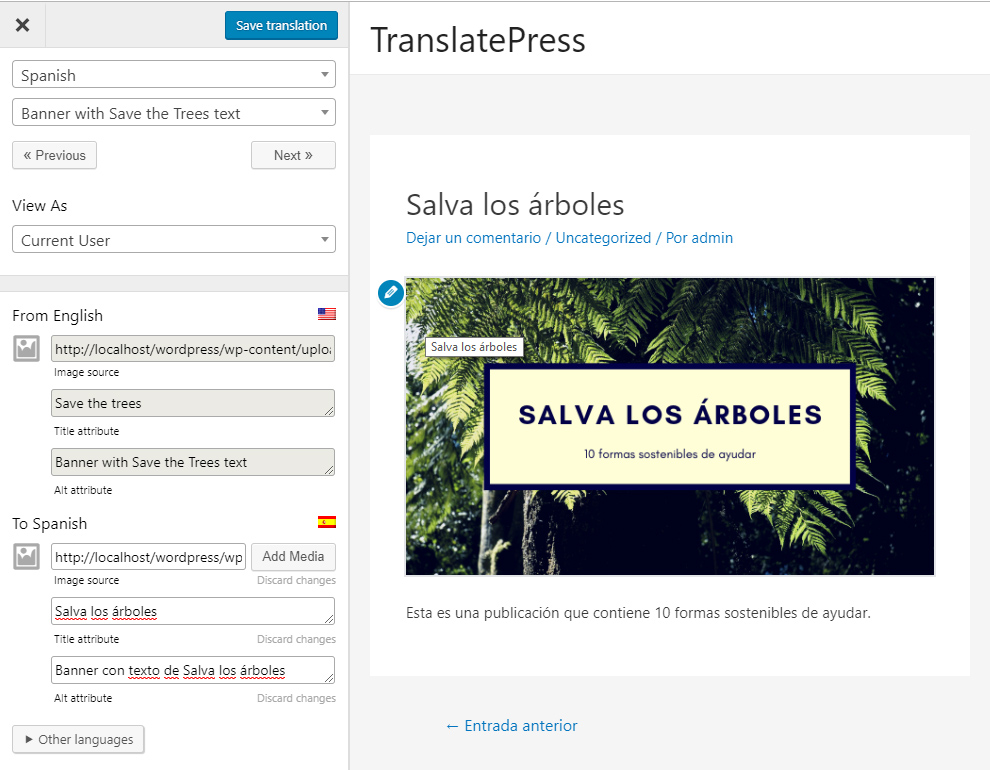
Translate Images and Image Sliders 
Stránka nastavení 
Plovoucí přepínač jazyka 
Menu Language Switcher
Bloky
Tento plugin poskytuje 1 blok.
- Language Switcher Displays the Language Switcher.
Instalace
- Nahrajte složku translatepress do adresáře ‚/wp-content/plugins/‘
- Activate the plugin through the ‚Plugins‘ menu in WordPress
- Go to Settings -> TranslatePress and choose a translation language.
- Open the front-end translation editor from the admin bar to translate your site.
Nejčastější dotazy
-
Kde jsou uloženy mé překlady?
-
All the translation are stored locally in your server’s database.
-
Jaké typy obsahu mohu překládat?
-
TranslatePress – Multilingual plugin works out of the box with WooCommerce, custom post types, complex themes and site builders, so you’ll be able to translate any type of content.
-
Jak se liší od jiných multijazykových & překladatelských pluginů, jako je WPML nebo Polylang?
-
TranslatePress is easier to use and more intuitive altogether. No more switching between the editor, string translation interfaces or badly translated plugins. You can now translate the full page content directly from the front-end. This makes TranslatePress a great alternative to plugins like Polylang and WPML. For more details check out this WordPress Translation Plugin Comparison: TranslatePress vs WPML vs Polylang vs Gtranslate.
-
Jak začnu překládat svůj web WordPress?
-
After installing the plugin, select your secondary language and click „Translate Site“ to start translating your entire site exactly as it looks in the front-end.
-
Zpomalí to můj web?
-
TranslatePress will have little impact on your site speed. For more details see Top WordPress Translation Plugins Compared Based on Page Load Time
-
Can you translate your WooCommerce store?
-
Ano, TranslatePress funguje s WooCommerce hned po vybalení. Můžete jej použít k vytvoření vícejazyčného obchodu WooCommerce.
-
Kde najdu další informace?
-
For more information please check out our documentation.
Recenze


Autoři
Translate Multilingual sites – TranslatePress je otevřený software. Následující lidé přispěli k vývoji tohoto pluginu.
Spolupracovníci


Plugin „Translate Multilingual sites – TranslatePress“ byl přeložen do 10 jazyků. Děkujeme všem překladatelům za jejich pomoc.
Přeložte “Translate Multilingual sites – TranslatePress” do svého jazyka.
Zajímá vás vývoj?
Prohledejte kód, podívejte se do SVN repozitáře, nebo se přihlaste k odběru protokolu vývoje pomocí RSS.
Přehled změn
2.7.4
- Fixed compatibility issue with WP Job Board Pro PDFs
- Fixed compatibility issue with Brikk theme forms
- Fixed scanning plugins and theme files for translation when Oxygen is active
2.7.3
- Improved automatic translation character count to better enforce enforce daily limit
- When Marketing opt-in feature is enabled, automatic translation usage is included in the non-sensitive diagnostic tracking data
- Added support for translating more meta tags
2.7.2
- Fixed translation saved confirmation message in the Translation Editor
- Fixed CSS issue in Advanced settings
- Fixed notice in TranslatePress settings
2.7.1
- Fixed potential security issue in the language switcher
- Fixed floating language switcher appearance when displaying only flags on sites with many languages
- Minor UI tweaks in TranslatePress settings
2.7.0
- Fixed issue with Exclude only certain paths advanced option on subfolder path installs
- Improved Error Manager by outputting the entire failed query
- Improved SQL error handling in trp-ajax calls
2.6.9
- Added compatibility with WooCommerce Product Filters by barn2
2.6.8
- Fixed relative urls with anchor links on translated pages
- Fixed searching in translated languages on sites with specific plugins combination
2.6.7
- Added new feature that displays translation percentage for current page in Translation Editor
- Added RSS Feed support for translating title, content and excerpt
- Added support for Duplicate Page plugin resolving post slug translation conflict
- Added compatibility with Fluent Forms
- Added compatibility with WooCommerce Bookings plugin
- Added WP Webhooks Automator under recommended plugins
- Fixed deprecated warning in PHP 8.1
2.6.6
- Allow translation of comments and categories in REST API
- Improved compatibility with Complianz plugin
- Improved rules for creating translation blocks
2.6.5
- Fixed some cases of unnecessarily detecting text inside script tags
- Fixed compatibility code with Oxygen
2.6.4
- Improved page loading speed when WooCommerce is active
- Fixed some cases of errors on function insert_gettext_string
- Fixed edge case issue with missing tables
2.6.3
- Improved page loading speed by optimizing code handling gettext
- Improved page loading speed when Query Monitor plugin is active
- Fixed internal links not being translated when using Do not translate certain paths feature
- Fixed trp-gettext wrappings on Query Monitor strings
- Fixed flag for Hindi and Punjabi (India) languages
2.6.2
- Fixed absolute paths not working in the Exclude Paths From Translation option
- Fixed Pencil icon displayed in wrong positions on WP Forms in the Translation Editor
- Added missing Sindhi language flag
- When Marketing opt-in feature is enabled, list of active plugins is now included in the non-sensitive diagnostic tracking data
- Updated logos for Profile Builder and Paid Member Subscriptions in the recommended plugins section
2.6.1
- Improved DOM parser to better handle HTML comments
- Improved Database optimization tool’s default operations
2.6.0
- Fixed some cases of 404 on translated pages for WooCommerce permalinks
- Improved compatibility with RankMath
2.5.9
- Added loader component as extra parameter in trp_allow_tp_to_run hook to ease integration with 3rd parties
- Fixed edge case error with undefined variable $disabled_language
- Fixed notice about deprecated property in php 8.2
- Fixed edge case error in class-error-manager.php file
2.5.8
- Fixed some cases of disappearing CPT slugs translations leading to 404 pages
- Fixed incorrectly adding empty href attributes to link tags on translated pages
- Fixed PHP 8 deprecated notices regarding dynamically defined properties
2.5.7
- Added a new item in Database optimization tool to fix some cases of gettext not being selectable in Translation Editor
- Fixed Edit pencil icon being difficult to click when hovering over certain text in Translation Editor
- Added compatibility with WooCommerce High-Performance Order Storage (HPOS)
- Improved compatibility with WP Rocket
2.5.6
- Improved settings UI by showing formality option only for languages and translation engines that support it
- Fixed focus on search input when opening the languages dropdown in settings
- Removed unnecessary calls for Marketing opt-in feature
2.5.5
- Redesigned TranslatePress Settings Advanced tab UI using subtabs
- Improved the translation status icons for the case when multiple strings are shown at once in Translation Editor
- Fixed deprecated notice on php 8
2.5.4
- Updated look of language switchers for shortcode generated and floating options
- Added notice in TranslatePress settings to avoid adding duplicate languages with different formalities
- Fixed deprecated warning triggered by date_create function
- Fixed bug with some strings not being editable in Translation Editor
2.5.3
- Improved security by escaping form actions
- Fixed filtering by gettext domain in String Translation
- Fixed title positioning in String Translation UI
- Added more information in our opt-in non-sensitive diagnostic tracking
2.5.2
- Redesigned Translation Editor UI to match the latest WordPress style
- Fixed hreflang language code attribute for languages with formal/informal in their default code
- Added missing Aragonese language flag
2.5.1
- Added Language Switcher block in Gutenberg Editor
- Fixed edge case error regarding __return_true function
2.5.0
- Improved converting urls in different languages
- Fixed language switcher directing to page not found in some edge cases
Click Here to view the full changelog.