
Popis
Use a Gutenberg Block to manage a download list with file type specific icons. No configuration is necessary. The Block can be used immediately after installation.
Features
- Choose files from media library
- Output chosen files as list with file-type-specific icon, download-link, title, size and description from media library
- Ships with multiple iconsets (Bootstrap-Icons, Dashicons, FontAweSome-Icons)
- Drag & Drop sorting for the list
- Remove files from list
Supports
- Display of file size, description and icon can be switched on and off
- Choose what link should be published: direct link or attachment page
- Choose an iconset for each Block; manage custom icons in unlimited lists
- Usage of multiple hooks to change or add icons to shipped iconsets
- Sort list by title or filesize with one click
- The Block can be used in widgets
- Set colors, typography and borders for each Block
- Use External files in media library if you want to link to external files
The development repository is on GitHub.
Snímky obrazovky
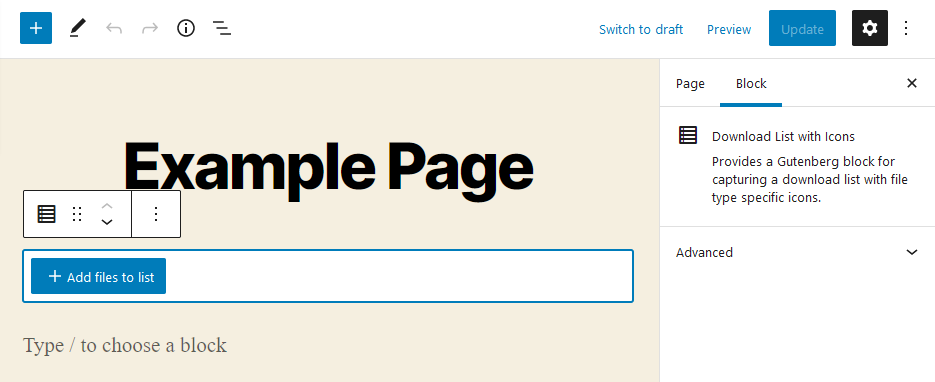
After adding the Block you have to choose the files. 
After adding files to the Block they will be listed. 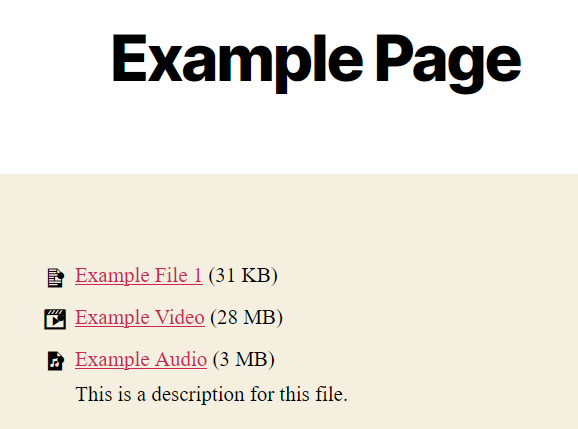
The files will be listed in frontend.
Bloky
Tento plugin poskytuje 1 blok.
- Download List Block with Icons Provides a Gutenberg block for capturing a download list with file type specific icons.
Instalace
- Upload „download-list-block-with-icons“ to the „/wp-content/plugins/“ directory.
- Activate the plugin through the „Plugins“ menu in WordPress.
- Add the Download List Block to the post or page where you want to show the downloadlist. Choose the file(s) you wish to present.
Nejčastější dotazy
-
Where do I enter the description of a file?
-
The description stored at the file in the Media Library itself is used as the description. You can edit it in 2 ways:
- Open the file in the Media Library for editing. There you will find the field „Description“. Enter the desired description here.
- Or open this editing mask via the pencil at the file in the block you have created.
You can also add a custom title and description per file used only by the Block of this plugin.
-
Is there a limit to the number of files?
-
No, there are no limitations.
-
Can I use the block in my theme?
-
The block can basically be used in any theme that supports Gutenberg blocks. If this is the case for your theme, you have to ask your theme developer.
-
Can I add my own icons?
-
Yes, you can manage your custom iconsets in WordPress-backend.
-
No icon is displayed at a file. Why?
-
The file will probably have a file type that does not comply with the WordPress standard and is therefore not included in our plugin. You have 2 options:
- Use the iconset specific hook downloadlist_*_icons to add the list of icons. Check beforehand with the developer of your chosen icon set if the icon you want is included there.
- Use another icon set which supports the file type if necessary.
-
Does the plugin also support Elementor or other PageBuilders?
-
No. The plugin is intended solely for the Gutenberg editor and will not be extended to other PageBuilders.
Recenze


Autoři
Download List Block with Icons je otevřený software. Následující lidé přispěli k vývoji tohoto pluginu.
Spolupracovníci
Plugin „Download List Block with Icons“ byl přeložen do 4 jazyků. Děkujeme všem překladatelům za jejich pomoc.
Přeložte “Download List Block with Icons” do svého jazyka.
Zajímá vás vývoj?
Prohledejte kód, podívejte se do SVN repozitáře, nebo se přihlaste k odběru protokolu vývoje pomocí RSS.
Přehled změn
1.0.0
- Initial commit
1.0.1
- Fixed issue with 3rd-party dependency
- Updated format for Changelog
1.0.2
- Updated dependencies
1.0.3
- Updated dependencies
1.0.4
- Updated compatibility-flag for WordPress 6.0
1.0.5
- replace serialize_block in favor of render_block for better compatibility with other blocks
1.0.6
- Add support for inner blocks
- Fixed usage of foreign shortcodes
- changed used sortable-library
2.0.0
- Added option to edit each file in a Block in media library with one click
- Added control-option to show or hide the filesize of all files in a Block (default: show)
- Added control-option to show or hide the description of all files in a Block (default: show)
- Added control-option to show or hide the icon of all files in a Block (default: show)
- Added toolbar-option to sort the files in a Block by their titles with one click
- Added toolbar-option to sort the files in a Block by their filesize with one click
- Added control-option to set the link target for all files in a Block to
„direct link“ (e.g. /wp-content/uploads/file.pdf) or „attachment page“ (e.g. /file/) - Added support for HTML-output in file description
- Added support for using this Block as Widget
- Changed loading of file-data in Block in Gutenberg: they are now loaded live from Media Library as the front page
- Fixed icon-visibility (only default icon was visible)
- Updated compatibility-flag for WordPress 6.0.1
2.0.1
- Fixed release-upload problem
2.0.2
- Fixed widget-handling: all other widgets were not visible
2.0.3
- Fixed limit of entries per list – it’s now unlimited
2.0.4
- Add some german translations
- Updated compatibility-flag for WordPress 6.1
2.1.0
- Added support for templates via theme
- Updated dependencies
- Updated compatibility-flag for WordPress 6.2
2.1.1
- Fixed output of classic block if this plugin is used
3.0.0
- Added possibility to manage different iconsets and assign them to each Block
- Added styling (e.g. color, typography …) for Blocks using WordPress-standards
- Compatible with WordPress Coding Standards
- Minimum PHP-compatibility set to 8.0
- Only compatible with WordPress 6.0 or newer
- Compatibility with WordPress 6.3
- Compatible with theme Blockify and much more FSE-themes
3.0.1
- Fixed initialization of iconsets during plugin activation
3.1.0
- Added option to disable forcing download on click on file-link
- Added option to show download-button on each file entry
- Optimized styling for files with description
- Optimized iconset-style-generation
- Fixed usage of unique function names
3.2.0
- Added custom title and description for files in downloadlist
- Added icon for our own icon-post-type in wp-admin
- Optimized rest of code regarding WordPress Coding Standard
- Updated dependencies
3.2.1
- Compatible with WordPress Coding Standards 3.0
- Prevented WPML from translating our (only internal used) custom post type and taxonomy for icons
- Compatibility with WordPress 6.4
- Updated dependencies
- Fixed possible error during adding files
3.2.2
- Changed text domain to plugin slug to match WordPress-Repository requirements
- Removed language-files from plugin (except the json-files for Block Editor)
- Added missing translations
3.2.3
- Check if attachment page is enabled for WordPress 6.4 or newer before generating link to it
- Updated dependencies
- Some style-optimizations
3.2.4
- Better check for uploads-directory existence for compatibility with playground-preview
3.3.0
- Added possibility to convert File-, Audio- and Video-Block to Downloadlist-Block
- Optimized sort-button: now sorting on every click in the opposite direction
- Disable sort-buttons if list contains less or equal than 1 file
- Releases now MUST fulfill all WordPress Coding Standard rules before creating release files
- Removed AJAX requests for preview as list to request is empty for preview
- Removed all language files from plugin directory
- Updated dependencies
3.3.1
- Fixed error in creating new Downloadlist-Block
- Fixed typos in descriptions
3.3.2
- Fixed loading of translation scripts
3.4.0
- Added possibility to use multiple custom iconsets
- Added automatic documentation of hooks in this plugin
- Now generating valid class names from mime types (thanks @samedwards)
- Rename handles of enqueued styles to prevent conflicts with other plugins
- Compatibility with WordPress 6.4.3
- Optimized style for editing custom icons
- Optimized performance
- Updated dependencies
- Plugin now won’t be usable with PHP older than 8.0
- Fixed missing translations
- Fixed error on search for iconsets during editing your own icon
- Fixed visibility of custom icons in backend
- Fixed problem with duplicate entries for each iconset
3.4.1
- Prevent uninstall with PHP older than 8.0 to prevent errors
- Hide „Mine“ in icon list in backend
- Updated dependencies
- Compatibility with WordPress 6.5
- Fixed possible notice in transient-handler
- Fixed removing of our own iconset taxonomy on uninstall
3.4.2
- Optimized output of file size in list
- Fixed choosing or uploading images button
- Fixed generating of styles for custom iconsets