Přeskočit na obsah
WordPress.org

Česko

  • Šablony
  • Pluginy
  • Novinky
  • Podpora
  • O WordPressu
  • Openverse
  • Vzory
  • Komunitní podpora
  • Překlady
  • Kontakt
  • Získejte WordPress
Získejte WordPress
WordPress.org

Plugin Directory

Admin login URL Change

  • Odeslat plugin
  • Moje oblíbené
  • Přihlásit se
  • Odeslat plugin
  • Moje oblíbené
  • Přihlásit se

Admin login URL Change

Autor: Jahid Hasan
Stáhnout
  • Podrobnosti
  • Hodnocení
  • Instalace
  • Vývojáři
Podpora

Popis

Admin login URL Change is a very lightweight, highly secure plugin that lets you easily and safely change the URL of the login form page to anything you want. It does not change any core files. It simply intercepts page requests and works on any WordPress website. This is great for your convenience, but it also closes the door to would-be brute-force attackers.

Why Use Admin Login URL Change?

WordPress websites are common targets for automated bots and hackers attempting to gain unauthorized access via brute-force login attempts. The default login URLs (wp-login.php and wp-admin) are widely known, making them easy targets. Admin Login URL Change solves this problem by letting you rename your login URL to something unique, effectively closing this security loophole.

🚀 Get Even More Security with Pro Features!

Upgrade to the Pro Version to unlock elite-level protection mechanisms:
* IP Address Blocker: Block individual IPs or entire CIDR ranges from even accessing your custom login page, featuring auto-ban thresholds, ban durations, and email alerts.
* Searchable Country Blocker: Restrict login access to specific countries using a live, search-filtered database of 200+ global regions.
* Login Attempt Limiter: Set max retries, retry windows, lockout durations, and display warning alerts to prevent dictionary and brute-force attacks.
* Two-Factor Authentication (2FA): Add an ironclad second layer of verification via Authenticator Apps (Google Authenticator, Authy, Microsoft Authenticator) or Email OTP.
* Login Alerts: Receive instant email notifications whenever someone successfully logs in or fails to log in — with IP, username, and timestamp included.
* Full Login Audit Log: Unlimited login history (up to 500 entries) with user-agent details, replacing the free 10-entry limit.

How to use the plugin

  1. Go to your dashboard and navigate to the Admin Login Slug menu.
  2. Enter your custom login slug (e.g. madmin).
  3. Click „Save Settings“.
  4. Bookmark your new URL and test it!

Snímky obrazovky

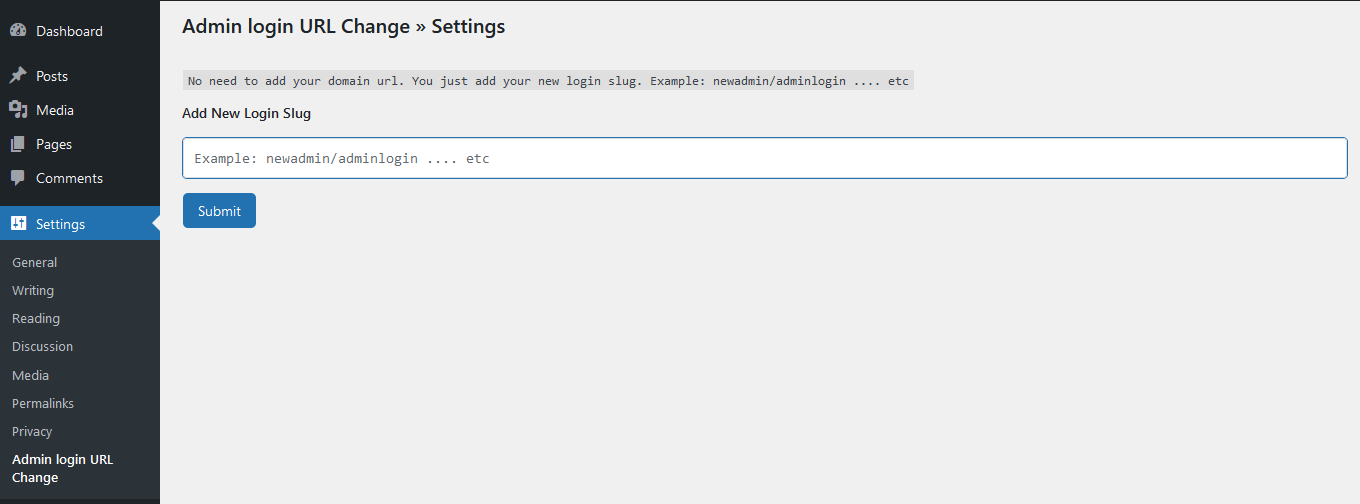
Settings
Settings
Other Settings
Other Settings
Login Logs
Login Logs

Instalace

  1. Install Admin login URL Change by uploading the admin-login-url-change directory to the /wp-content/plugins/ directory.
  2. Activate Admin login URL Change through the Plugins menu in WordPress.
  3. Change your URL Slug by going to the Admin Login Slug
  4. Now you can logout and login by new URL.

Nejčastější dotazy

Do I need to have coding skills to use Admin login URL Change?

Absolutely not.

Will this break standard login page actions or WooCommerce integrations?

No, the plugin is fully compatible with native WordPress login flows and integrates seamlessly with WooCommerce checkouts and account logins.

Recenze

Excellent Little Plugin

Cam Bruhns 18. 8. 2025 1 odpověď
This plugin works exactly as expected and is no-frills, lightweight, and makes other robust competitor plugins used for this purpose look clunky. Great job! Thanks!

It always works

devjesus 10. 1. 2025 2 odpovědi
I have installed this plugin on several websites and it always works with no issues. The only thing that I don’t see right is that after login with the custom url it shows a 404 page message (always on every installation I have made); I can navigate the Wordpress admin/backend using the top menu., but it should go to the main dashboard page by default. Is there a way to fix/solve it ? Thank you in advanced

Perfect and The best!

Delyan Petrov 11. 8. 2024
I tried many plugins but only this one works!Thanks!

Perfect!

raywjohnson 11. 5. 2024 1 odpověď
Thanks for solving this with a usable and functional plugin. I tested more than a few plugins and tried creating my own. Could not quite get it to work. This plugin works perfectly. Any of the built in redirects fail with a proper 404 (/dashboard, /login, /admin, /wp-admin, etc). This plugin does not create files or the .htaccess file. Just enter a new slug, done.
Přečtěte si všechny 4 recenze

Autoři

Admin login URL Change je otevřený software. Následující lidé přispěli k vývoji tohoto pluginu.

Spolupracovníci
  • Jahid Hasan

Plugin „Admin login URL Change“ byl přeložen do 1 jazyku. Děkujeme všem překladatelům za jejich pomoc.

Přeložte “Admin login URL Change” do svého jazyka.

Zajímá vás vývoj?

Prohledejte kód, podívejte se do SVN repozitáře, nebo se přihlaste k odběru protokolu vývoje pomocí RSS.

Přehled změn

1.2.2

  • Added: Compatibility with WordPress 7.1
  • Added: Login Alerts — instant admin email notification on every successful or failed login attempt (IP, username, and timestamp included).
  • Added: Full Login Audit Log — unlimited login history (up to 500 entries with user-agent).
  • Added: Create a time-limited login link (1hr/24hr/7day) without needing a password

1.2.1

  • Added: Compatibility with WooCommerce 11.0.1
  • Added: Compatibility with Elementor 4.2.2

1.2.0

  • Improved: Submenu „Admin Login URL Change“ Position as a top-level menu „Admin Login Slug“.
  • Added: Seamless integration hooks for Pro features (IP Blocker, searchable Country Blocker, Login Limiter, and Two-Factor Authentication).
  • Improved: Restructured dashboard settings page into a stunning, responsive Material-style grid with notice suppression.
  • Improved: Codebase refactored into clean Object-Oriented Programming (OOP) structure.
  • Added: Compatibility with WordPress 7.0

1.1.6

  • Fixed: Broken Access Control

1.1.5

  • Added: Compatibility with WordPress 6.9

1.1.4

  • Improvement: Updated file Structure
  • Fixed: Redirect issue fixed

1.1.3

  • Fixed: Deprecated issue Fixed

1.1.2

  • Added: Compatibility with WordPress 6.8

1.1.1

  • Added: Compatibility with WooCommerce 9.8.1

1.1.0

  • Added: Compatibility with WordPress 6.7

1.0.9

  • Added: Compatibility with WordPress 6.6

1.0.8

  • Removed: Auto Redirect to the Setting Page

1.0.7

  • Added: Compatibility with WordPress 6.5

1.0.6

  • Updated: Security
  • Fixed: Nonce Validation and escaping issues

1.0.5

  • Fixed: Redirect Issue

1.0.4

  • Added: Compatibility with WordPress 6.4

1.0.3

  • Added: Compatibility with WordPress 6.3

1.0.2

  • Added: Compatibility with WordPress 6.2
  • Removed: Unused Code

1.0.1

  • Settings Page Integrate

1.0

  • Initial version

Meta

  • Verze 1.2.2
  • Poslední aktualizace před 2 týdny
  • Aktivních instalací 2 000+
  • Verze WordPressu 4.7 nebo novější
  • Testováno až do WordPressu 7.1
  • Verze PHP 5.3 nebo novější
  • Jazyky

    English (US) a Ukrainian.

    Přeložte do vašeho jazyka

  • Štítků
    change wp-logincustom loginloginRemove WP-Loginwordpress login
  • Podrobnosti

Hodnocení

5 z 5 hvězdiček.
  • 4 5hvězdičkové hodnocení 5 hvězdiček 4
  • 0 4hvězdičkové hodnocení 4 hvězdičky 0
  • 0 3hvězdičkové hodnocení 3 hvězdičky 0
  • 0 2hvězdičkové hodnocení 2 hvězdičky 0
  • 0 1hvězdičkové hodnocení 1 hvězdička 0

Vaše hodnocení

Zobrazit všechny recenze

Spolupracovníci

  • Jahid Hasan

Podpora

Potřebujete pomoc?

Fórum podpory

  • O WordPressu
  • Novinky
  • Hosting
  • Soukromí
  • Příklady
  • Šablony
  • Pluginy
  • Vzory
  • Vzdělávání
  • Podpora
  • Vývojáři
  • WordPress.TV
  • Zapojte se
  • Události
  • Podpořit
  • Swag ↗
  • WordPress.com
  • Matt
  • bbPress
  • BuddyPress
WordPress.org
WordPress.org

Česko

  • Navštivte náš účet na X (dříve Twitter)
  • Navštivte náš Bluesky účet
  • Navštivte náš účet Mastodon
  • Navštivte náš Threads účet
  • Navštivte naši stránku na Facebooku
  • Navštivte náš Instagram účet
  • Navštivte náš LinkedIn účet
  • Navštivte náš TikTok účet
  • Navštivte náš YouTube kanál
  • Navštivte náš Tumblr účet
Code is Poetry.
The WordPress® trademark is the intellectual property of the WordPress Foundation.